Senior Data Engineer
Interview Questions
Architecture trade-offs, data contracts, platform design, SLA ownership, and leadership scenarios for 5+ years experience roles.

After your deployment, some customer balances don't match the transaction records. What will you do?
Medium“After your deployment, some customer balances don't match the transaction records. What will you do?”
For example:
Customer C001
Transaction total = ₹50,000
Customer balance  = ₹45,000
                     ❌ Mismatch
You should not immediately change the data. First, investigate and find the root cause.
1. Treat it as a production data-integrity incident
Your first statement should be:
“I would treat this as a production data-integrity incident and first identify the scope and root cause before correcting the data.”
That sounds much better than:
“I will rerun the pipeline.”
2. Identify affected transactions
First determine:
- Which customers are affected?
- Which transactions are affected?
- When did the mismatch start?
- Is it affecting all customers or only some?
For example:
Before deployment
       ↓
Everything correct ✅

Deployment
       ↓
Mismatch starts
       ↓
C001 ❌
C025 ❌
C100 ❌
This helps determine whether the deployment is actually related.
3. Compare source and target counts
Compare records between systems.
For example:
Source transactions = 1,000,000
Target transactions =   999,500
                         ↓
                    500 missing
This tells you that data may have been lost or not processed.
Also compare totals:
Source amount = ₹100 Crore
Target amount = ₹99.5 Crore
A count comparison alone isn't enough; financial totals and transaction IDs are also important.
4. Check for duplicate records
The opposite problem may also occur.
Instead of missing transactions, some transactions may have been processed twice.
Example:
Source:

TX1001 → ₹5,000

Target:

TX1001 → ₹5,000
TX1001 → ₹5,000
Then:
Expected = ₹5,000
Actual   = ₹10,000
So you should check:
SELECT transaction_id, COUNT(*)
FROM transactions
GROUP BY transaction_id
HAVING COUNT(*) > 1;
5. Check failed/retried jobs
Look at the Spark/ADF/Databricks job history.
For example:
Pipeline
   ↓
Step 1 ✅
Step 2 ✅
Step 3 ❌
Step 4 not executed
Or:
Job failed
   ↓
Retry
   ↓
Some records processed twice
You need to determine whether the problem came from a failure or retry.
6. Check deployment changes
Because the problem started after deployment, compare the new version with the previous version.
Check:
- SQL changes
- PySpark changes
- Join logic
- Filtering logic
- Aggregation logic
- Schema changes
- Configuration changes
- Partitioning changes
For example, someone may have changed:
filter(col("status") == "SUCCESS")
to:
filter(col("status") == "COMPLETED")
and accidentally excluded valid transactions.
7. Check Kafka offsets
If Kafka is part of the architecture, check whether all messages were consumed.
Kafka
  ↓
Partition 1
Partition 2
Partition 3
  ↓
Spark
You might discover:
Expected Kafka offset → 10,000,000
Processed offset      → 9,950,000
That could indicate unprocessed events.
Also investigate:
- Consumer lag
- Restarted consumers
- Offset commits
- Failed batches
- Reprocessing
8. Check processing logs
Look at application/Spark logs for errors.
For example:
ERROR: schema mismatch
ERROR: failed write
ERROR: timeout
ERROR: executor lost
You want to establish:
What happened?
       ↓
Which records were affected?
       ↓
Why did it happen?
9. Check whether events were lost or processed twice
This is one of the most important checks.
There are two possibilities:
Missing events
Source
TX1001
TX1002
TX1003

Target
TX1001
TX1003

TX1002 missing ❌
Duplicate events
Source
TX1001

Target
TX1001
TX1001

Processed twice ❌
Compare using the transaction ID.
10. Compare transaction IDs between systems
This is often the fastest way to identify the exact problem.
Conceptually:
Source transaction IDs
        ↓
Compare
        ↓
Target transaction IDs
You can identify:
Missing IDs
Duplicate IDs
Unexpected IDs
For example:
Source:
TX001
TX002
TX003
TX004

Target:
TX001
TX003
TX004
TX004

Result:
TX002 → Missing ❌
TX004 → Duplicate ❌
11. Stop propagation if necessary
If you discover that the pipeline is actively producing incorrect financial data, don't allow the problem to continue.
For example:
Kafka
  ↓
Spark
  ↓
❌ Incorrect transformation
  ↓
Delta
  ↓
Warehouse
  ↓
Reports
You may need to:
STOP / PAUSE
      ↓
Investigate
      ↓
Fix
      ↓
Validate
      ↓
Resume
This is especially important for payment/financial data.
12. Reconcile the affected transactions
Once you identify the problem, reconcile the data.
For example:
Customer C001

Transactions:
₹10,000
₹20,000
₹15,000
₹ 5,000
──────────
₹50,000
But balance says:
₹45,000
Difference:
₹50,000 - ₹45,000 = ₹5,000
Now identify which transaction caused the ₹5,000 difference.
13. Find the root cause
The goal isn't just to fix today's data.
You need to answer:
Why did this happen?
For example:
Deployment
    ↓
Changed transformation logic
    ↓
Some transactions filtered out
    ↓
Balance calculation incorrect
Or:
Kafka retry
    ↓
Same event processed twice
    ↓
Duplicate transaction
    ↓
Balance incorrect
14. Add prevention mechanisms
After fixing the issue, add controls so it doesn't happen again.
Reconciliation checks
Compare:
Source count vs Target count
Source amount vs Target amount
Source IDs vs Target IDs
Idempotency
Make sure the same transaction cannot be applied twice.
TX1001
   ↓
Already processed?
   ↓
YES → Don't process again
Data-quality alerts
For example:
Expected:
Source total = Target total

If difference > threshold
        ↓
      ALERT 🚨
This can catch the issue automatically.
interview answer
You can say:
“I would treat this as a production data-integrity incident. First, I would identify the affected customers and transactions and determine when the mismatch started. Then I would compare source and target record counts, financial totals and transaction IDs, and check for missing or duplicate transactions. I would review failed or retried jobs, Kafka offsets and processing logs, and compare the recent deployment changes with the previous version. If the pipeline is still producing incorrect data, I would stop or isolate the affected propagation. Once I identify the root cause, I would reconcile and correct the affected transactions, validate the results, and then add prevention mechanisms such as reconciliation checks, idempotent processing and automated data-quality alerts.”
Suppose customer data changes in the source database. How would you capture those changes?
Medium1. What is CDC?
CDC = Change Data Capture
It captures changes made to a database, such as:
INSERT
UPDATE
DELETE
For example, suppose the customer table contains:
customer_id | name   | city
------------|--------|------
101         | Amit   | Delhi
102         | Rahul  | Mumbai
Now Rahul changes his city:
UPDATE customer
SET city = 'Pune'
WHERE customer_id = 102;
CDC captures this change:
customer_id = 102
old city = Mumbai
new city = Pune
operation = UPDATE
Instead of reloading the entire customer table, we process just this change.
2. Without CDC
Imagine the customer table has:
100 million records
Every time one customer changes:
Customer 102 changed city
A traditional full load would do:
100 million records
        ↓
Read everything
        ↓
Process everything
        ↓
Write everything
That's expensive and slow.
3. With CDC
CDC captures only the changes:
Customer 102 changed
        ↓
CDC
        ↓
Only changed record
        ↓
Kafka
        ↓
Spark
        ↓
Target
So instead of processing 100 million rows, maybe we process only:
10,000 changed records
Much more efficient.
4. What changes does CDC capture?
There are usually three important operations.
INSERT
New customer:
INSERT
101 | Amit | Delhi
CDC event:
operation = INSERT
UPDATE
Customer changes:
101 | Amit | Delhi
becomes:
101 | Amit | Mumbai
CDC event:
operation = UPDATE
DELETE
Customer is deleted:
DELETE customer_id = 101
CDC event:
operation = DELETE
So we can think:
Source DB
   │
   ├── INSERT
   ├── UPDATE
   └── DELETE
          ↓
         CDC
5. Architecture from the image
The image shows:
OLTP Database
      ↓
     CDC
      ↓
    Kafka
      ↓
 Spark / Flink
      ↓
   Data Lake
      ↓
  Data Warehouse
Let's understand each component.
Step 1 — OLTP Database
OLTP means Online Transaction Processing.
For example:
MySQL
PostgreSQL
Oracle
SQL Server
The application continuously changes customer data.
Application
     ↓
OLTP DB
Step 2 — CDC
CDC monitors database changes.
For example:
UPDATE customer
SET city = 'Pune'
WHERE customer_id = 102;
CDC captures:
customer_id = 102
operation = UPDATE
old_city = Mumbai
new_city = Pune
Depending on the CDC technology, the change may be captured from database logs such as transaction/WAL/binlog logs rather than repeatedly querying the whole table.
6. Step 3 — Kafka
CDC events can be published to Kafka.
OLTP DB
   ↓
 CDC
   ↓
Kafka
Kafka acts as the streaming layer.
Example Kafka event:
{
  "customer_id": 102,
  "operation": "UPDATE",
  "old_city": "Mumbai",
  "new_city": "Pune"
}
Kafka is useful because downstream systems can consume these changes independently.
7. Step 4 — Spark / Flink
Now Spark Structured Streaming or Flink consumes Kafka.
Kafka
  ↓
Spark Structured Streaming
The streaming job can:
- Parse CDC events
- Validate data
- Deduplicate events
- Apply INSERT
- Apply UPDATE
- Apply DELETE
- Enrich data
- Write to the target
8. Step 5 — Data Lake
The processed data can be stored in a data lake such as:
S3 / ADLS
    ↓
Delta Lake
For example:
Bronze
  ↓
Raw CDC events

Silver
  ↓
Current/clean customer data

Gold
  ↓
Business-level customer metrics
9. How do we apply UPDATE and DELETE?
This is an important interview follow-up.
Suppose the target contains:
customer_id | name  | city
------------|-------|-------
102         | Rahul | Mumbai
CDC sends:
UPDATE
customer_id = 102
city = Pune
We need to update the target:
customer_id | name  | city
------------|-------|-------
102         | Rahul | Pune
In Delta Lake, one common approach is a MERGE.
Conceptually:
MERGE INTO target t
USING changes c
ON t.customer_id = c.customer_id

WHEN MATCHED AND c.operation = 'UPDATE'
THEN UPDATE SET
    t.city = c.new_city

WHEN NOT MATCHED AND c.operation = 'INSERT'
THEN INSERT (...);
For deletes, we can use:
WHEN MATCHED AND c.operation = 'DELETE'
THEN DELETE
So:
CDC Event
    ↓
MERGE
    ↓
INSERT / UPDATE / DELETE
10. Why is CDC better?
Suppose:
Source table = 100 GB
Changes today = 500 MB
Full load
100 GB
  ↓
Process everything
CDC
500 MB changes
      ↓
Process only changes
Benefits include:
- Less data movement
- Lower processing cost
- Faster pipelines
- Near-real-time updates
- Less load on source databases
11. Important CDC challenges
For a strong interview answer, mention a few challenges.
Duplicate events
The same CDC event might arrive more than once.
UPDATE customer 102
UPDATE customer 102
You need deduplication/idempotent processing.
Ordering
Suppose:
UPDATE city = Pune
UPDATE city = Delhi
The events need to be applied in the correct order.
Otherwise you might end up with the wrong final state.
CDC events often include sequencing information such as an LSN, SCN, timestamp, or source offset depending on the database/CDC technology.
Deletes
Deletes need special handling because the source row no longer exists.
You need to propagate the delete event to the target.
Schema changes
The source table may add a column:
customer_id
name
city
age  ← new column
The CDC pipeline needs a strategy for schema evolution.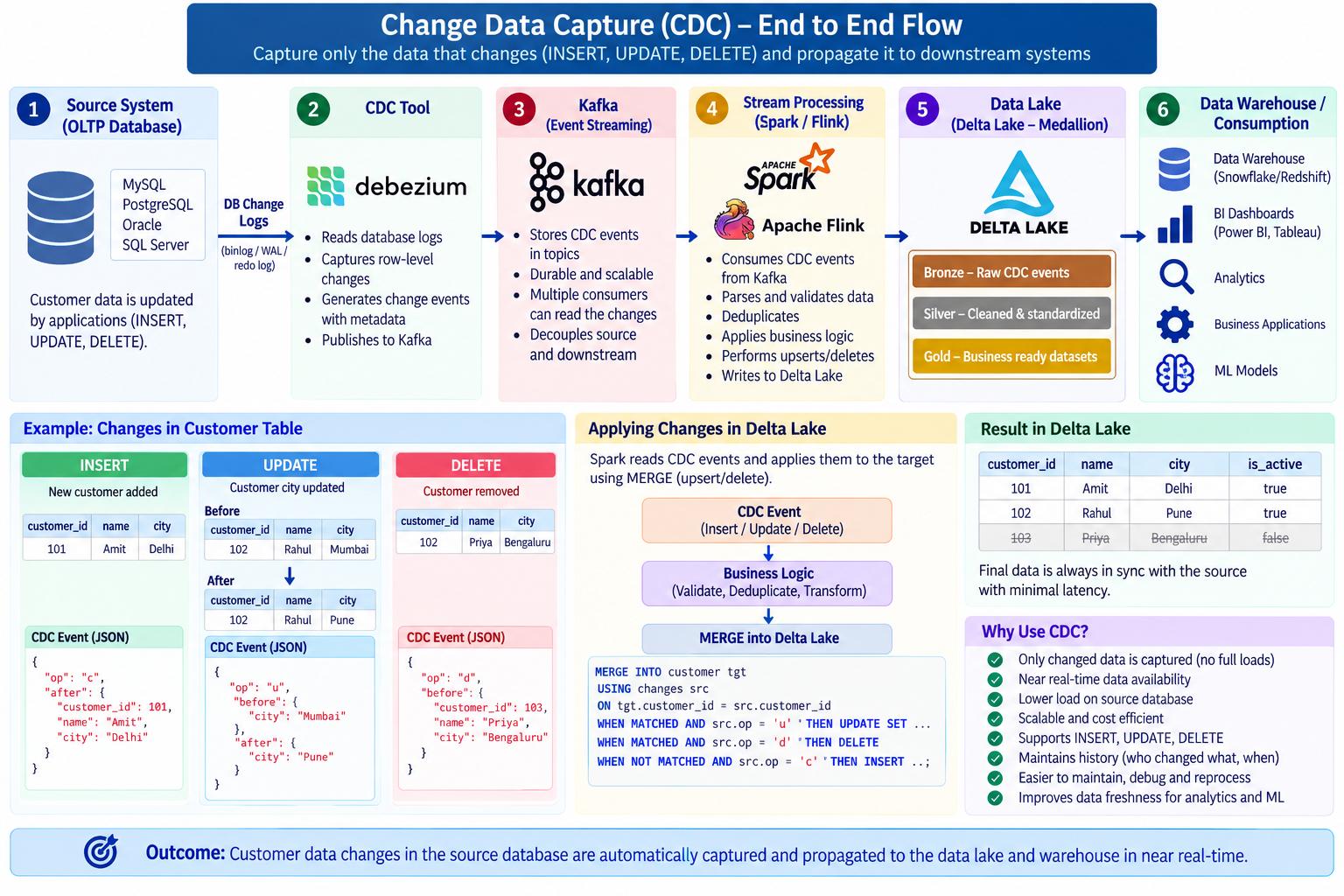
Why do you use Medallion Architecture?
MediumHow data moves from raw data → clean data → business-ready data.
Easy way to remember:
Bronze = Raw
Silver = Clean
Gold = Business-ready
1. Bronze Layer — Raw Data
Bronze contains data as received from the source.
Source
  ↓
Kafka / API / Database
  ↓
BRONZE
For example, a payment event may arrive like:
TX1001 | C001 | M001 | "5000" | 2026-09-14
We generally preserve the original data so that we can reprocess it later if something goes wrong.
“Bronze stores the raw data with minimal transformation.”
Think:
Bronze = Original data
2. Silver Layer — Cleaned Data
Silver contains cleaned, validated and standardized data.
Bronze
   ↓
Clean
Validate
Deduplicate
Standardize
Enrich
   ↓
Silver
Typical operations:
- Remove duplicates
- Validate schema
- Handle NULLs
- Standardize data types
- Clean invalid records
- Enrich with reference data
For example:
Bronze
amount = "5000"
Silver
amount = 5000
Or if Bronze has:
TX1001
TX1001
TX1002
Silver can contain:
TX1001
TX1002
after deduplication.
“Silver provides clean and trusted data for downstream processing.”
Think:
Silver = Clean + Trusted
3. Gold Layer — Business-Ready Data
Gold contains data that is ready for business users, dashboards and reporting.
Silver
   ↓
Business Logic
   ↓
Aggregations
   ↓
Gold
Examples from the question:
daily_merchant_sales
customer_payment_summary
daily_settlement
fraud_metrics
For example, Silver may contain millions of individual transactions:
M001 | ₹500
M001 | ₹700
M001 | ₹300
Gold could contain:
merchant_id | total_sales
------------|------------
M001        | ₹1500
“Gold contains business-ready datasets with business logic and aggregations.”
Think:
Gold = Business-ready
4. Complete flow
                 DATA SOURCE
                     │
                     ▼
             ┌───────────────┐
             │    BRONZE     │
             │    RAW DATA   │
             └───────┬───────┘
                     │
          Clean / Validate /
        Deduplicate / Enrich
                     │
                     ▼
             ┌───────────────┐
             │    SILVER     │
             │  CLEAN DATA   │
             └───────┬───────┘
                     │
            Business Logic /
             Aggregations
                     │
                     ▼
             ┌───────────────┐
             │     GOLD      │
             │ BUSINESS-READY│
             └───────┬───────┘
                     │
          ┌──────────┼──────────┐
          ▼          ▼          ▼
         BI       Reports       ML
5. Why use Medallion Architecture?
This is the most important part of the question.
Suppose you put everything into one table:
Raw → Clean → Transform → Dashboard
It becomes difficult to:
- Debug problems
- Reprocess data
- Track transformations
- Fix bad records
- Change business logic
- Reuse cleaned data
With Medallion:
Bronze → Silver → Gold
each layer has a clear responsibility.
Benefits
1. Easy debugging
If Gold numbers are wrong, you can check Silver and Bronze.
2. Reprocessing
If transformation logic changes, you can go back to Bronze.
3. Data quality
Silver provides a clean/trusted layer.
4. Reusability
Multiple Gold datasets can use the same Silver data.
5. Maintainability
Each layer has a specific purpose.
6. Real-world payment example
Imagine you are building a payment data platform.
Bronze
TX1001 | C001 | M001 | "5000"
TX1002 | C002 | M002 | "7000"
TX1001 | C001 | M001 | "5000"
Raw data from Kafka.
Silver
After cleaning and deduplication:
TX1001 | C001 | M001 | 5000
TX1002 | C002 | M002 | 7000
Gold
Business aggregation:
merchant | total_sales
---------|------------
M001     | 5000
M002     | 7000
A dashboard can directly consume the Gold table.
I use Medallion Architecture to separate data based on its level of refinement. Bronze stores raw data as received from the source, allowing us to preserve the original data and reprocess it if required. Silver contains cleaned, validated, standardized, deduplicated and enriched data. Gold contains business-ready datasets with business logic and aggregations, such as daily merchant sales, customer payment summaries, settlement reports and fraud metrics. This separation makes the pipeline easier to maintain, debug, reprocess and consume.

Suppose Paytm needs to process 10 crore (100 million) transactions every day. Design the data pipeline?
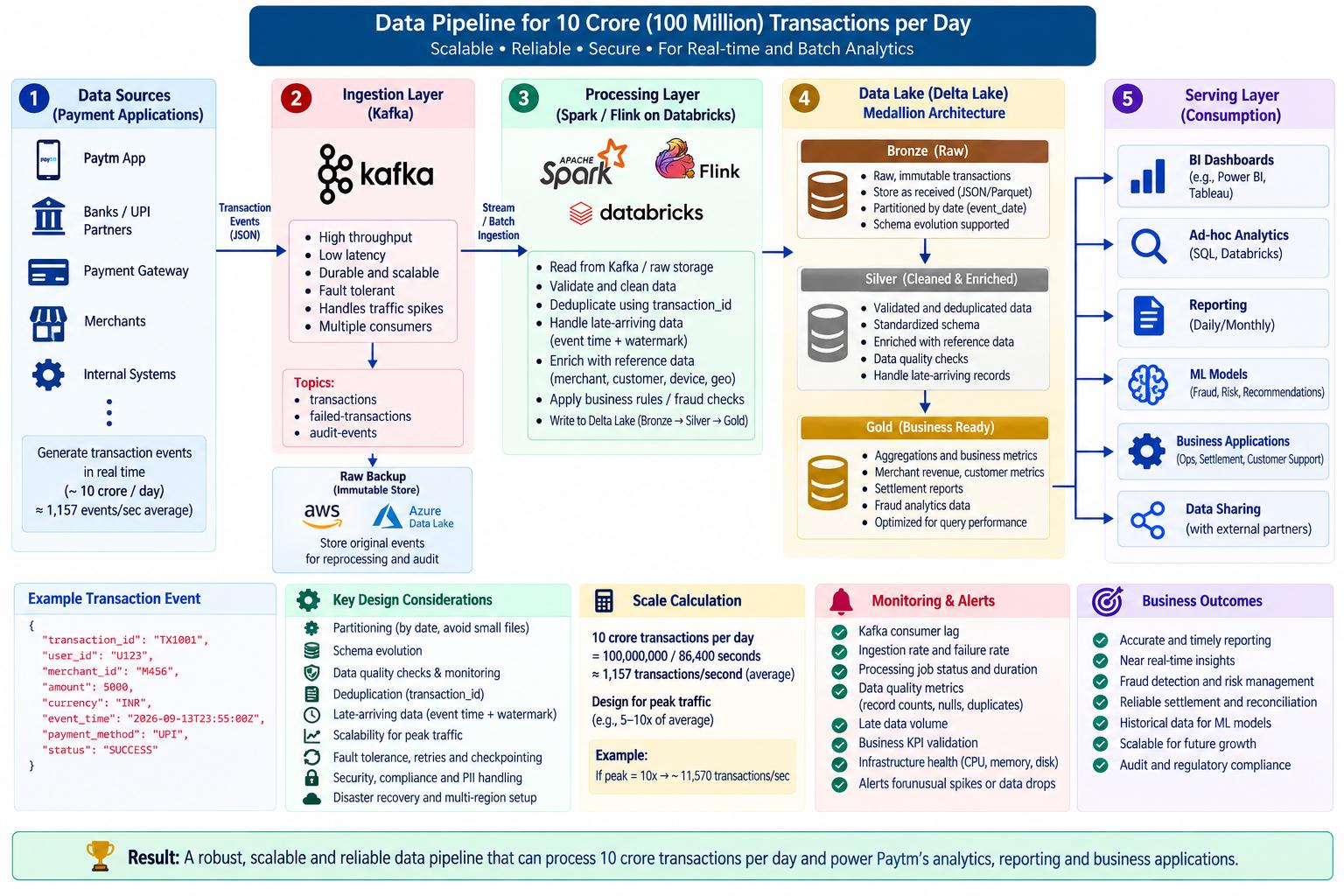
MediumA good architecture is:
Payment Applications
        │
        ▼
      Kafka
        │
        ├──────────────────► Raw Data Lake
        │                         │
        ▼                         ▼
   Spark / Flink               Bronze
        │                         │
        ▼                         ▼
      Silver ◄────────────── Cleaning
        │
        ▼
       Gold
        │
        ├────► BI Dashboards
        ├────► Reports
        ├────► Analytics
        ├────► ML Models
        └────► Business Applications
The architecture can be remembered as:
Ingest → Store → Process → Curate → Serve
2. Layer 1 — Ingestion
Payment applications continuously generate transactions:
Payment App
Payment App
Payment App
     │
     ▼
   Kafka
Kafka is used because we have a very high volume of events.
100 million transactions/day is approximately:
100,000,000 / 24 / 60 / 60
≈ 1,157 transactions/sec average
Real production traffic will not be perfectly uniform, so the system should be designed for peak traffic much higher than the average.
Kafka gives us:
- High throughput
- Scalability
- Fault tolerance
- Buffering
- Multiple consumers
3. Layer 2 — Raw Storage
The Kafka events should also be persisted to a data lake such as:
Kafka
  ↓
S3 / ADLS
  ↓
Raw data
This is important because Kafka should not necessarily be your long-term analytical storage.
We keep the original/immutable events so that we can:
- Reprocess data
- Investigate issues
- Recover from processing failures
- Perform audits
- Train ML models later
4. Layer 3 — Processing
Now Spark or Flink processes the transaction data.
For example:
Raw transactions
       ↓
Spark
       ↓
Clean
Validate
Deduplicate
Enrich
Transform
Typical processing might include:
Validate transaction
        ↓
Remove duplicates
        ↓
Handle bad records
        ↓
Enrich merchant/customer data
        ↓
Calculate business metrics
For real-time requirements, Spark Structured Streaming or Flink could be used.
For large batch workloads, Spark is a common choice.
5. Layer 4 — Bronze → Silver → Gold
This is a very important Databricks/Delta Lake interview concept.
Bronze — Raw data
Contains data close to its original form:
Bronze
  ↓
Raw transactions
Example:
transaction_id
customer_id
merchant_id
amount
event_time
We generally don't perform heavy business transformations here.
Silver — Cleaned data
Now we clean and validate:
Bronze
   ↓
Cleaning
   ↓
Validation
   ↓
Deduplication
   ↓
Silver
Silver might contain:
Valid transactions
Correct data types
Deduplicated records
Enriched information
Gold — Business-ready data
Gold contains data designed for business use.
For example:
Gold
 ├── Merchant Revenue
 ├── Customer Metrics
 ├── Daily Transactions
 ├── Settlement Reports
 └── Fraud Metrics
For example:
merchant_id | total_revenue
------------|--------------
M001        | ₹50 Crore
M002        | ₹35 Crore
6. Layer 5 — Serving
Gold data can then be consumed by:
Gold
  │
  ├── BI Dashboards
  ├── Analytics
  ├── Reporting
  ├── ML Models
  └── Business Applications
For example, a business dashboard might show:
Today's Transactions = 10 Crore
Total Revenue = ₹X Crore
Failed Transactions = X
Fraud Transactions = X
7. Why partitioning is important
With 100 million records/day, we don't want queries scanning everything.
Suppose transaction data is partitioned by:
transaction_date
Then:
2026-09-10
2026-09-11
2026-09-12
2026-09-13
If someone asks:
"Give me transactions for September 13."
the engine can read the relevant partition instead of scanning the entire history.
10 years of data
      ↓
Partition pruning
      ↓
Read only required date
This improves performance.
8. Don't create too many tiny partitions
This is another good interview point.
You don't want:
100 million tiny files
because this creates metadata and file-management overhead.
Instead, use appropriate file sizes and partitioning.
For example:
Good:
Date → manageable number of reasonably sized files

Bad:
Transaction ID → millions of tiny partitions
9. Deduplication
Payment systems can sometimes produce duplicate events.
For example:
TX1001
TX1001
The pipeline should identify duplicates using a unique transaction/event ID.
Conceptually:
Kafka
 ↓
Spark
 ↓
Deduplication
 ↓
Silver
This prevents one logical transaction from being counted multiple times.
10. Data quality
At this scale, data-quality checks are very important.
Examples:
transaction_id cannot be NULL
amount > 0
valid customer_id
valid merchant_id
valid transaction status
Bad records can be sent to a quarantine/dead-letter area:
Invalid records
      ↓
Quarantine table
      ↓
Investigation
11. Schema evolution
Payment systems change over time.
Today:
transaction_id
customer_id
amount
Tomorrow:
transaction_id
customer_id
amount
currency
payment_method
The pipeline should be designed to handle controlled schema changes without unnecessarily breaking downstream processing.
You can say:
“I would implement schema validation and a controlled schema-evolution strategy.”
12. Monitoring
For a production pipeline processing 100 million events/day, monitoring is critical.
Monitor:
Kafka
 ├── Throughput
 ├── Consumer lag
 └── Failed messages

Spark
 ├── Job duration
 ├── Processing rate
 ├── Failed tasks
 └── Data skew

Data
 ├── Record counts
 ├── Null checks
 ├── Duplicate counts
 └── Failed records
For example:
Expected = 100 million
Received = 85 million
        ↓
ALERT 🚨
13. Disaster recovery
You also need to consider what happens if:
Spark fails
Kafka broker fails
Storage becomes unavailable
Region goes down
Possible mechanisms include:
- Kafka replication
- Checkpointing
- Durable cloud storage
- Retry mechanisms
- Job restart
- Backup/DR strategy
For example:
Spark Job
   ↓
Failure ❌
   ↓
Restart
   ↓
Checkpoint
   ↓
Resume processing
“For 10 crore transactions per day, I would design a scalable layered architecture. Payment applications would publish events to Kafka for reliable and scalable ingestion. The events would be persisted to S3 or ADLS as raw immutable data. Spark Structured Streaming or Flink would process the data depending on the latency requirement. In Databricks, I would use a Bronze-Silver-Gold architecture with Delta Lake: Bronze for raw transactions, Silver for cleaned, validated, deduplicated and enriched data, and Gold for business-level aggregates such as merchant revenue, customer metrics and settlement reports.
I would also design appropriate partitioning, avoid small files, handle schema evolution and late-arriving data, implement data-quality checks and deduplication, and monitor Kafka lag, Spark performance and data-quality metrics. Finally, I would include checkpointing, retries, replication and disaster-recovery mechanisms to make the pipeline reliable at scale
The daily report was completed at midnight, but a payment from 11:55 PM arrives at 12:10 AM. What will you do?
MediumUnderstand the scenario
Suppose:
Transaction actually happened:
11:55 PM
But because of network delay, Kafka delay, application retry, etc.:
Transaction received:
12:10 AM
So:
Event Time        = 11:55 PM
Processing Time   = 12:10 AM
The transaction belongs to the previous business day, even though we received it after midnight.
1. What is the problem?
A transaction happens at 11:55 PM, but because of network/Kafka/application delays, it arrives at 12:10 AM.
Transaction happens        Transaction arrives
     11:55 PM  ───────────────→  12:10 AM
       ↑                              ↑
   Event Time                  Arrival/Processing Time
The transaction still belongs to September 13, because that is when it actually happened.
2. Why does it matter?
If the daily report for September 13 was already generated at midnight:
Sep 13: ₹10,00,000
          ↓
       Midnight
          ↓
Report generated
          ↓
12:10 AM → ₹50,000 arrives
The correct result should be:
Sep 13 = ₹10,50,000 ✅
Not:
Sep 13 = ₹10,00,000
Sep 14 = ₹50,000 ❌
So business date should generally be based on event time, not arrival time.
3. How does Spark handle it?
For streaming, use:
.withWatermark("event_time", "10 minutes")
A watermark tells Spark:
“I will allow events to arrive late up to a certain amount.”
Conceptually:
Late event
    ↓
Check event_time
    ↓
Within allowed lateness?
   ↙              ↘
 YES              NO
  ↓                ↓
Process       Very late data
                  ↓
             Separate handling
4. Why do we need a watermark?
We cannot wait forever for late events.
11:55 PM
   ↓
12:10 AM
   ↓
12:30 AM
   ↓
2:00 AM
   ↓
Next morning...
If Spark waited forever, the report might never be finalized.
So we define a practical policy such as:
Allow late data → 10 minutes / 1 hour
The actual value depends on the business SLA and observed data delays.
5. What about batch processing?
If the report is already generated and a late record arrives:
Late transaction
       ↓
Find event_time
       ↓
Find affected business date
       ↓
Recalculate/update that date
       ↓
Refresh report
For example:
Sep 13 report = ₹10,00,000
Late transaction = ₹50,000
                  ↓
Correct Sep 13
                  ↓
Sep 13 = ₹10,50,000
This is called incremental correction/backfill.
6. Very late events
If an event arrives much later than the allowed threshold:
Very late event
      ↓
Late-data table
      ↓
Review / batch correction
      ↓
Update affected date
“Late-arriving data means an event arrives after its actual event time. I would distinguish event time from processing time and use event time for business reporting. In Spark Structured Streaming, I would use watermarks to allow a defined amount of late data. For batch reports that are already generated, I would identify the affected business date and run an incremental correction or backfill. Extremely late events can be stored separately and processed through a controlled correction process.”
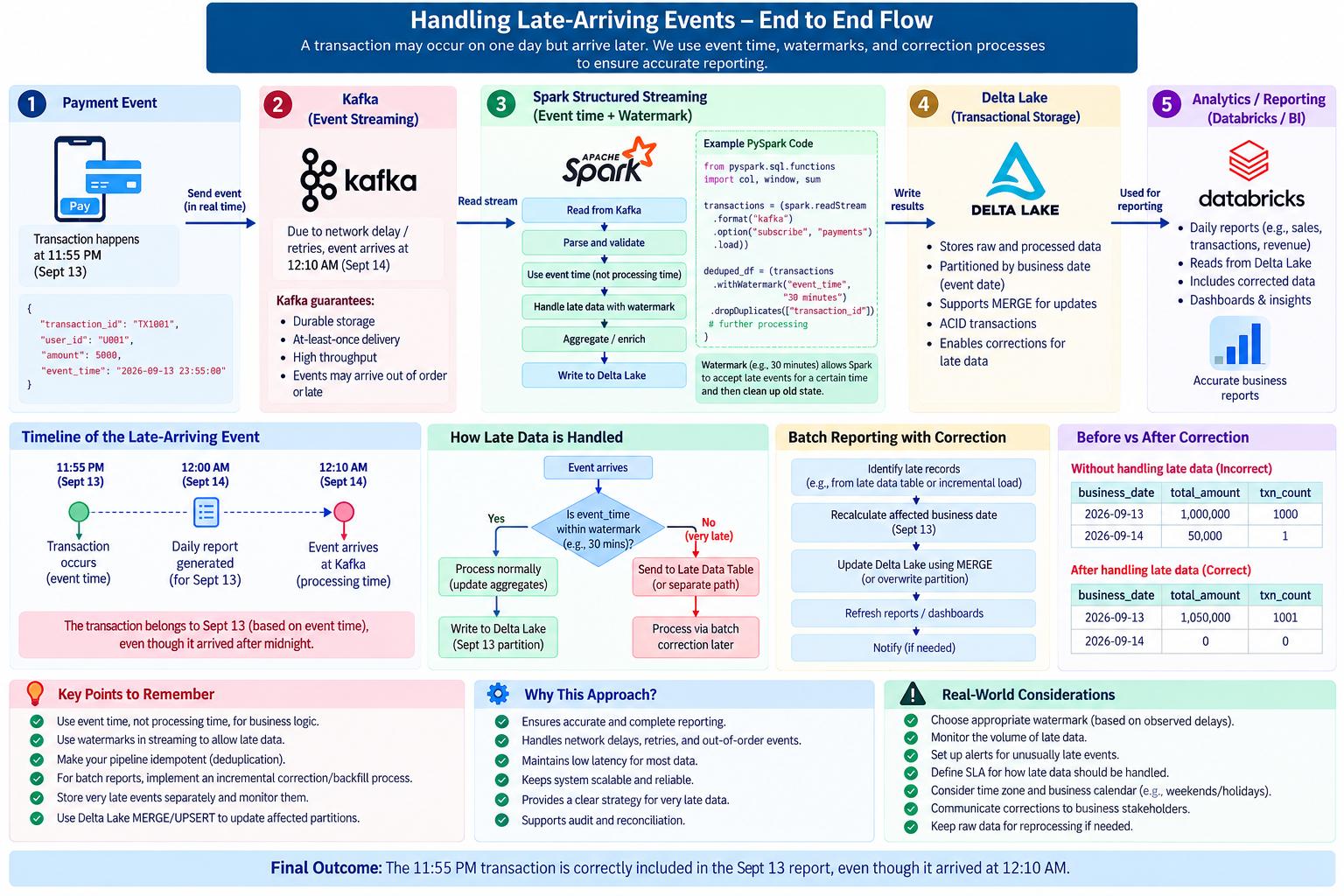
“Late-arriving data means an event arrives after its actual event time. I would distinguish event time from processing time and use event time for business reporting. In Spark Structured Streaming, I would use watermarks to allow a defined amount of late data. For batch reports that are already generated, I would identify the affected business date and run an incremental correction or backfill. Extremely late events can be stored separately and processed through a controlled correction process.”
Kafka sends the same transaction twice. How will you prevent double processing?
MediumIf duplicate payment events arrive from Kafka, I would make the processing idempotent. I would use a unique transaction or event ID as the business key and deduplicate events before writing them downstream. For Spark Structured Streaming, I can use dropDuplicates() with an appropriate event-time watermark to control state growth. I would also use checkpointing for recovery and make the sink idempotent, for example by using a MERGE or UPSERT based on the transaction ID. This ensures that if TX1001 arrives twice, the downstream system still contains only one logical transaction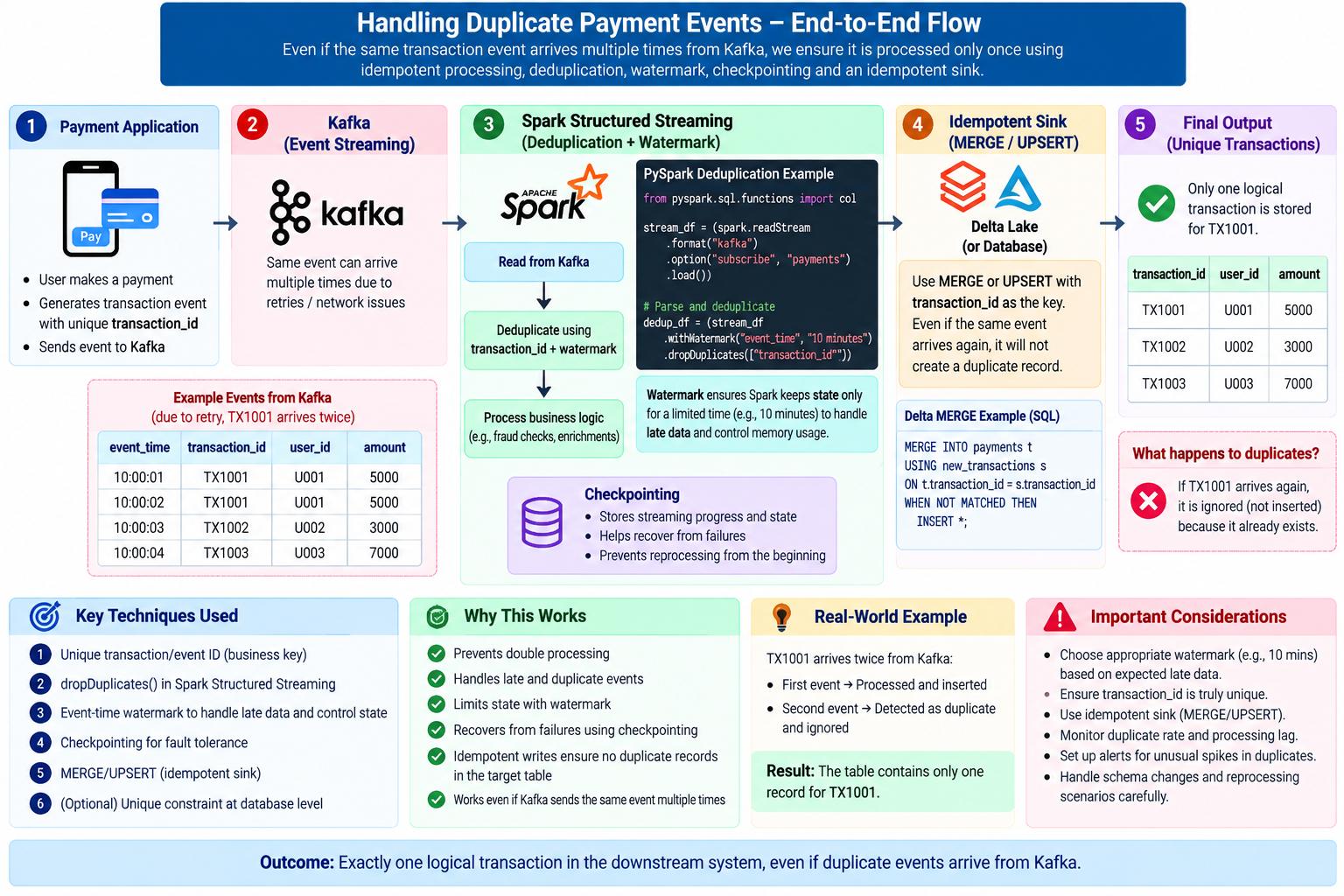
Design a real-time fraud detection pipeline for payment transactions.?
MediumThe interviewer is checking whether you understand:
- Real-time data ingestion
- Kafka
- Spark Structured Streaming
- Feature generation
- ML/rules-based fraud detection
- Low-latency processing
- Data lake storage
- Monitoring and reliability
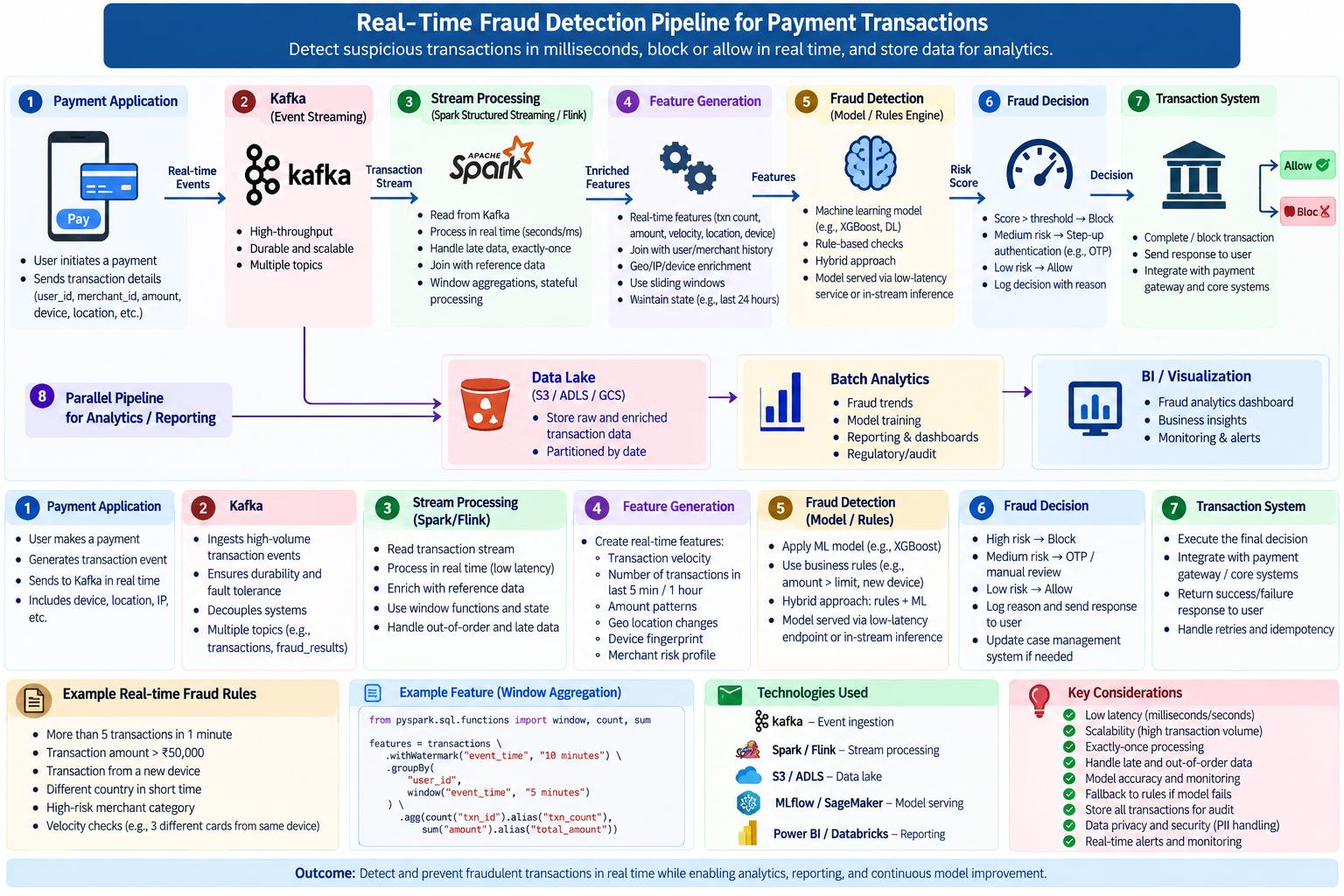
For a real-time payment fraud detection system, I would first capture transaction events from the payment application and publish them to Kafka. Spark Structured Streaming would consume the Kafka events and process them in real time. I would enrich the transactions and generate features such as transaction count, transaction velocity, amount patterns, device information, location changes, and customer history using streaming windows.
These features would then be passed to a rules engine and/or a machine-learning model to calculate a fraud risk score. Based on the score, the system would allow, block, or step-up authenticate the transaction. The decision would then be sent back to the transaction system.
In parallel, I would store the raw and enriched events and fraud decisions in a data lake such as S3/ADLS using Delta Lake for analytics, auditing, reporting, and model training. For production, I would also consider checkpointing, duplicate handling, late-arriving events, scalability, monitoring, security, and low-latency requirements
One merchant has 40% of all transactions. Your Spark job is very slow. Why?(Asked in Paytm already)
MediumThis is a classic data-skew problem. If we partition or join using merchant_id, the heavily used merchant key can cause a disproportionate amount of data to go to one or a few partitions. Those tasks take much longer while other executors finish early, so the entire stage waits for the skewed task.
First, I would confirm the skew using the Spark UI by checking task duration, partition sizes, and shuffle statistics. I would also check the distribution of merchant_id.
Depending on the situation, I would consider salting the skewed key, using a broadcast join if the other table is small, enabling or tuning AQE skew optimization, and reviewing the partitioning strategy. I would also filter unnecessary data before the join to reduce the amount of data being shuffled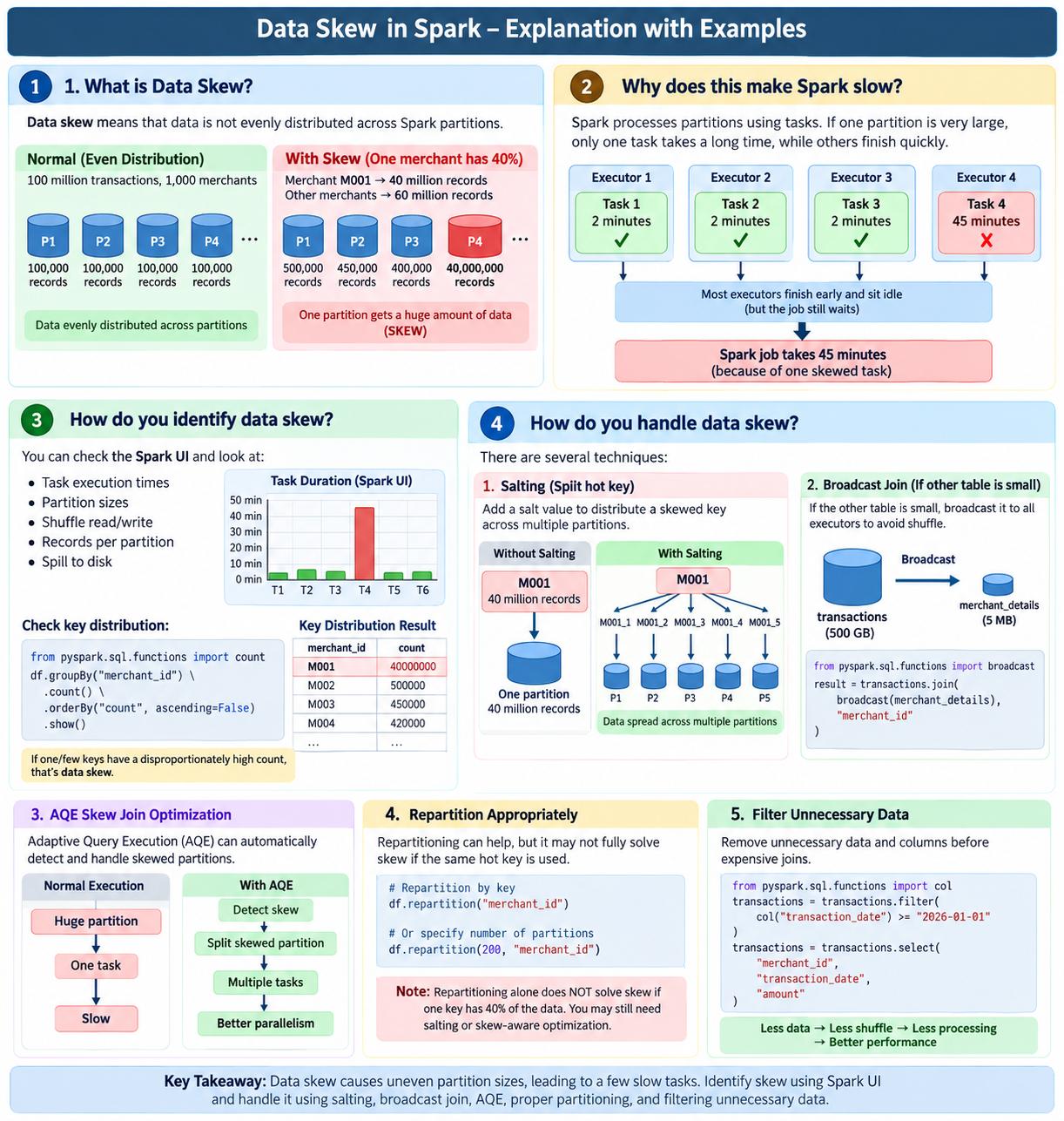
Tell me about a pipeline failure you handled?
MediumIn one of my data pipelines, the pipeline failed because there was a schema change in the source data. A new column was added to the source, and our existing transformation logic was not expecting that column/schema change.
I first checked the ADF/Databricks pipeline logs and identified the activity where the failure occurred. I compared the source schema with the expected target schema and confirmed that the issue was caused by the schema change.
I updated the transformation logic and schema handling to accommodate the new column. After making the changes, I tested the pipeline with the updated data and reprocessed the failed data.
The pipeline completed successfully, and I also improved the schema-handling logic and validation so that similar source schema changes would be detected earlier and would not unexpectedly break the pipeline in the future.
Delta table has over-partitioning. How do you handle it?
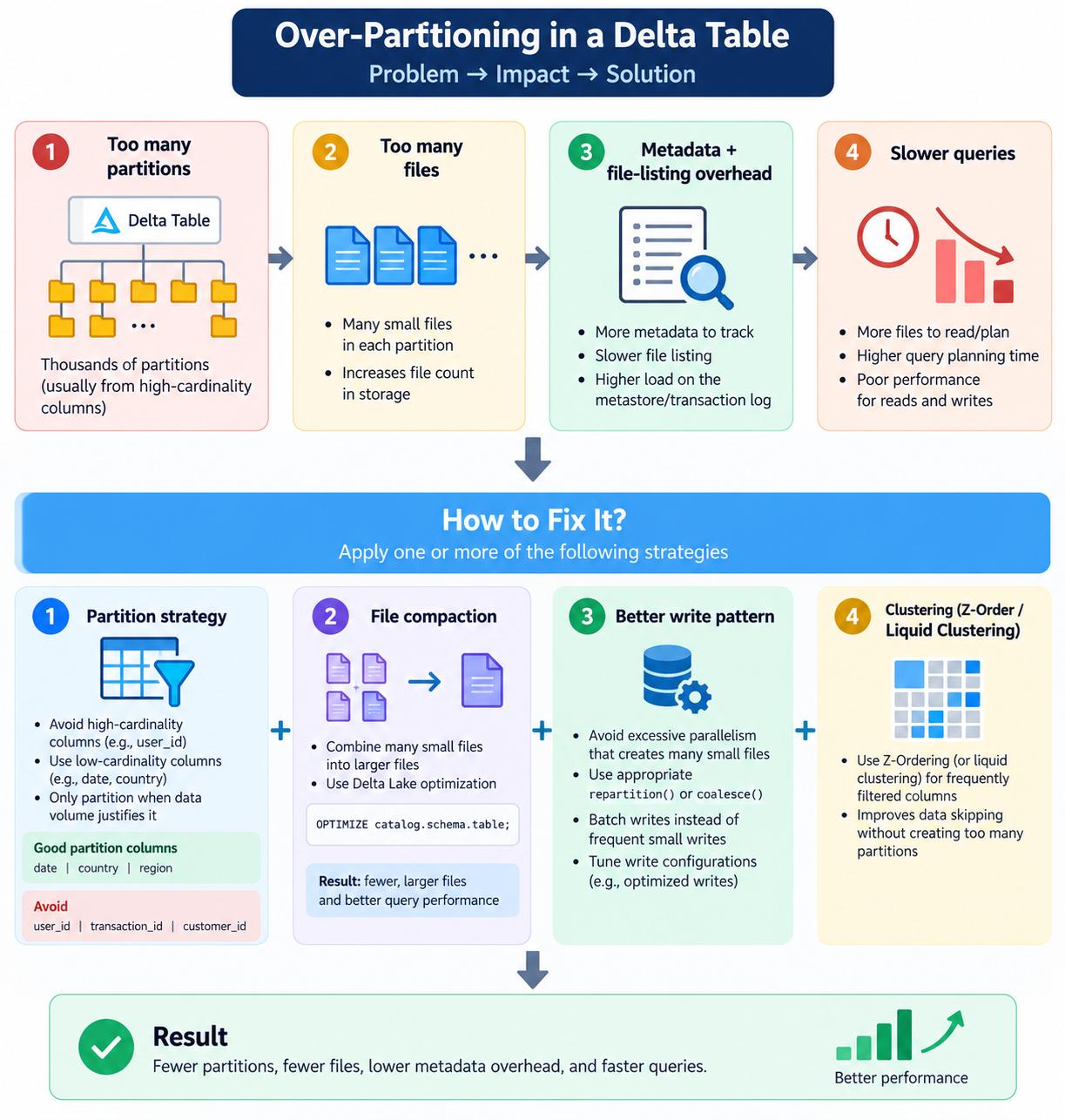
EasyI wouldn't blindly repartition the table. First I'd determine whether the issue is too many logical partitions or too many small files. If the partition column has high cardinality, I'd redesign the partitioning strategy and potentially remove the partition column. If the problem is small files, I'd compact them using Delta optimization and fix the upstream write pattern. For frequently filtered non-partition columns, I'd use clustering rather than creating more partitions