Python
Interview Questions
Data structures, OOP, decorators, generators, pandas, and ETL scripting patterns for data engineering.

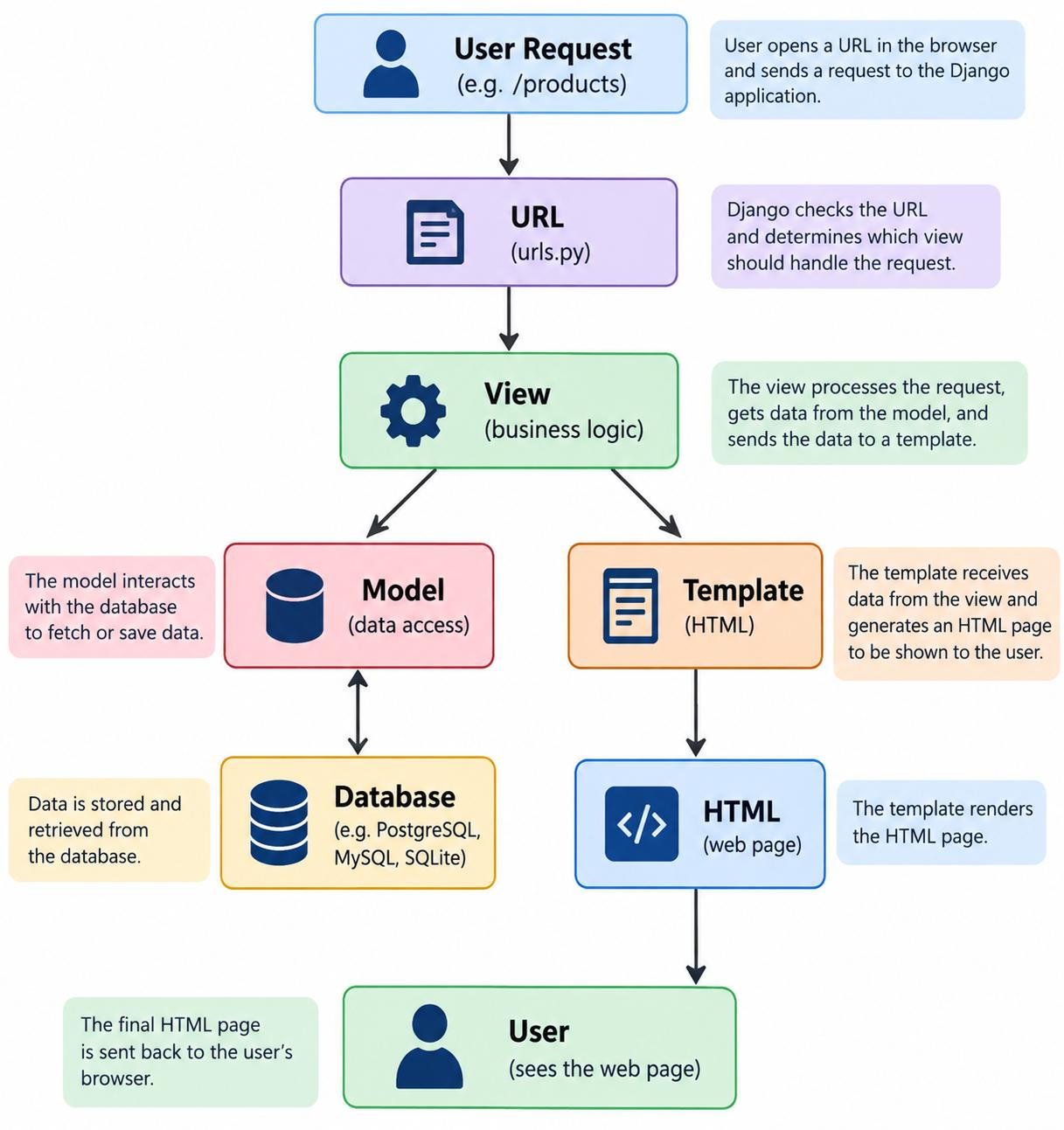
Django Architecture
MediumDjango follows MVT Architecture
Django mainly uses:
M → Model
V → View
T → Template
So we call it MVT — Model, View, Template.
Let's understand each one.
1. Model = Data / Database 🗄️
The Model deals with data.
For example, suppose we have an online shopping website.
Our database might contain:
Products
ID Name Price
1 Laptop 50000
2 Mobile 20000
3 Mouse 1000
The Django Model defines how this data is stored and accessed.
Example:
Think:
Model = Database/data
2. Template = What User Sees 🖥️
The Template is the front end / HTML page shown to the user.
For example:
Products
Laptop - ₹50,000
Mobile - ₹20,000
The user sees something like:
--------------------------
Products
--------------------------
Laptop ₹50,000
Mobile ₹20,000
Think:
Template = User Interface / HTML
3. View = The Logic 🧠
The View contains the logic that connects the request, Model, and Template.
For example:
What is happening?
The View says:
"Give me all the products from the database."
Then it sends those products to the Template.
Think:
View = Business logic / Controller between data and page
4. What is URL?
There is one more important part: URL routing.
Suppose the user visits:
www.example.com/products
Django needs to know:
"Which View should handle /products?"
This is done using urls.py.
Example:
So:
/products
↓
urls.py
↓
products() View
5. Complete Django Flow ⭐
Now let's put everything together.
Suppose the user opens:
/products
The flow is:
USER
│
│
▼
/products
│
▼
URLS
(urls.py)
│
▼
VIEW
(business logic)
│
▼
MODEL
(database)
│
▼
Get product data
│
▼
VIEW
│
▼
TEMPLATE
(HTML)
│
▼
Final Web Page
│
▼
USER
🍕 Real-Life Example
Imagine ordering a pizza.
User
You say:
"I want a pizza."
User → Request
URL
Django receives the request and determines where it should go.
URL → Which View?
View
The View processes your request:
"The user wants a pizza. Let's get the available pizzas."
View → Business Logic
Model
The Model gets information from the database:
Database:
Pizza
------
Margherita ₹300
Farmhouse ₹450
Paneer ₹400
Template
The Template displays the result:
Available Pizzas
🍕 Margherita - ₹300
🍕 Farmhouse - ₹450
🍕 Paneer - ₹400
User sees the page.
🔥 Simple Example
Suppose you visit:
/products
Step 1 — URL
path("products/", views.products)
Django says:
/products → call products() View.
Step 2 — View
def products(request):
products = Product.objects.all()
return render(
request,
"products.html",
{"products": products}
)
The View asks the Model for data.
Step 3 — Model
products = Product.objects.all()
Model gets data from the database.
Database
↓
Product data
↓
Model
Step 4 — Template
The data is sent to:
products.html
Template displays it.
{% for product in products %}
{{ product.name }} - {{ product.price }}
{% endfor %}
The user finally sees:
Laptop - ₹50,000
Mobile - ₹20,000
Mouse - ₹1,000
⭐ Easy Way to Remember
Think of a restaurant:
MODEL → Kitchen / Storage
↓
Food/Data
VIEW → Waiter
↓
Handles request
TEMPLATE → Menu / Presentation
↓
What customer sees
Or simply remember:
MODEL → DATA
VIEW → LOGIC
TEMPLATE → UI
Interview Answer
If the interviewer asks:
"Explain Django Architecture."
You can answer:
Django follows the MVT architecture, which stands for Model, View, and Template. The Model handles data and database operations, the View contains the application or business logic and processes requests, and the Template handles the presentation or HTML shown to the user. Django's URL configuration maps incoming URLs to the appropriate View.
Shallow Copy vs Deep Copy
MediumImagine you have a school bag.
Inside the bag, you have:
School Bag
│
├── Book
├── Pen
└── Pencil Box
      │
      ├── Pencil
      └── Eraser
Now you want to make a copy of the bag.
There are two ways to copy it.
🟡 1. Shallow Copy = New Bag, Same Pencil Box
With a shallow copy, Python creates a new bag, but the pencil box inside is the same pencil box.
Original Bag                 Shallow Copy
     👜                           👜
     │                            │
     ├── Book                    ├── Book
     ├── Pen                     ├── Pen
     │                            │
     └──────┐              ┌─────┘
            ↓              ↓
        Same Pencil Box
             📦
          ├── Pencil
          └── Eraser
So there are:
- 2 bags ✅
- 1 pencil box ❗
Both bags are pointing to the same pencil box.
Python example
Now:
shallow[2].append("Sharpener")
We added "Sharpener" to the pencil box in the shallow copy.
Let's check:
print(original)
print(shallow)
Output:
['Book', 'Pen', ['Pencil', 'Eraser', 'Sharpener']]

['Book', 'Pen', ['Pencil', 'Eraser', 'Sharpener']]
😮 Why did the original also change?
Because both copies are using the same nested list.
🟢 2. Deep Copy = New Bag, New Pencil Box
With a deep copy, Python creates:
- a new bag
- a new pencil box
- new nested objects
Everything is independent.
Original Bag                 Deep Copy
     👜                           👜
     │                            │
     ├── Book                    ├── Book
     ├── Pen                     ├── Pen
     │                            │
     └── Pencil Box              └── Pencil Box
          📦                          📦
          │                           │
       Pencil                      Pencil
       Eraser                      Eraser
Now there are:
- 2 bags ✅
- 2 pencil boxes ✅
Python example
Now:
deep[2].append("Sharpener")
Check both:
print(original)
print(deep)
Output:
['Book', 'Pen', ['Pencil', 'Eraser']]

['Book', 'Pen', ['Pencil', 'Eraser', 'Sharpener']]
The original didn't change. ✅
The easiest way to remember
Think about copying a house.
Shallow Copy 🏠
You build a new house, but both houses share the same garage.
House 1 ──────┐
              ↓
            Garage
              ↑
              │
House 2 ──────┘
If something changes in the garage, both houses see the change.
Deep Copy 🏠🏠
You build a completely separate house with its own garage.
House 1              House 2
  │                     │
Garage 1              Garage 2
If you change Garage 2, Garage 1 doesn't change.
Let's see it with a very simple Python example
Shallow Copy
Result:
a = [[1, 2, 100], [3, 4]]

b = [[1, 2, 100], [3, 4]]
Why?
Because:
a
│
└── [1, 2] ─────┐
                │
b               │
│               │
└── [1, 2] ─────┘
Both are using the same inner list.
Deep Copy
Result:
a = [[1, 2], [3, 4]]

b = [[1, 2, 100], [3, 4]]
Because:
a
│
└── [1, 2]

b
│
└── [1, 2, 100]
They have separate inner lists.
Interview shortcut
Remember just this:
Shallow Copy: New outer object, but nested objects are shared.
Deep Copy: New outer object and new nested objects.
Or even simpler:
SHALLOW
New outside ❌ New inside
          ↓
       Shared inside


DEEP
New outside ✅
New inside  ✅
          ↓
    Completely separate
Python functions
copy.copy()       → Shallow Copy
copy.deepcopy()   → Deep Copy
One-line memory trick:
🟡 Shallow = Copy the box, share what's inside.
🟢 Deep = Copy the box AND everything inside it.
Write a program to check if a string is a palindrome?
EasyA palindrome is a word or string that reads the same forward and backward.
Examples:
madam  → Palindrome ✅
level  → Palindrome ✅
racecar → Palindrome ✅
hello → Not a Palindrome ❌
"MADAM"
│
Reverse string
↓
"MADAM"
│
Compare both
↙ ↘
Same Different
↓ ↓
Palindrome Not Palindrome
What is the difference between a list and a tuple?
EasyThe main difference is that a list is mutable, whereas a tuple is immutable. Lists use square brackets and can be modified using operations such as append, remove and item assignment. Tuples use parentheses and cannot be modified after creation. Because tuples are immutable and hashable when all their elements are hashable, they can be used as dictionary keys, whereas lists cannot.
LIST
[10, 20, 30]
↓
Can CHANGE
↓
Mutable
TUPLE
(10, 20, 30)
↓
Cannot CHANGE
↓
Immutable
↓
Can be dictionary key*
What Is the Purpose of the Pass Statement?
EasyThe pass statement is a null operation in Python. It is used as a placeholder when a statement is syntactically required but no action needs to be performed. It is commonly used for empty functions, classes, loops, and conditional blocks that will be implemented later.
Real-Life Example: Employee Management System
Imagine you're building an HR application.
You already have employee details, but the bonus calculation feature is still under development.

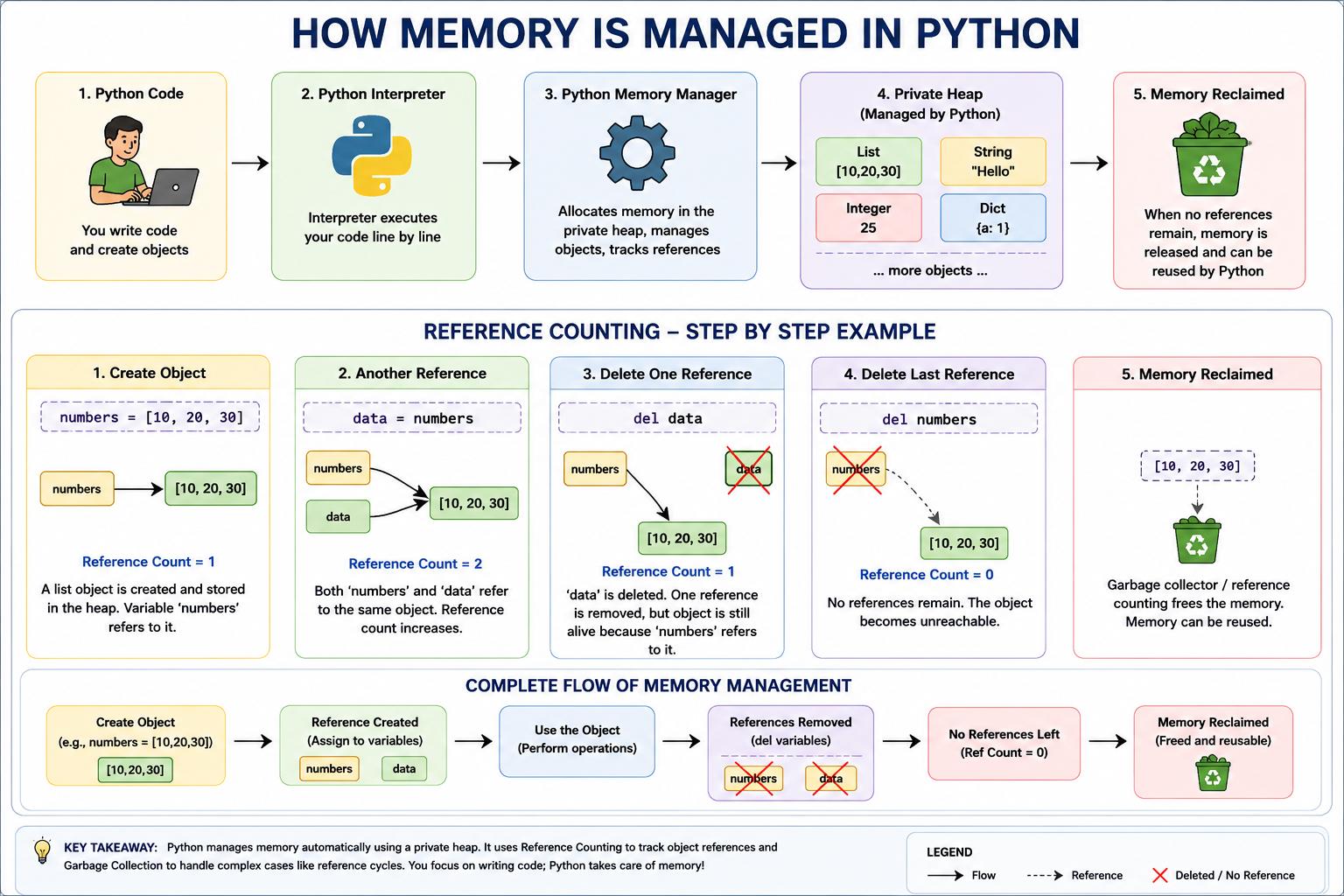
How is Memory managed in Python?
EasyPython manages memory automatically. Objects are stored in a private heap managed by Python's memory manager. Developers don't normally allocate or free this memory manually. Python primarily uses reference counting, along with garbage collection for reference cycles, to reclaim memory when objects are no longer needed.
Real-Life Example
Warehouse = Private Heap
Warehouse Manager = Python Memory Manager
Items = Python Objects
Removing unused items = Memory Reclamation
How Is Multithreading Achieved in Python?
EasyReal-Life Example: Restaurant
Imagine a restaurant with one chef and three orders.
The chef cannot physically cook three dishes at exactly the same instant.
Instead, the chef works like this:
👨🍳 CHEF
│
┌────────┴────────┐
↓ ↓
🍕 Order 1 🍔 Order 2
│ │
Cooking Waiting
│ │
↓ ↓
👨🍳 switches between tasks
│
↓
🌮 Order 3For example:
Chef starts Pizza
       ↓
Pizza is in the oven 🔥
       ↓
Chef doesn't wait doing nothing
       ↓
Starts Burger 🍔
       ↓
Burger is cooking
       ↓
Chef works on Taco 🌮
       ↓
Checks Pizza again 🍕
The chef is switching between tasks instead of waiting for one task to completely finish.This is similar to how multithreading works.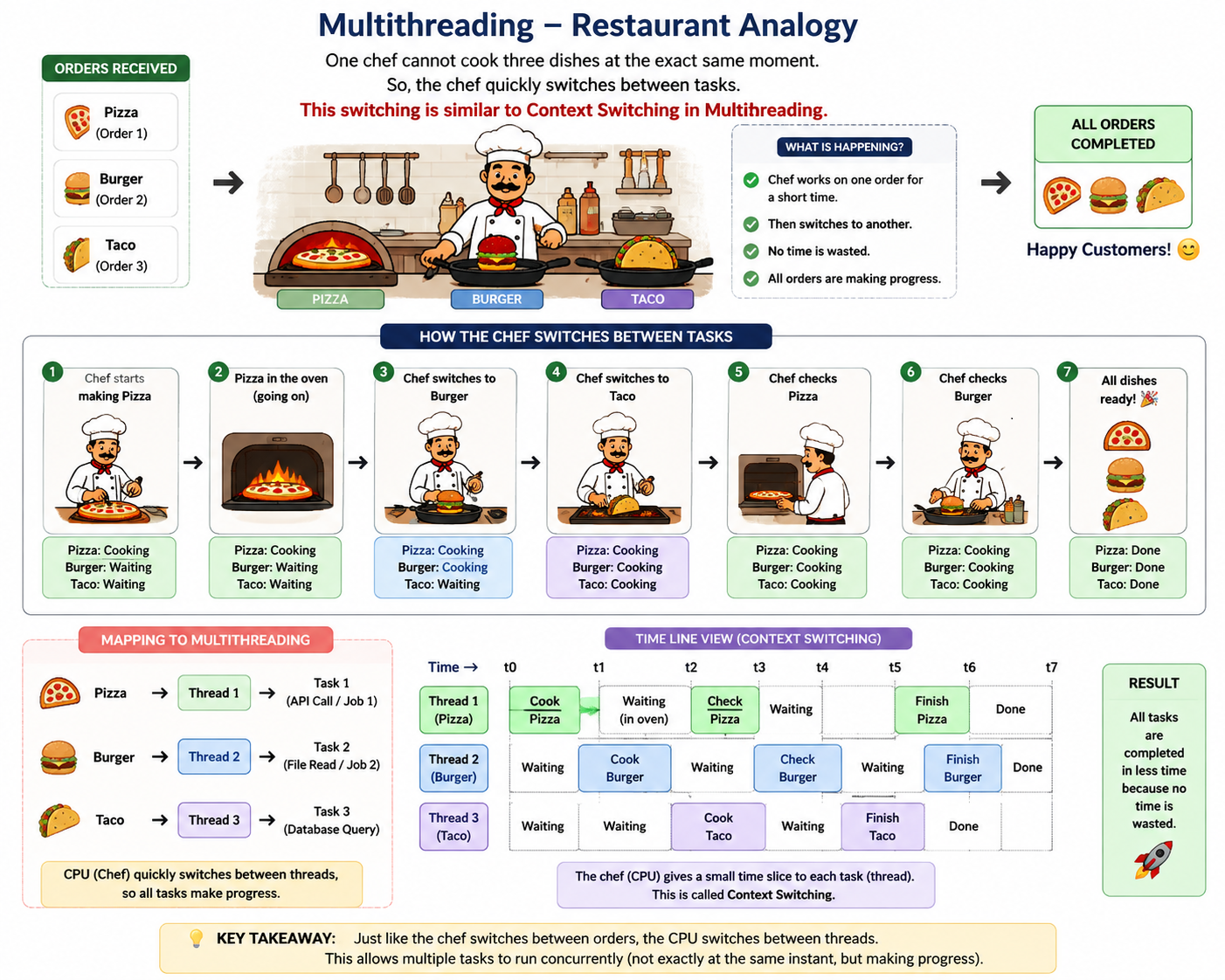
The concept students should understand
👨🍳 CHEF / CPU│├── 🍕 Thread 1 → Cooking → ⏳ Waiting│ ↓├── 🍔 Thread 2 → Cooking → ⏳ Waiting│ ↓├── 🌮 Thread 3 → Cooking → ⏳ Waiting│ ↓└── Threads finish → ✅ All orders completed
What is the Difference Between Shallow Copy and Deep Copy in Python?
EasyThe main difference between shallow copy and deep copy is how they handle nested/child objects.
Shallow Copy — A shallow copy creates a new outer object, but the nested objects inside it are shared references to the original objects.
Therefore, if you modify a nested object, the change can be reflected in both the original and the copied object.
Here, `original` and `shallow` are different outer lists, but their inner lists are the same objects.
Deep Copy — A deep copy creates a new outer object and recursively creates copies of all nested objects. Therefore, changes made to nested objects in the original do not affect the deep copy.
| Feature | Shallow Copy | Deep Copy |
| Function | copy.copy() | copy.deepcopy() |
| Outer object | New object | New object |
| Nested objects | Shared references | New copies |
| Nested changes affect original? | Yes | No |
| Memory usage | Lower | Higher |
| Copying speed | Faster | Slower |
Easy Way to Remember
Shallow Copy: New container, same children.
Deep Copy: New container, new children.

Use dict comprehension to create a dict mapping names to salaries > 70,000 only.
MediumInput List of Dicts:
employees = [
{'name': 'Alice', 'salary': 75000},
{'name': 'Bob', 'salary': 95000},
{'name': 'Charlie', 'salary': 65000}
]
Question:
Use dict comprehension to create a dict mapping names to salaries > 70,000 only.
Expected Output:
{'Alice': 75000, 'Bob': 95000}
Explanation:
– Iterates through list of dicts, accessing 'name' and 'salary' keys
– if emp['salary'] > 70000 filters high earners
– Transforms nested data into flat dict for quick lookups!

Parse the file and extract all lines where the log level is "ERROR"
HardScenario: You are given a system log file. Each line contains
a timestamp and a log level. Your task is to parse the file and
extract all lines where the log level is "ERROR"
Sample logs.txt content:
2024-07-01 10:02:15 [INFO] System started
2024-07-01 10:05:22 [ERROR] Failed to load config
2024-07-01 10:07:30 [WARNING] Low memory
2024-07-01 10:10:45 [ERROR] Connection timeout
Explanation:
* This script reads the file line-by-line and filters entries that contain "[ERROR]".
* .strip() removes newline characters or extra spaces.
* This is a typical pre-processing step before sending alerts, logging metrics, or dashboarding.