PySpark & Apache Spark
Interview Questions
RDDs, DAG execution, lazy evaluation, shuffle, partitioning & memory — the depth FAANG interviewers actually test.

What Is a Broadcast Join?
MediumA Broadcast Join is a Spark optimization technique in which a small table is copied to all executors so they can join it with a large table locally.
This avoids shuffling the huge table across the network for the join.
Simple real-life example
Suppose an e-commerce company has two tables:
Transactions (Large Table) | Merchants (Small Table) |
|---|---|
10 billion records | 50,000 records |
Transaction ID | Merchant ID |
Merchant ID | Merchant Name |
Amount | Location |
You want to join these tables using merchant_id to find the merchant name for every transaction.
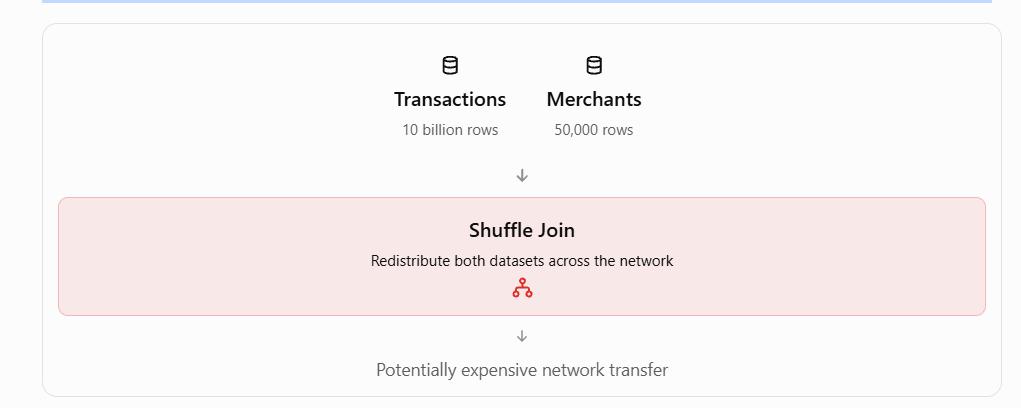
Without Broadcast Join
Spark may need to shuffle data from both tables across executors to bring matching merchant IDs together.
With Broadcast Join
Spark sends the small merchant table to every executor, allowing each executor to join its portion of the transaction data locally.
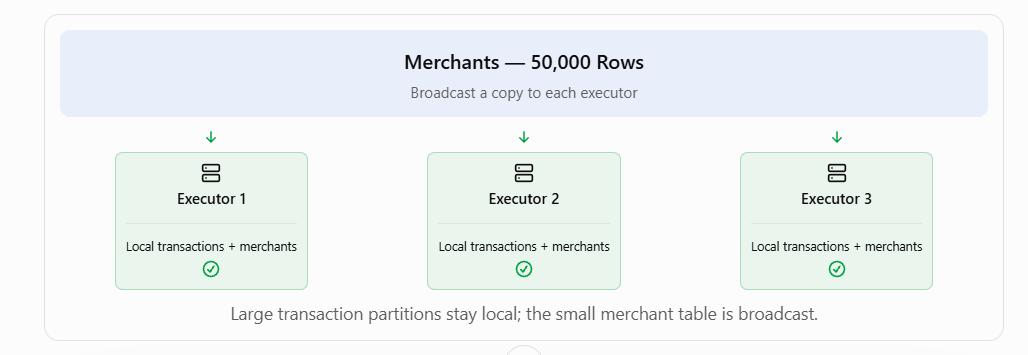
Result: The join can become much faster because Spark avoids shuffling the 10-billion-row transaction table for this operation.
Code Explanation
transactions— The large DataFrame containing 10 billion records.merchants— The smaller DataFrame containing 50,000 records.broadcast(merchants)— Tells Spark to broadcast the smaller DataFrame.merchant_id— The common column used to match records.inner— Returns records with matching merchant IDs in both tables.
3. When Should You Use a Broadcast Join?
A Broadcast Join is useful when one table is much smaller than the other and the smaller table can fit comfortably in executor memory.
However, 50,000 records does not automatically mean a table is small enough. The actual size in bytes matters.
Broadcasting a very large table can cause memory pressure, timeouts, or job failures.
Interview Answer:
"I would consider using a Broadcast Join because the transactions table has 10 billion records, while the merchant table has only 50,000.
In a Broadcast Join, Spark sends the smaller merchant table to all executors. Each executor can then join it with its local transaction data without shuffling the huge transaction table across the network.
This reduces shuffle overhead and can significantly improve performance.
However, before using it, I would verify that the merchant table is small enough to fit safely in executor memory."

How Do You Handle Data Skew in Apache Spark?
MediumData skew means data is not distributed equally among Spark partitions, so some tasks have much more work than others.
Imagine four workers in a company. Their manager gives them 100 files to process.
Worker 1 receives 70 files.
Worker 2 receives 10 files.
Worker 3 receives 10 files.
Worker 4 receives 10 files.
Three workers finish quickly, but Worker 1 takes much longer.
Even though three workers have finished, the overall work cannot be completed until Worker 1 finishes.
This is exactly what happens with data skew in Apache Spark.
2. Understand the Interview Example
Interviewer: Suppose one merchant has 40% of all transactions. Your Spark job is very slow. Why?
Imagine an e-commerce company has 1,000 transactions.
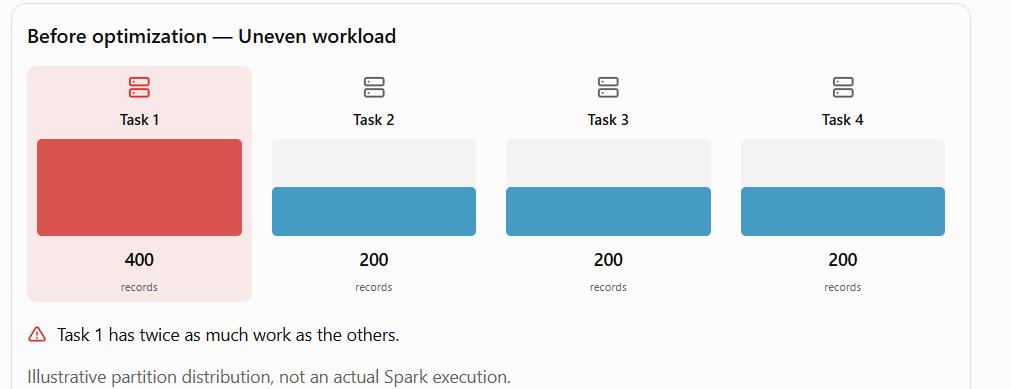
One merchant, Merchant A, has 400 transactions, while the remaining 600 transactions belong to other merchants.
When Spark performs certain operations, such as groupBy("merchant_id") or a shuffle join on merchant_id, records with the same key may be assigned to the same partition.
Before optimization — Uneven workload
Why does Spark become slow?
Spark processes partitions in parallel.
If one partition contains a large number of records, its task takes longer to complete.
Other tasks may finish quickly, but the Spark stage must wait for the slowest task.
This is called a straggler task, and it increases the overall job execution time.
3. How Can We Solve Data Skew?
There are five important techniques.
1. Salting
Salting means adding an extra value to a heavily repeated key so that its records can be distributed across multiple partitions.
For example, instead of processing all Merchant A records under one key:
Merchant_A
We can create salted keys:
Merchant_A_0, Merchant_A_1, Merchant_A_2, Merchant_A_3
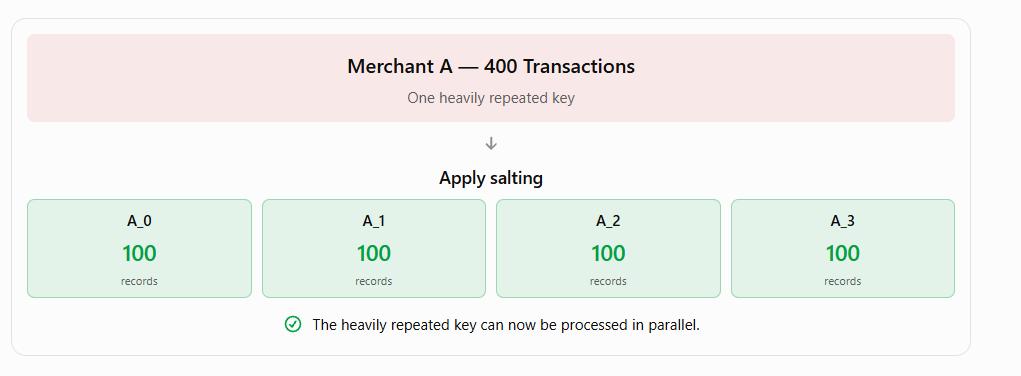
For joins, the other table must also be prepared to match the salted keys correctly. Otherwise, records may be missed.
2. Broadcast Join
If one of the tables is small, Spark can send a copy of it to each executor.
This avoids a large shuffle of both tables and can make the join faster.
Example: A huge transactions table joined with a small merchants lookup table.
3. Adaptive Query Execution (AQE)
AQE allows Spark to optimize certain operations while the job is running.
Its skew-join optimization can split unusually large shuffle partitions into smaller tasks for supported joins.
4. Repartitioning
Repartitioning helps distribute data across partitions.
However, simply repartitioning by the same heavily skewed merchant_id may not solve the problem, because records with the same key can still end up together.
A better partitioning strategy may be needed.
5. Filtering Unnecessary Data
Remove records and columns that are not required before performing expensive joins.
This reduces the amount of data Spark needs to process.
4. Best Answer for an Interview
"This is a data skew problem. Since one merchant has 40% of all transactions, Spark may assign a disproportionately large amount of data to one partition during a join or shuffle.
As a result, other tasks finish quickly, but the task handling the large partition takes longer, slowing down the entire job.
First, I would check the Spark UI to confirm data skew by comparing task execution times and shuffle sizes.
To resolve it, I would consider salting the skewed key, using a broadcast join if one table is small, enabling Adaptive Query Execution, choosing an appropriate repartitioning strategy, and filtering unnecessary data.
Finally, I would rerun the job and compare its performance to verify the improvement."
Walk me through Spark Architecture?
EasyThe easiest way to understand Spark architecture is: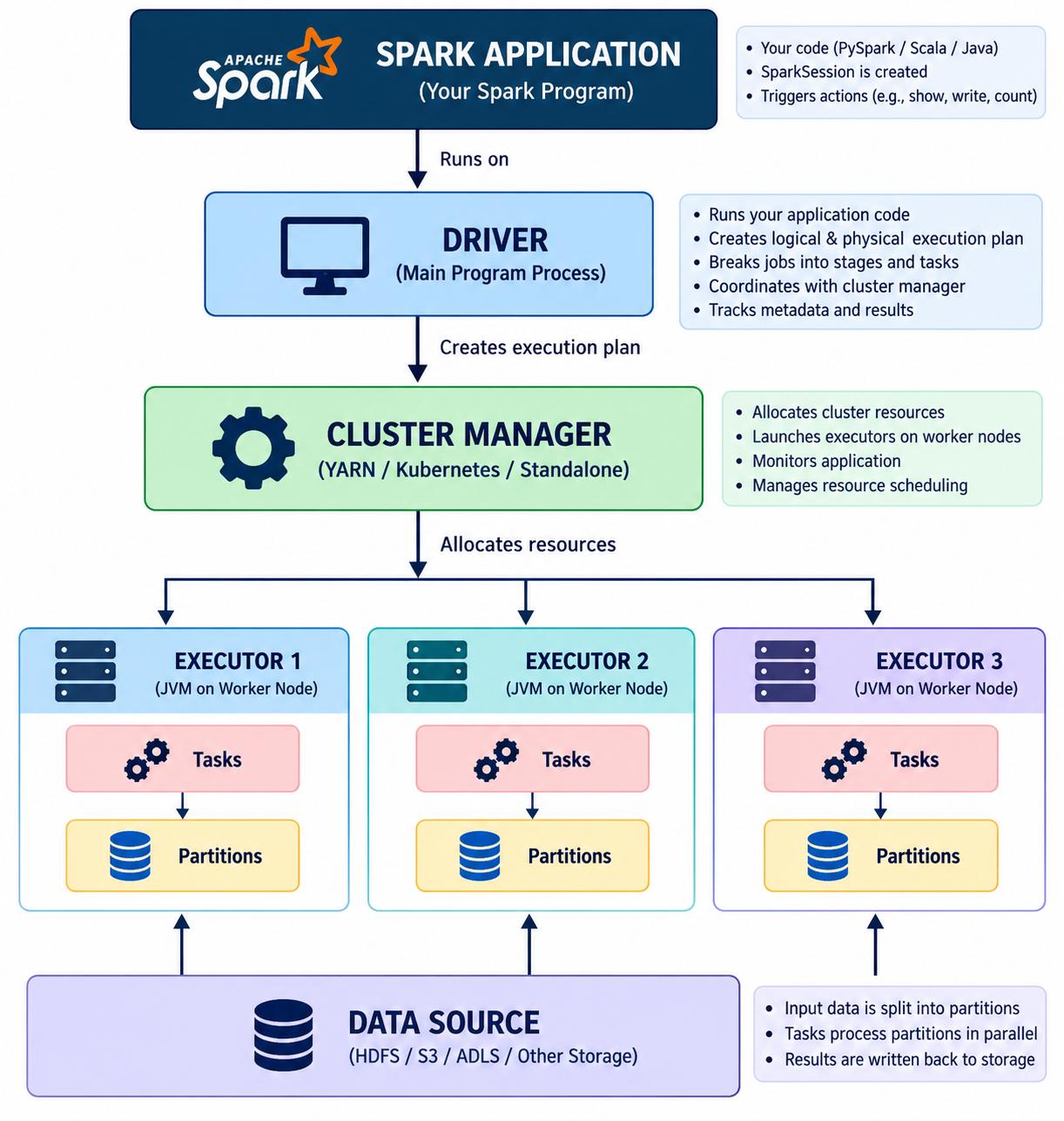
There are three important components:
- Driver
- Cluster Manager
- Executors
1️⃣ Driver
The Driver is the brain of the Spark application.
Suppose you write:
df = spark.read.parquet("s3://data/sales")

result = (
    df.filter("amount > 1000")
      .groupBy("country")
      .sum("amount")
)

result.show()
The Driver:
- Runs your main application code
- Creates the SparkSession
- Builds the logical/physical execution plan
- Creates jobs
- Divides jobs into stages
- Coordinates tasks
- Communicates with executors
Think:
Driver = Brain
2️⃣ Cluster Manager
The cluster manager is responsible for providing/allocating cluster resources.
Examples:
YARN
Kubernetes
Standalone
The Driver asks the cluster manager for resources.
Conceptually:
Driver
  │
  │ "I need resources"
  ↓
Cluster Manager
  │
  ├── Executor 1
  ├── Executor 2
  └── Executor 3
3️⃣ Executors
Executors are processes running on worker nodes that actually execute the tasks.
For example:
Executor 1
 ├── Task 1
 ├── Task 2
 ├── Task 3
 └── Task 4
Executors also provide memory for things such as:
- Cached/persisted data
- Shuffle data
- Intermediate computation
- Execution memory
Think:
Executor = Worker
Simple analogy
Imagine a restaurant.
Driver          = Manager
Cluster Manager = Resource/Staff allocator
Executors       = Chefs
Tasks           = Individual cooking jobs
The manager doesn't cook every dish.
The manager coordinates the work.
Similarly:
Driver coordinates; executors execute.
Interview answer
If interviewer asks:
"Explain Spark architecture."
Say:
"A Spark application consists primarily of a Driver, executors, and a cluster manager. The Driver runs the application's main code, builds the execution plan, and coordinates jobs, stages, and tasks. The cluster manager allocates resources for the application. Executors run on worker nodes and execute the tasks assigned by the Driver while also providing memory for cached data and intermediate processing."
What is a DAG and what does the DAG Scheduler do?
EasyDAG stands for:
Directed Acyclic Graph
Don't worry about the name initially.
Think of it as:
A graph showing the sequence of transformations Spark needs to perform.
Suppose you write:
df.filter("amount > 1000") \
  .select("customer_id", "amount") \
  .groupBy("customer_id") \
  .sum("amount")
Spark doesn't immediately execute every line.
Because of lazy evaluation, Spark builds a plan.
Conceptually:
Read Data
    ↓
Filter
    ↓
Select
    ↓
GroupBy
    ↓
Aggregation
This is part of Spark's execution planning.
What does the DAG Scheduler do?
The DAG Scheduler analyzes the computation and divides it into stages based primarily on dependencies and shuffle boundaries.
For example:
Filter
  ↓
Select
  ↓
Shuffle
  ↓
GroupBy
  ↓
Aggregation
The scheduler can divide it approximately into:
Stage 1
Filter
  ↓
Select
  ↓
Shuffle
and:
Stage 2
GroupBy
  ↓
Aggregation
The resulting stage tasks are then submitted for execution through Spark's scheduling mechanisms
Explain Application → Job → Stage → Task in Spark
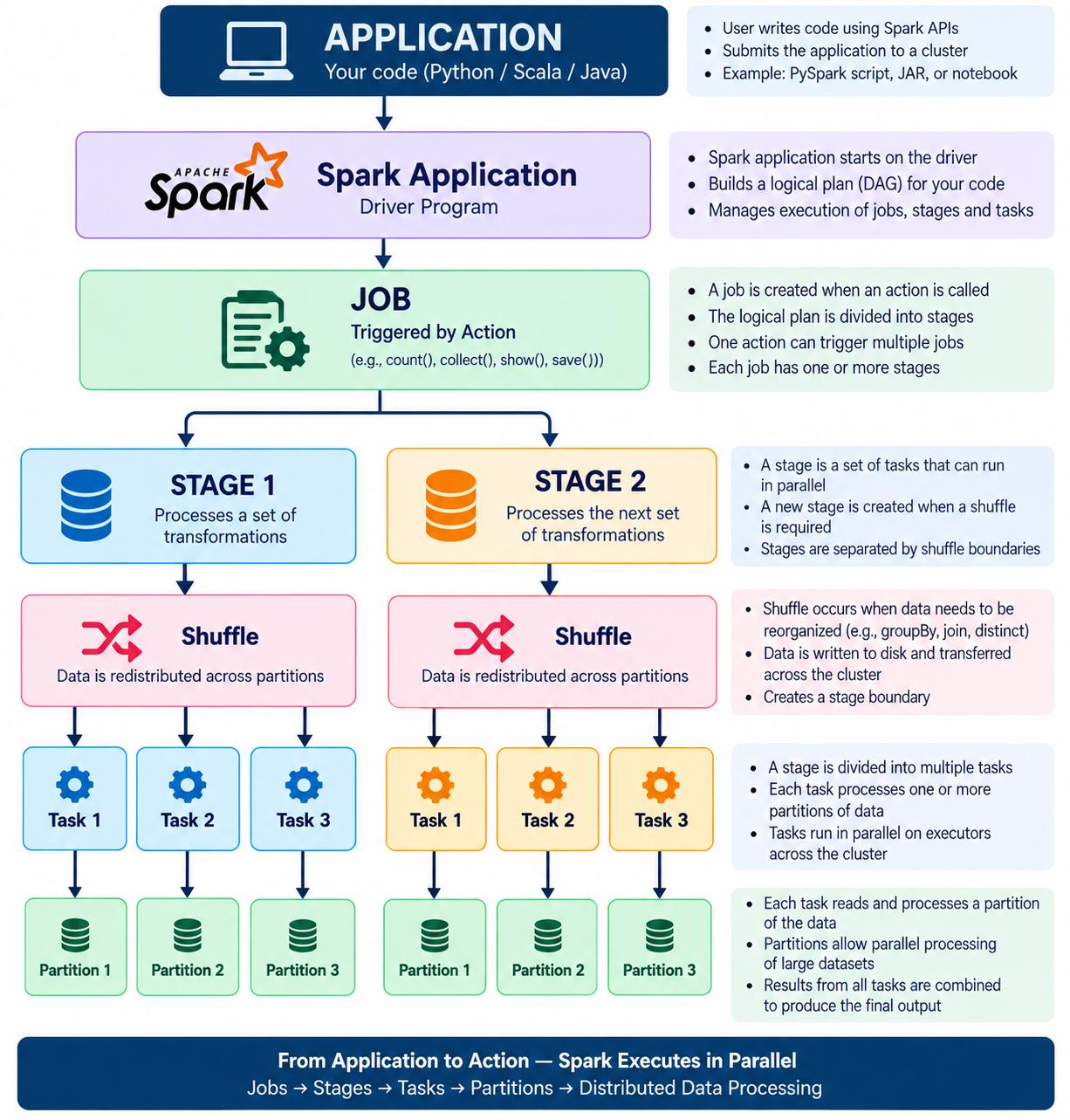
EasyThis is one of the most important Spark interview concepts.
Remember:
Application
     ↓
   Job
     ↓
  Stage
     ↓
  Task
Let's understand each.
Application
A Spark application is the entire Spark program.
For example:
spark = SparkSession.builder.getOrCreate()

df = spark.read.parquet("sales")

result = df.groupBy("country").sum("amount")

result.write.parquet("output")
This whole program is the Spark application.
Typically, one application has one SparkSession.
Job
A job is triggered by an action.
Examples of actions:
df.count()
df.collect()
df.show()
df.write.parquet(...)
For example:
df.count()
can trigger a Spark job.
So:
Transformation
Transformation
Transformation
     ↓
   Action
     ↓
   JOB
Important
Transformations such as:
filter()
select()
groupBy()
withColumn()
are lazy and generally don't execute immediately.
An action triggers execution.
Stage
A job is divided into stages.
The major boundary between stages is generally a shuffle.
For example:
df.filter(...)
  .groupBy("country")
  .sum("amount")
The groupBy may require data to move between partitions.
Conceptually:
Stage 1
filter
  ↓
shuffle
  ↓
Stage 2
groupBy + aggregation
So remember:
Shuffle → Stage boundary
Task
A stage contains multiple tasks.
Generally:
One task processes one partition for that stage.
Suppose a stage has:
4 partitions
then you generally get:
Task 1 → Partition 1
Task 2 → Partition 2
Task 3 → Partition 3
Task 4 → Partition 4
These tasks execute on executors.
Complete picture
Interview answer
"A Spark application is the complete Spark program. An action triggers a job. A job is divided into stages, generally at shuffle boundaries. Each stage contains tasks, and typically one task processes one partition. Tasks are the units of work that execute on Spark executors."
What are the components of the Spark ecosystem?
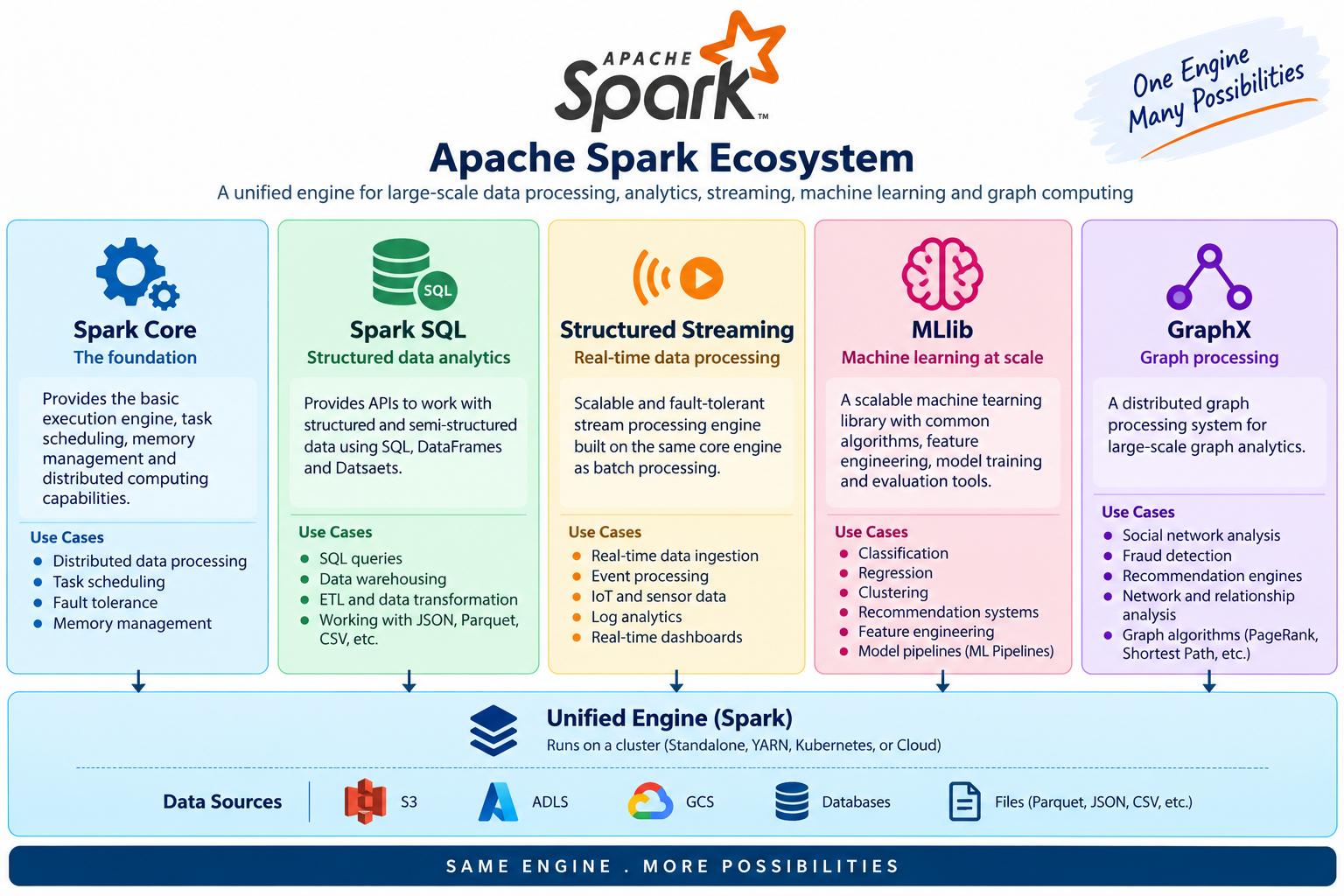
EasyThe image mentions:
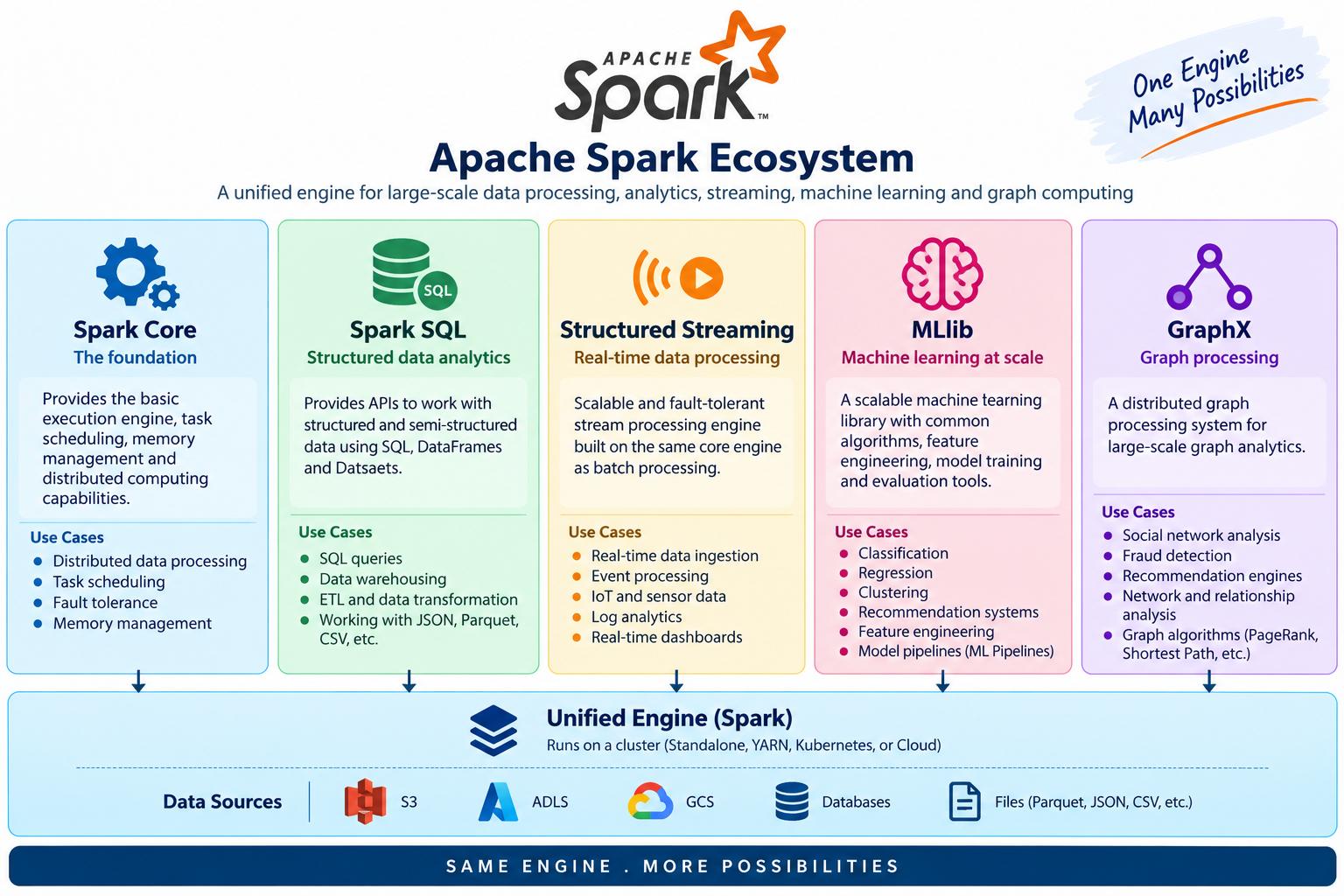
Let's understand each.
Spark Core
This is the foundation of Spark.
It handles things such as:
- Task scheduling
- Memory management
- Fault recovery
- RDDs
- Communication with executors
Think:
           Spark Core
               │
       ┌───────┼───────┐
       ↓       ↓       ↓
 Scheduling  Memory  Fault Recovery
Spark SQL
Used for:
- DataFrames
- SQL queries
- Structured data
- Query optimization
Example:
df = spark.read.parquet("sales.parquet")

df.groupBy("country").sum("amount")
Or:
SELECT country, SUM(amount)
FROM sales
GROUP BY country;
Spark SQL uses the Catalyst optimizer to optimize SQL/DataFrame query plans.
Structured Streaming
Used for processing continuously arriving data.
For example:
Kafka
  ↓
Spark Structured Streaming
  ↓
Transform
  ↓
Delta Lake
Typical use cases:
- Real-time transaction processing
- Log processing
- IoT
- Event processing
MLlib
Spark's machine-learning library.
Used for algorithms such as:
- Classification
- Regression
- Clustering
- Recommendation-related workflows
GraphX
Spark's graph-processing library.
Used for graph-oriented problems such as:
Customer → Account → Transaction
or network relationships.
For modern interviews, Spark SQL and Structured Streaming are generally much more relevant for data-engineering roles than spending a lot of time on GraphX.
Interview answer
"The Spark ecosystem includes Spark Core as the execution foundation, Spark SQL for structured data and DataFrame/SQL processing, Structured Streaming for streaming workloads, MLlib for machine learning, and GraphX for graph processing."
SparkContext vs SparkSession — which one do you use?
EasyThis is another very common question.
SparkContext
SparkContext is the older/core entry point into Spark.
It provides access to things such as:
- Cluster resources
- RDD APIs
- Spark configuration
- Executors
Conceptually:
SparkContext
     │
     ↓
Spark Cluster
     │
     ├── Executor 1
     ├── Executor 2
     └── Executor 3
SparkSession
Modern Spark applications normally use:
spark = SparkSession.builder.getOrCreate()
SparkSession is the primary entry point for:
- DataFrames
- SQL
- Structured Streaming
- Spark configuration
- Catalog operations
It also provides access to the underlying SparkContext:
spark.sparkContext
Easy way to remember
SparkContext
"Core connection to the Spark cluster."
SparkSession
"Main entry point for modern Spark applications."
Relationship:
            SparkSession
                 │
       ┌─────────┼─────────┐
       ↓         ↓         ↓
   DataFrame    SQL     Streaming
                 │
                 ↓
          SparkContext
                 │
                 ↓
           Spark Cluster
Interview answer
"SparkContext is the older core entry point that represents the connection to the Spark execution environment and is mainly associated with the RDD API. SparkSession is the modern unified entry point for DataFrame, SQL, and Structured Streaming applications. In modern PySpark applications, I normally use SparkSession and access SparkContext through
spark.sparkContextwhen needed."
What is PySpark? How does Python communicate with the JVM?
EasyWhat is PySpark?
PySpark is the Python API for Apache Spark.
Spark itself is primarily implemented on the JVM, particularly in Scala and Java.
When you write:
from pyspark.sql import SparkSession

spark = SparkSession.builder.getOrCreate()

df = spark.read.parquet("s3://bucket/data/")
you are writing Python code, but Spark's execution engine operates on the JVM.
How does Python communicate with Spark?
Conceptually:
PySpark uses a gateway mechanism to communicate between Python and the JVM.
Does every DataFrame operation execute Python code row-by-row?
No.
This is extremely important.
Suppose you write:
df.select("customer_id", "amount")
Spark doesn't normally execute:
Python
 ↓
row 1
 ↓
Python
 ↓
row 2
 ↓
Python
 ↓
row 3
Instead, Spark builds a logical plan and executes the supported DataFrame operations through the Spark engine.
That's one reason DataFrame APIs are much more efficient than Python row-by-row processing.
What happens with a Python UDF?
Now consider:
from pyspark.sql.functions import udf
If you use a regular Python UDF, Python code needs to participate in processing the data.
Conceptually:
Spark JVM
   ↓
Python Worker
   ↓
Python function
   ↓
Result
   ↓
Spark JVM
That communication can introduce overhead.
That's why native Spark functions are generally preferred when possible.
For example, prefer:
from pyspark.sql import functions as F

df = df.withColumn(
    "upper_name",
    F.upper("name")
)
over a Python UDF for something Spark already provides natively.
🎯 Interview answer
"PySpark is the Python API for Apache Spark. Spark's core execution engine runs on the JVM. PySpark communicates with the JVM, and DataFrame operations are converted into Spark execution plans that run in the Spark engine. Regular Python UDFs can introduce additional Python-JVM communication and serialization overhead, so native Spark functions are generally preferred when available."
What is Apache Spark, and why is it faster than MapReduce?
EasySimple explanation
Apache Spark is a distributed data-processing engine used to process large amounts of data across multiple machines.
For example, suppose you have 1 TB of transaction data.
Instead of processing it on one machine:
1 TB Data
   ↓
One machine
   ↓
Very slow
Spark distributes the data:
                 1 TB Data
                     ↓
              Spark Cluster
                     │
        ┌────────────┼────────────┐
        ↓            ↓            ↓
    Executor 1   Executor 2   Executor 3
       330 GB       330 GB       340 GB
The executors process their portions in parallel.
Why is Spark generally faster than traditional MapReduce?
The most important reason is that Spark can keep intermediate data in memory and avoid unnecessary disk I/O.
Traditional MapReduce
Conceptually:
Input
  ↓
Map
  ↓
Write intermediate data to disk
  ↓
Shuffle
  ↓
Write/read intermediate data
  ↓
Reduce
  ↓
Output
There can be substantial disk I/O between stages.
Spark
Spark builds a computation plan and can keep intermediate data in memory when appropriate:
Input
  ↓
Transformation
  ↓
Transformation
  ↓
Transformation
  ↓
Action
Spark also uses:
- DAG execution
- Lazy evaluation
- Query optimization
- In-memory caching when beneficial
- Efficient shuffle mechanisms
Important interview correction
Don't say:
❌ "Spark is always 100 times faster than MapReduce."
That's too absolute.
Say:
"Spark can be significantly faster than traditional MapReduce for many workloads, especially iterative and multi-stage workloads, because it can avoid repeated disk I/O and optimize the execution plan. The actual improvement depends on the workload, data size, cluster configuration, and implementation."
Interview answer
"Apache Spark is a distributed processing engine designed for large-scale data processing. Compared with traditional MapReduce, Spark can be faster because it builds a DAG of operations, optimizes execution, and can keep intermediate data in memory rather than repeatedly writing intermediate results to disk. This is particularly beneficial for iterative and multi-stage workloads."
What is the difference between a transformation and an action in Spark?
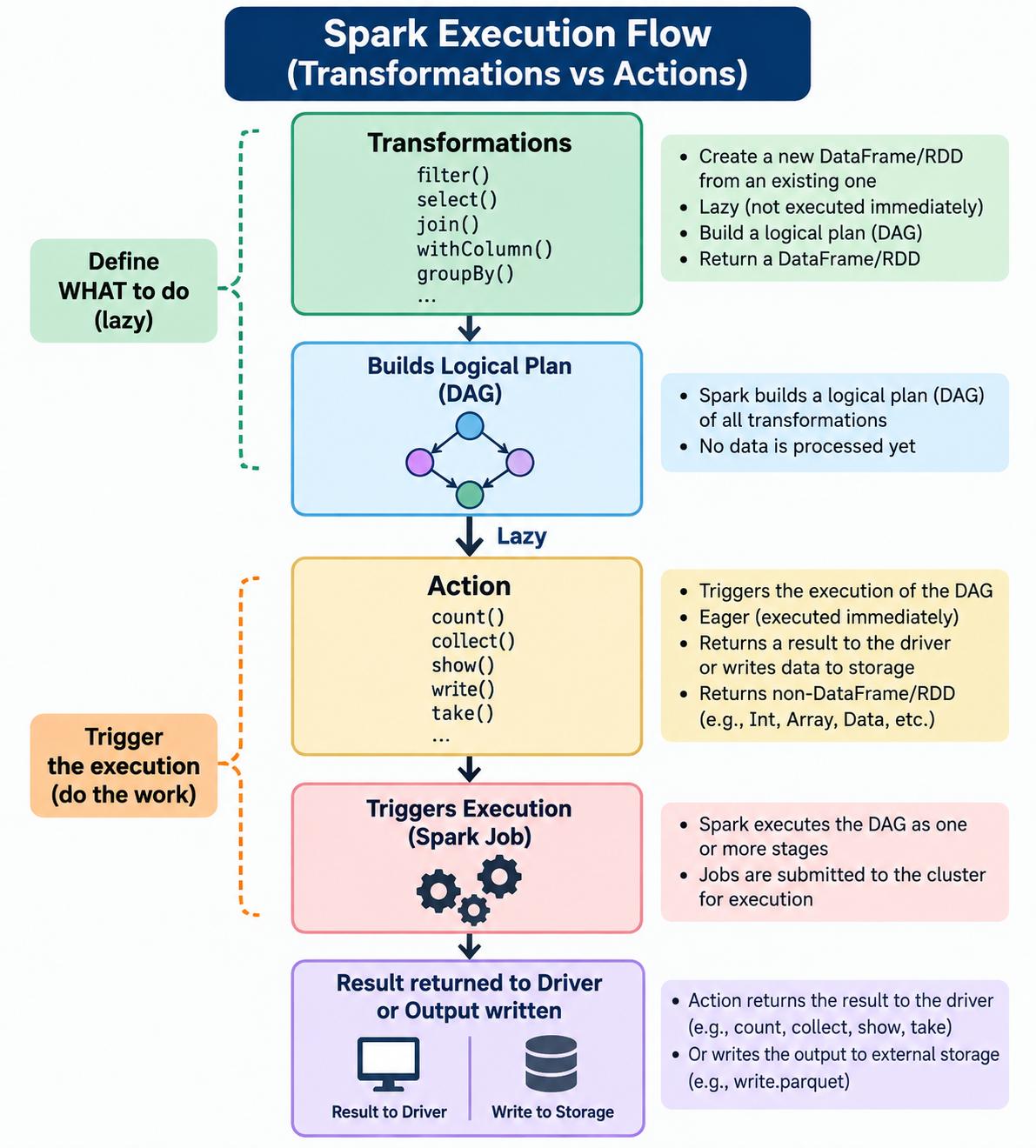
EasyTransformation
Operations that create a new RDD/DataFrame from an existing one. They are lazy, i.e., not executed immediately. They build a logical plan.
Action
Operations that trigger the execution of the DAG and return a result to the driver program or write data to storage. They are eager (executed immediately).
Transformation vs Action
| Aspect | Transformation | Action |
|---|---|---|
| Definition | Creates a new RDD/DataFrame from an existing one | Triggers execution and returns a result or writes data |
| Evaluation | Lazy (not executed immediately) | Eager (executed immediately) |
| Return Type | Returns RDD/DataFrame | Returns non-RDD/DataFrame, e.g. Int, Array, data, etc. |
| Triggers Job | No | Yes |
| Examples | map(), filter(), select(), join(), groupBy(), withColumn() | count(), collect(), show(), write, take() |
| Purpose | To transform data | To get a result or write output |
| Execution | Builds the DAG | Starts DAG execution |
Transformation Examples
df.filter(df.age > 18)
df.select("name", "age")
df.withColumn("salary", df.salary * 1.1)
df.join(other_df, "id")
df.groupBy("dept").count()
Action Examples