Databricks
Interview Questions
Delta Lake, Unity Catalog, Databricks Workflows, Auto Loader, Photon engine, and Lakehouse architecture — real questions from Databricks-stack interviews.

What is a Checkpoint?
EasyA checkpoint in Delta Lake is a periodic snapshot of the table's state at a particular version. The Delta transaction log contains individual changes such as files added or removed. As the number of transactions grows, replaying all those log files can be inefficient. A checkpoint summarizes the table state, so Delta can start from the checkpoint and process only the newer transactions, making table-state reconstruction faster.
Simple example
Transaction Log

V1 → V2 → V3 → V4 → V5
                  ↓
             CHECKPOINT
                  ↓
        Table state at V5
                  ↓
          V6 → V7 → V8
Remember
Transaction Log = What changed?
Checkpoint = What is the table state at this version?
Time Travel = Access an older version
VACUUM = Remove obsolete physical files
If interviewer asks "Why do we need it?"
"To avoid replaying a large number of transaction-log entries from the beginning and efficiently reconstruct the Delta table state."
What is a Delta Table?
EasyA Delta Table is not a new file format.
It is a table built on top of Parquet data files, with a transaction log that tracks changes to the table.
                 DELTA TABLE
                      │
          ┌───────────┴───────────┐
          ↓                       ↓
    Parquet Files           _delta_log
       Actual Data        Transaction History
For example:
sales/
├── part-00001.parquet
├── part-00002.parquet
├── part-00003.parquet
└── _delta_log/
    ├── 00000000000000000000.json
    ├── 00000000000000000001.json
    └── ...
Interview answer
"A Delta Table is a table format built on Parquet files and managed through a transaction log. The transaction log tracks changes to the table and enables features such as ACID transactions, time travel, schema enforcement, and reliable UPDATE, DELETE, and MERGE operations."
What is the Delta Transaction Log?
EasyThis is probably the most important Delta Lake concept.
The transaction log is located at:
_delta_log/
It records the changes made to the table.
For example:
_delta_log/
│
├── version 0
├── version 1
├── version 2
├── version 3
└── ...
Each committed transaction creates a new version.
The log can contain information about:
- Added files
- Removed files
- Metadata
- Schema
- Protocol information
- Transaction information
Think of it as:
"The history and source of truth for the table state."
Interview answer
"The Delta transaction log is the heart of Delta Lake. It records committed changes to the table, including files added or removed and metadata changes. Delta uses this log to determine the current table state and reconstruct previous versions."
Is Delta Lake the same as a Lakehouse?
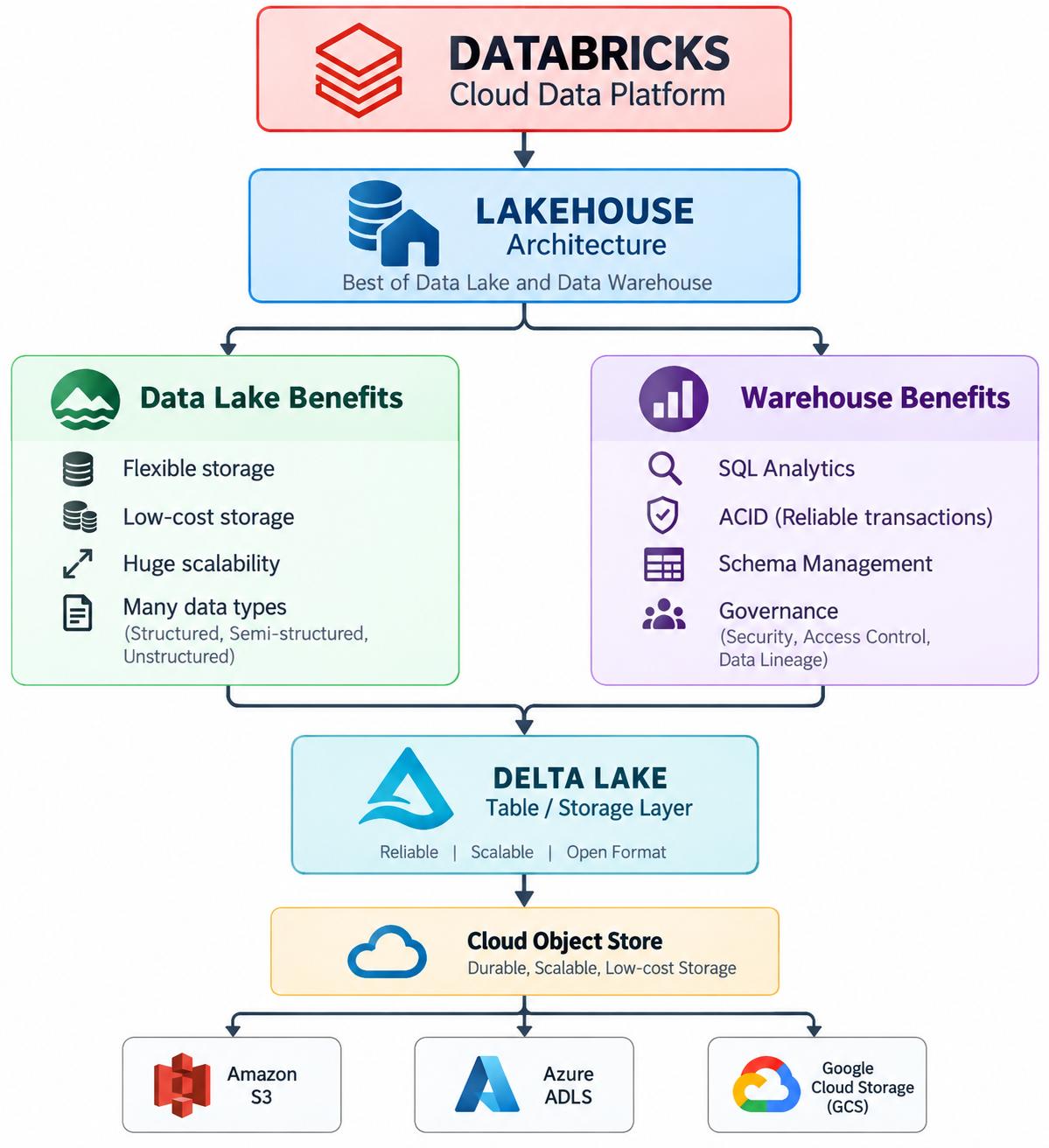
EasyNo. They are related but different. A lakehouse is an architecture, while Delta Lake is a table/storage technology that provides transactional and data-management capabilities on top of cloud object storage. Delta Lake can be used as part of a lakehouse architecture.
Is Databricks the same as a Lakehouse?
EasyDatabricks is a broader data and AI platform that provides the capabilities to build and operate a lakehouse architecture. The lakehouse is the architectural approach, while Databricks provides services such as Spark compute, SQL, workflows, governance, ML and AI around that architecture.
Data Lake vs Lakehouse
EasyA Data Lake is primarily a scalable and flexible storage system where we can store large volumes of structured, semi-structured, and unstructured data, usually on cloud object storage such as S3 or ADLS.
The limitation is that raw files in a Data Lake don't inherently provide database-like capabilities such as ACID transactions, schema management, reliable updates, and versioning.
A Lakehouse builds on the Data Lake and adds these data-management and analytical capabilities, allowing us to use the same underlying cloud storage for reliable data engineering, SQL analytics, BI, and AI workloads.
In Databricks, Delta Lake is commonly used as the table layer to provide capabilities such as ACID transactions, schema enforcement, schema evolution, Time Travel, and MERGE operations
Then give a simple example
For example, in a banking project, we can store raw transaction data in S3 as our Data Lake. With a Lakehouse architecture, we can create Bronze, Silver, and Gold Delta tables on that storage. Bronze contains raw data, Silver contains cleaned and transformed data, and Gold contains business-ready data for reporting and analytics.
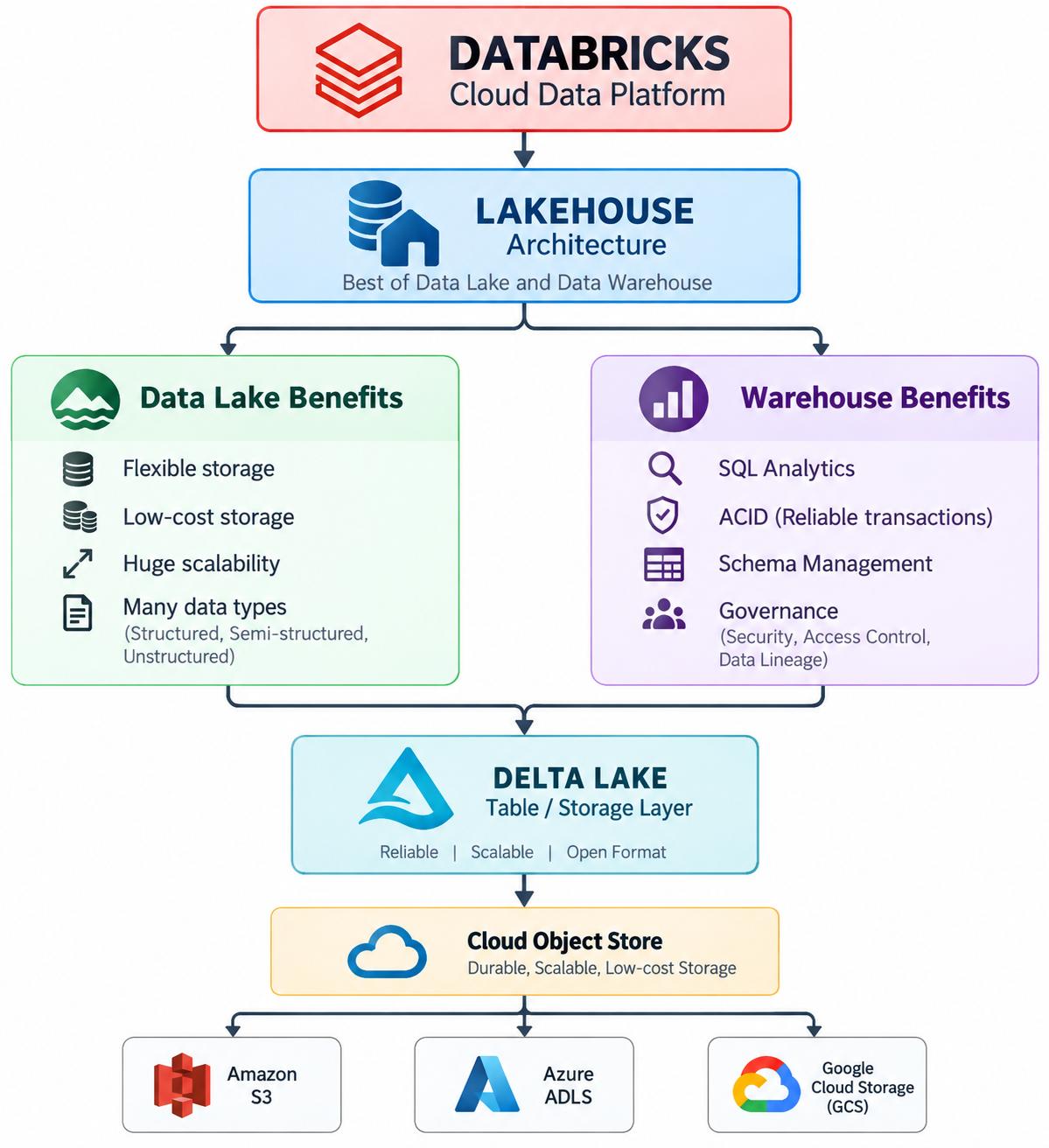
Data Lake = Store data at scale
Lakehouse = Store + Manage + Analyze data at scale
And if the interviewer asks "What makes the Lakehouse reliable?", answer:
"A lakehouse uses table formats such as Delta Lake, Iceberg, or Hudi to add capabilities like transactions, schema management, and versioning on top of cloud object storage."
What is MERGE?
EasySuppose your existing customer table contains:
ID    Name      Balance
-----------------------
101   Rahul     5000
102   Amit      7000
Today's incoming data is:
ID    Name      Balance
-----------------------
101   Rahul     6000
103   Neha      9000
We want:
101 → UPDATE
103 → INSERT
This is called an upsert.
Delta Lake supports MERGE.
Conceptually:
Existing table
      +
Incoming data
      ↓
    MERGE
      ↓
Update existing records
Insert new records
Example:
MERGE INTO target t
USING source s
ON t.id = s.id

WHEN MATCHED THEN
  UPDATE SET *

WHEN NOT MATCHED THEN
  INSERT *;
Interview answer
"MERGE is commonly used for upsert operations. It updates existing records when the key matches and inserts records when there is no match."
What is Time Travel?
EasyThis is one of the most important Delta Lake features.
Imagine your table has:
Version 0
Version 1
Version 2
Version 3
Today you're using:
Version 3
But yesterday the table was:
Version 2
You can query an older version.
For example:
SELECT *
FROM customer
VERSION AS OF 2;
Or using a timestamp:
SELECT *
FROM customer
TIMESTAMP AS OF '2026-09-20 10:00:00';
Real-world example
Suppose somebody accidentally deletes:
100,000 customer records
You can investigate previous table versions using Delta's history/time-travel capabilities.
Interview answer
"Delta Lake Time Travel allows us to access previous versions of a Delta table. It is useful for auditing, debugging, comparing historical data, and recovering from certain accidental changes."
What is Schema Evolution?
EasyNow suppose your existing table is:
customer_id
name
balance
Later the source introduces:
customer_id
name
balance
city
If your business wants to accept this new column, you can use schema evolution.
Before:

customer_id
name
balance

After:

customer_id
name
balance
city
Remember the difference
Schema enforcement:
"Don't allow incompatible schema."
Schema evolution:
"Allow the schema to change in a controlled way."
This distinction is frequently asked in interviews.
What is Schema Enforcement?
EasyImagine your table expects:
customer_id → INTEGER
name        → STRING
balance     → DOUBLE
But someone tries to write:
customer_id → STRING
name        → STRING
balance     → STRING
That could create a data-quality problem.
Schema enforcement helps prevent incompatible data from being written.
Interview answer
"Schema enforcement ensures that incoming data is compatible with the existing table schema before it is written."