Data Engineering System Design
Interview Questions
Design real-time pipelines, data lakehouses, CDC systems, and batch ETL at scale — Lambda vs Kappa, partitioning, idempotency, and fault tolerance.

Suppose your transaction table has 10 billion records and your merchant table has only 50,000 records. How could you optimize the join?
EasyI would consider using a broadcast join because the merchant table is much smaller than the transaction table. Spark can distribute the small merchant table to the executors, allowing each executor to join it locally with its portion of the large transaction table. This can avoid a large shuffle of the transaction data and significantly improve join performance. However, I would first make sure the smaller table is small enough to safely fit in executor memory.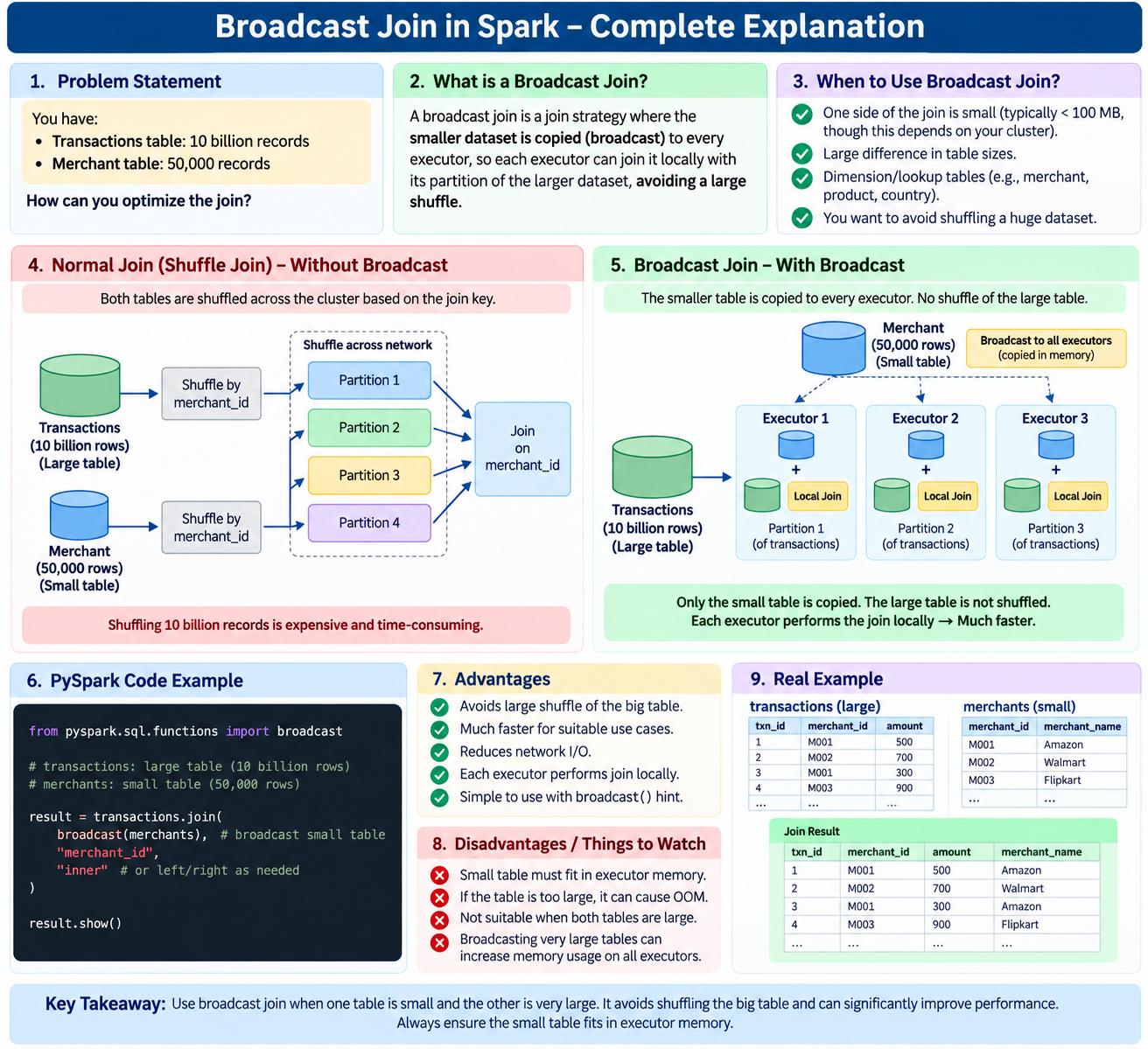

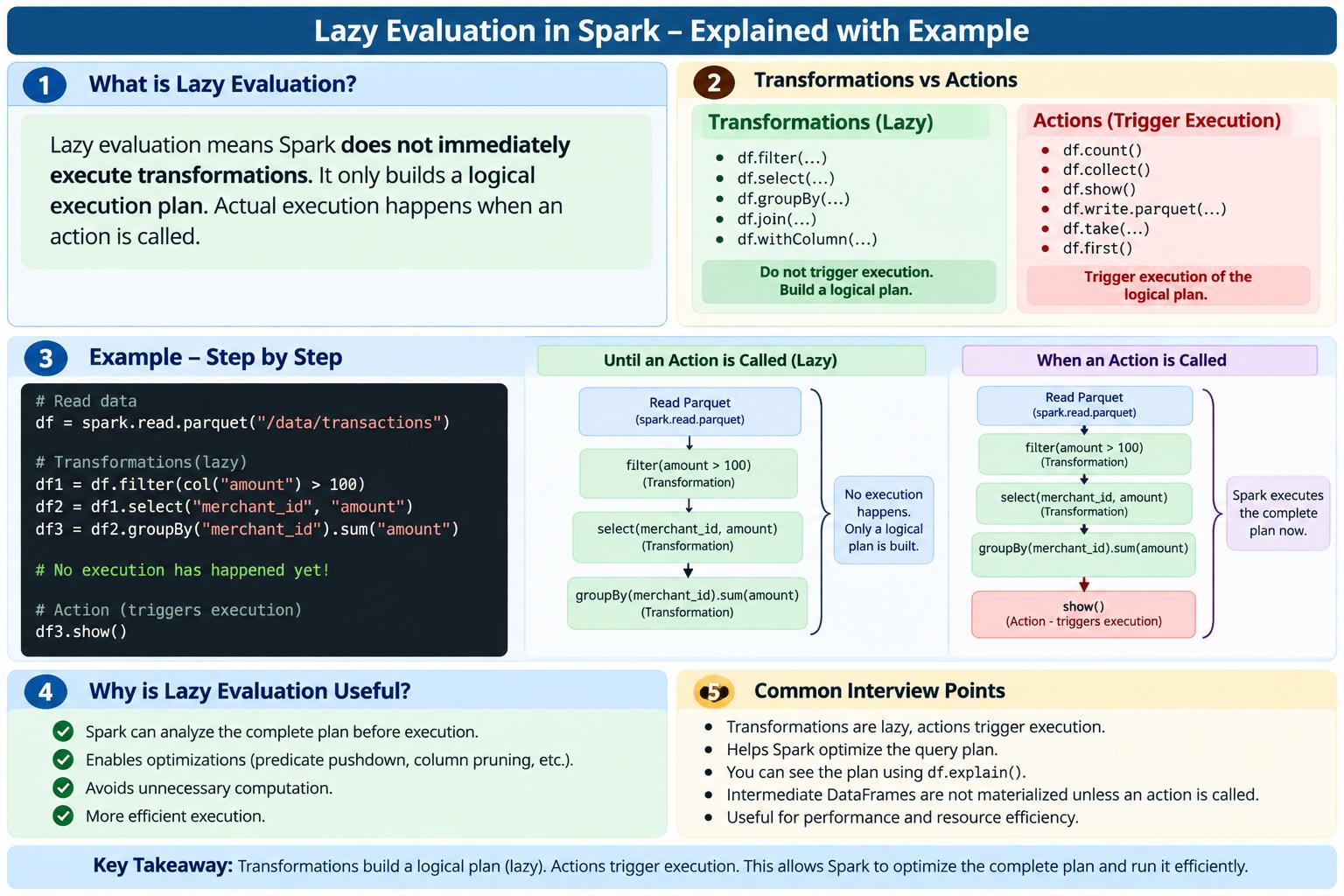
What is lazy evaluation in Spark?
EasyLazy evaluation means Spark does not immediately execute transformations when we write them. Instead, Spark builds an execution plan, and the actual computation happens only when we call an action.
The easiest way to remember:
Transformation → Build plan
Action → Execute plan
Explain SCD2 with example?
EasySCD Type 2 (Slowly Changing Dimension Type 2) is used when we want to preserve the complete history of changes in a dimension.
Simple Sefinition
SCD2 maintains historical versions of a record instead of overwriting the old value. When a customer's attribute changes, we expire the old record and insert a new record with the updated value.
Banking Example
Suppose we have a customer_dim table.
Initially, customer C101 lives in Delhi.
| customer_id | name | city | account_type | start_date | end_date | is_current |
|---|---|---|---|---|---|---|
| C101 | Rahul | Delhi | Savings | 2025-01-01 | 9999-12-31 | 1 |
Now Rahul moves from Delhi → Mumbai on 2026-03-01.
With SCD2, we don't update Delhi to Mumbai.
Instead:
Step 1 — Expire old record
C101 | Rahul | Delhi | Savings | 2025-01-01 | 2026-02-28 | 0
Step 2 — Insert new record
C101 | Rahul | Mumbai | Savings | 2026-03-01 | 9999-12-31 | 1
Final table:
| customer_id | name | city | account_type | start_date | end_date | is_current |
|---|---|---|---|---|---|---|
| C101 | Rahul | Delhi | Savings | 2025-01-01 | 2026-02-28 | 0 |
| C101 | Rahul | Mumbai | Savings | 2026-03-01 | 9999-12-31 | 1 |
Now we know where Rahul lived at any point in time.
Why is this important in banking?
Imagine Rahul took a loan when he lived in Delhi.
A year later he moved to Mumbai.
If we simply update:
UPDATE customer_dim
SET city = 'Mumbai'
WHERE customer_id = 'C101';
we lose the historical information.
Suppose the bank asks:
"How many customers from Delhi took loans in 2025?"
If we overwrote Delhi with Mumbai, our historical analysis could become incorrect.
With SCD2, we can correctly identify that Rahul was a Delhi customer during 2025.
⭐ Star Schema vs ❄️ Snowflake Schema
EasyFirst remember just one thing:
Star Schema = Dimension tables are directly connected to the Fact table.
Snowflake Schema = Dimension tables are further split into smaller tables.
1. Understand with a banking example
Suppose a bank has a transaction table.
A transaction contains:
Transaction
------------
transaction_id
account_id
customer_id
branch_id
date_id
amount
transaction_type
Here:
-
amount→ measure -
transaction_type→ transaction information -
customer_id,account_id,branch_id,date_id→ keys
Our central table is:
FACT_TRANSACTION
And around it we have:
Customer
Account
Branch
Date
⭐ 2. Star Schema
In Star Schema, the Fact table is in the center, and all dimension tables connect directly to it.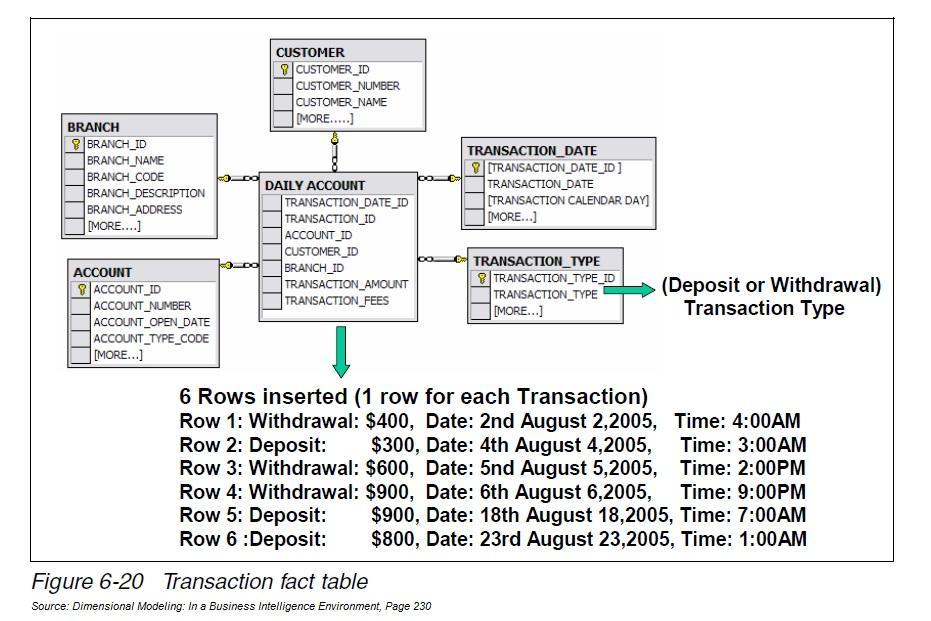
                    DIM_CUSTOMER
                         |
                         |
DIM_ACCOUNT ---- FACT_TRANSACTION ---- DIM_DATE
                         |
                         |
                    DIM_BRANCH
It looks like a star ⭐, so we call it Star Schema.
Example
DIM_BRANCH might contain:
branch_id | branch_name | city | state | country
------------------------------------------------
101       | Delhi Branch| Delhi| Delhi | India
102       | Mumbai      | Mumbai| MH   | India
Everything about the branch is kept in one dimension table.
That's called denormalized.
❄️6 3. Snowflake Schema
00000
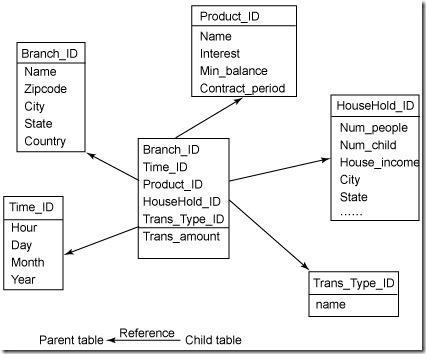
For example, instead of keeping this:
DIM_BRANCH
-------------------------------
branch
city
state
country
we split it:
FACT_TRANSACTION
       |
       ↓
  DIM_BRANCH
       |
       ↓
   DIM_CITY
       |
       ↓
  DIM_STATE
       |
       ↓
 DIM_COUNTRY
So:
DIM_BRANCH
-----------
branch_id
branch_name
city_id
DIM_CITY
--------
city_id
city_name
state_id
DIM_STATE
---------
state_id
state_name
country_id
DIM_COUNTRY
-----------
country_id
country_name
This is called normalization.
4. The easiest way to understand it
Imagine:
Branch → City → State → Country
⭐ Star
Everything is together:
BRANCH
--------------------------------
Branch | City | State | Country
❄️ Snowflake
Everything is separated:
BRANCH
   ↓
 CITY
   ↓
 STATE
   ↓
COUNTRY
That's the main difference.
5. What happens when we query?
⭐ Star Schema
"Give me total transactions by state."
Because state is already inside DIM_BRANCH:
SELECT
    b.state,
    SUM(t.amount) AS total_amount
FROM fact_transaction t
JOIN dim_branch b
    ON t.branch_id = b.branch_id
GROUP BY b.state;
Only one join is required.
❄️ Snowflake Schema
If state is in a separate table:
FACT_TRANSACTION
       ↓
DIM_BRANCH
       ↓
DIM_CITY
       ↓
DIM_STATE
We need multiple joins:
SELECT
    s.state_name,
    SUM(t.amount) AS total_amount
FROM fact_transaction t
JOIN dim_branch b
    ON t.branch_id = b.branch_id
JOIN dim_city c
    ON b.city_id = c.city_id
JOIN dim_state s
    ON c.state_id = s.state_id
GROUP BY s.state_name;
So Snowflake generally requires more joins.
6. Why use Star Schema?
Star Schema is popular for analytics and reporting because:
- Simple design
- Fewer joins
- Easier SQL queries
- Easy for BI/reporting users to understand
- Usually good query performance
Think:
"I want my reporting queries to be simple."
Use Star Schema.
7. Why use Snowflake Schema?
Snowflake Schema is useful when you want to reduce duplication and keep dimensions more normalized.
For example, instead of storing:
India
India
India
India
India
...
across many rows, you can maintain country information separately.
Think:
"I want to reduce redundancy and keep the data more normalized."
Use Snowflake Schema.
8. Interview-friendly comparison
| ⭐ Star Schema | ❄️ Snowflake Schema |
|---|---|
| Fact table in center | Fact table in center |
| Dimensions directly connected | Dimensions can connect to other dimensions |
| Denormalized | Normalized |
| Fewer tables | More tables |
| Fewer joins | More joins |
| Simple queries | More complex queries |
| More redundancy | Less redundancy |
| Easy for reporting | More structured |
If the interviewer asks:
"What is the difference between Star Schema and Snowflake Schema?"
You can say:
"In a Star Schema, we have a central fact table and the dimension tables are directly connected to the fact table. The dimensions are generally denormalized, so we have fewer tables and fewer joins.
In a Snowflake Schema, the dimensions are normalized. For example, instead of keeping branch, city, state, and country information in one branch dimension, we can split them into separate related tables. This reduces redundancy but increases the number of joins and makes queries slightly more complex."
Explain SCD Type 2 with an example?
EasySCD stands for Slowly Changing Dimension. SCD Type 2 is used when we need to maintain the complete history of changes in a dimension table.
For example, suppose we have a customer whose city is Delhi. If the customer later moves to Mumbai, we don't overwrite the Delhi record. Instead, we mark the old Delhi record as inactive and insert a new record for Mumbai.
Usually, we maintain columns like a surrogate key, start date, end date, and
is_currentflag to identify the different versions of the record.
Example
Initially:
| Customer ID | Name | City | Start Date | End Date | Is Current |
|---|---|---|---|---|---|
| 101 | Amit | Delhi | 01-Jan-2026 | 31-Jul-2026 | N |
| 101 | Amit | Mumbai | 01-Aug-2026 | 9999-12-31 | Y |
Here, Amit's city changed from Delhi → Mumbai.
We have not deleted or overwritten Delhi. We preserved it as historical data.
How it works
Source
Customer 101 → Mumbai
       ↓
Compare with current Target
Customer 101 → Delhi
       ↓
Change detected
       ↓
Expire old record
Delhi → is_current = N
       ↓
Insert new record
Mumbai → is_current = Y
Why do we use SCD Type 2?
Say:
“We use SCD Type 2 when historical accuracy is important. For example, if we are analyzing customer transactions, we may need to know which city the customer belonged to at the time of the transaction, not just their current city.”
Note: SCD Type 2 means when a dimension attribute changes, expire the old record and insert a new record so that we maintain the complete history.
SCD Type 1 vs Type 2
| SCD Type 1 | SCD Type 2 |
|---|---|
| Overwrites old value | Maintains old value |
| No history | Complete history |
| Simpler | More complex |
| Example: Delhi → Mumbai | Keeps both Delhi and Mumbai |
How is Star Schema different from Snowflake Schema?
EasyThe main difference is normalization. In a Star Schema, dimension tables are generally denormalized and directly connected to the fact table. In a Snowflake Schema, dimensions are normalized into multiple related tables.
Star Schema is simpler and usually requires fewer joins, so it is commonly preferred for analytical queries. Snowflake Schema reduces data redundancy but requires more joins and is more complex.
1. Star Schema
In a Star Schema, we have one central fact table surrounded by dimension tables.
Example:
                Dim_Customer
                     |
                     |
Dim_Product ---- Fact_Sales ---- Dim_Date
                     |
                     |
                 Dim_Store
Fact Table
| sale_id | customer_id | product_id | date_id | amount |
|---|---|---|---|---|
| 1 | 101 | 10 | 20260101 | 5000 |
| 2 | 102 | 20 | 20260102 | 3000 |
Dimension Table
Dim_Product
| product_id | product_name | category |
|---|---|---|
| 10 | Laptop | Electronics |
| 20 | Mobile | Electronics |
The category information is kept directly in the product dimension.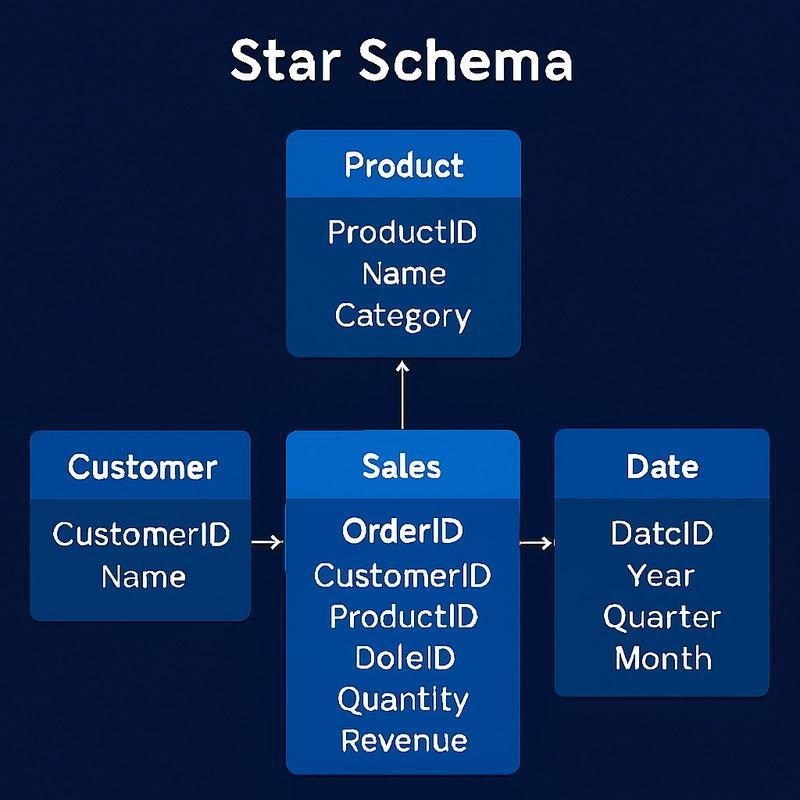
2. Snowflake Schema
In a Snowflake Schema, dimensions are further normalized into multiple tables.
Example:
                    Dim_Category
                         |
                         |
                    Dim_Product
                         |
                         |
Dim_Customer ---- Fact_Sales ---- Dim_Date
Instead of:
Dim_Product
----------------
product_id
product_name
category
we might have:
Dim_Product
----------------
product_id
product_name
category_id
and:
Dim_Category
----------------
category_id
category_name
Now getting product category requires another join.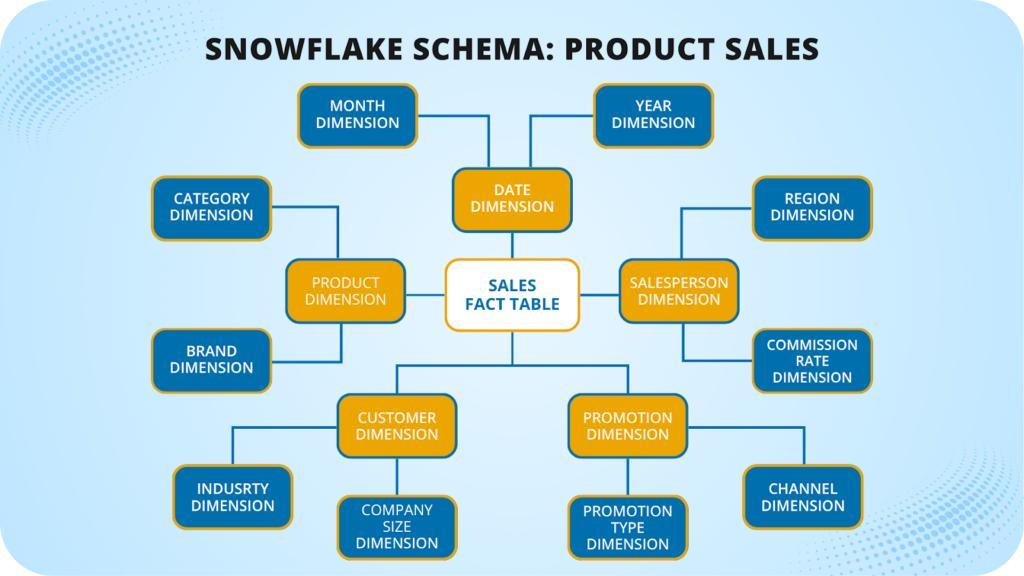
Star vs Snowflake
| Feature | Star Schema ⭐ | Snowflake Schema ❄️ |
|---|---|---|
| Dimension | Denormalized | Normalized |
| Number of tables | Fewer | More |
| Joins | Fewer | More |
| Query complexity | Simple | More complex |
| Data redundancy | Higher | Lower |
| Storage | May require more | Usually less |
| Query performance | Generally faster | Can be slower due to joins |
| Maintenance | Simpler | More complex |
| Common use | Analytics/BI | Complex normalized warehouse models |
What is Data Modeling?
EasyData modeling is the process of designing how data is structured, stored, and related to each other in a database or data warehouse.
It defines tables, columns, relationships, keys, and how the data should be organized so that it is easy to store, maintain, and query efficiently.
Simple Example
Suppose we have an e-commerce application.
Instead of putting everything into one huge table, we can model the data like this:
Customer Table
| customer_id | customer_name | city |
|---|---|---|
| 101 | Amit | Delhi |
| 102 | Priya | Mumbai |
Product Table
| product_id | product_name | price |
|---|---|---|
| 1 | Laptop | 50000 |
| 2 | Mobile | 20000 |
Orders Table
| order_id | customer_id | product_id | quantity |
|---|---|---|---|
| 1001 | 101 | 1 | 2 |
| 1002 | 102 | 2 | 1 |
Here:
Customer
   |
   | customer_id
   ↓
Orders
   |
   | product_id
   ↓
Product
This is data modeling because we have decided:
- What tables we need
- What columns each table contains
- Which columns are primary keys
- How tables are related
- How data should be organized
Types of Data Modeling
1. Conceptual Data Model
High-level view of the business.
Example:
Customer → Orders → Product
It focuses on what entities exist and how they are related.
2. Logical Data Model
Adds more details such as:
- Columns
- Primary keys
- Foreign keys
- Relationships
- Business rules
Example:
Customer
---------
customer_id (PK)
customer_name
city

Orders
---------
order_id (PK)
customer_id (FK)
product_id (FK)
quantity
3. Physical Data Model
Defines how the data will actually be stored in the database.
For example:
customer_id INT
customer_name VARCHAR(100)
city VARCHAR(50)
It can also include indexes, partitions, storage considerations, etc.
How do you manage memory issues in Spark?
MediumWhat are memory issues in
Spark?
Common
problems:
- OutOfMemoryError (OOM)
- Excessive spill to disk
- Long GC (garbage collection)
- Slow joins / shuffles
Why do memory issues happen?
- Large datasets in memory
- Heavy shuffle operations
- Data skew (one partition too
big)
- Too many cached datasets
- Poor partitioning
How to Manage Memory in Spark
1 Optimize Partitioning
Avoid very large partitions
df = df.repartition(200)
Why?
- Large partitions → one
executor gets too much data → OOM
- Balanced partitions → better
memory usage
2 Use repartition vs coalesce correctly
- repartition() → increases partitions
(with shuffle)
- coalesce() → reduces partitions (no
shuffle)
Use case:
df = df.coalesce(10) # before writing
3 Avoid Collecting Large Data to Driver
Bad:
df.collect()
Loads entire dataset into driver memory →
crash
Use:
- show()
- limit()
4 Use Broadcast Join
from pyspark.sql.functions import broadcast
df_large.join(broadcast(df_small), "id")
Avoids shuffle → less memory usage
5 Handle Data Skew
If one
key has huge data → one executor OOM
Solutions:
- Salting technique
- AQE (Adaptive Query
Execution)
spark.conf.set("spark.sql.adaptive.enabled",
"true")
6 Cache Only When Needed
df.cache()
Problem:
- Too many cached datasets →
memory full
Solution:
df.unpersist()
7 Use Efficient File Formats
Prefer:
- Parquet
- ORC
Benefits:
- Columnar storage
- Compression → less memory
8 Tune Spark Configuration
Important configs:
spark.executor.memory = 8g
spark.executor.memoryOverhead = 2g
spark.sql.shuffle.partitions = 500
9 Avoid Wide Transformations When Possible
Operations like:
- join
- groupBy
- orderBy
Cause:
- Heavy shuffle → memory
pressure
Difference between fact and dimension table?
Easy What is a Fact
Table?
A fact
table stores business events (transactions)
Key Characteristics:
- Contains numeric measures
- Very large in size
- Grows continuously
- Linked to dimensions via foreign keys
Example: Sales Fact Table
|
sale_id |
customer_id |
product_id |
date_id |
amount |
quantity |
Here:
- amount, quantity → measures (facts)
- customer_id, product_id → references to dimensions
What is a Dimension Table?
A dimension table stores descriptive
information
Key Characteristics:
- Contains textual/descriptive
attributes
- Smaller in size
- Used for filtering,
grouping, slicing
Example:
Customer Dimension
|
customer_id |
name |
city |
segment |
Real-World Example
Scenario:
A
customer buys a product
- Fact table → stores the transaction
- Dimension tables → describe who,
what, when
Fact:
- Sale amount = 1000
- Quantity = 2
Dimensions:
- Customer → Rahul, Delhi
- Product → Laptop
- Date → 10 Jan 2024
Key Differences
|
Feature |
Fact Table |
Dimension Table |
|
Data
type |
Numeric
(measures) |
Text/attributes |
|
Size |
Large |
Smaller |
|
Purpose |
Store
transactions |
Provide
context |
|
Keys |
Foreign
keys |
Primary
keys |
|
Updates |
Frequent
(append) |
Slowly
changing |
|
Example |
Sales,
Orders |
Customer,
Product |
How do you handle schema changes in production?
MediumWhat are schema changes?
Schema changes happen when the structure of data changes, for example:
Examples:
- New column added → email
- Column removed → age
- Data type changed → amount (int → string)
Why is this a problem?
If not handled:
- Pipelines fail
- Data corruption
- Downstream dashboards break
1 Enable Schema Evolution (Flexible Layer)
In Delta Lake, you can allow new columns automatically
df.write.format("delta") \
.option("mergeSchema", "true") \
.mode("append") \
.save("/path")
What it does:
- Adds new columns without breaking pipeline
Where to use:
- Bronze / Raw layer
Important:
- Do NOT blindly allow this in curated layers
2 Validate Schema Before Load
Always compare incoming schema with expected schema
Example checks:
- Column exists?
- Data type matches?
- Nullable constraints?
Approach:
- Schema registry / metadata table
- JSON schema validation
- Custom validation logic
“I always validate schema before loading into curated layers to prevent silent data corruption.”
3 Maintain Versioned Tables
Keep track of schema versions over time
Example:
version | columns |
v1 | id, name |
v2 | id, name, email |
Why?
- Backward compatibility
- Easy rollback
- Debugging production issues
In Delta:
- Time travel:
SELECT * FROM table VERSION AS OF 3
4 Alert on Breaking Changes
Not all schema changes are safe
Breaking changes:
- Column removed
- Data type changed
- Column renamed
Action:
- Send alerts (Slack/Email)
- Stop pipeline (fail fast)
5 Never Auto-Apply in Curated Layer
Why?
Curated (Silver/Gold) layer is used by:
- BI tools
- Reports
- Business users
If schema changes automatically:
- Dashboards break
- Metrics change silently