Azure Data Engineer
Interview Questions
Azure Data Factory, Synapse Analytics, ADLS Gen2, Event Hubs, Azure Databricks, and cloud architecture patterns for DP-203 and hands-on Azure DE roles.

How Azure Data Factory (ADF) starts a pipeline automatically?
MediumWhat is a Trigger?
A trigger tells Azure Data Factory when to start a pipeline.
Think of it like an alarm clock:
                 Azure Data Factory
                         │
                         ▼
                    TRIGGER
                         │
              "When should I run?"
                         │
                         ▼
                     PIPELINE
                         │
                         ▼
                  Execute Activities
For example:
"Run my sales pipeline every day at 2 AM."
The trigger waits until 2 AM and then starts the pipeline.
2. Schedule Trigger
A Schedule Trigger runs a pipeline based on a predefined clock schedule.
For example:
Schedule Trigger
       │
       ├── Every 15 minutes
       ├── Every hour
       ├── Every day
       ├── Every week
       └── Every month
              │
              ▼
          Pipeline
Example
Suppose you want to load yesterday's sales data every day at 2 AM.
01 Sep → 2:00 AM → Pipeline
02 Sep → 2:00 AM → Pipeline
03 Sep → 2:00 AM → Pipeline
04 Sep → 2:00 AM → Pipeline
You configure:
Frequency = Day
Time      = 02:00 AM
ADF supports recurrence such as minutes, hours, days, weeks and months.
Important interview point
Schedule triggers have a many-to-many relationship with pipelines:
Trigger A ──┐
Trigger B ──┼──> Pipeline
Trigger C ──┘
And:
Trigger
   │
   ├──> Pipeline A
   ├──> Pipeline B
   └──> Pipeline C
So one schedule trigger can invoke multiple pipelines, and multiple triggers can invoke one pipeline.
When to use?
Use Schedule Trigger for:
- Daily ETL
- Hourly data loads
- Weekly reports
- Monthly processing
- Regular batch jobs
3. Tumbling Window Trigger ⭐
This is the most important one to understand for interviews.
A Tumbling Window Trigger divides time into fixed, non-overlapping windows.
For example, hourly processing:
10:00 ───── 11:00
              ↓
          Pipeline Run 1

11:00 ───── 12:00
              ↓
          Pipeline Run 2

12:00 ───── 13:00
              ↓
          Pipeline Run 3
Each window represents a specific piece of data.
Microsoft describes tumbling windows as fixed-size, non-overlapping, contiguous intervals, and they retain state.
Why is this useful?
Imagine your database receives sales data every hour.
You want:
10–11 → process data
11–12 → process data
12–1  → process data
The trigger can provide:
windowStartTime
windowEndTime
to the pipeline.
Then your pipeline can execute something like:
SELECT *
FROM sales
WHERE order_time >= '10:00'
  AND order_time <  '11:00';
Next run:
SELECT *
FROM sales
WHERE order_time >= '11:00'
  AND order_time <  '12:00';
This is extremely useful for incremental processing and historical/backfill processing.
4. Tumbling Window vs Schedule Trigger
This is a very common interview question.
Schedule Trigger
Think:
"Run the pipeline at this time."
2:00 AM
   ↓
Run pipeline
Tumbling Window
Think:
"Process this specific time period."
1:00–2:00
     ↓
Process this window

2:00–3:00
     ↓
Process this window
The Tumbling Window trigger also retains state and supports features such as dependencies and retrying failed windows.
5. Why Tumbling Window is useful for historical data
Suppose yesterday's processing failed.
You have:
09:00–10:00 ✅
10:00–11:00 ❌
11:00–12:00 ❌
12:00–13:00 ✅
With a window-based design, you can process the failed historical windows again:
10:00–11:00 → Rerun
11:00–12:00 → Rerun
This is called backfill/reprocessing.
Microsoft specifically documents tumbling windows as supporting past start times and backfill scenarios.
6. Event-Based Trigger
An Event Trigger starts a pipeline when something happens rather than at a particular clock time.
For example:
Azure Blob Storage
       │
       │ New file arrives
       ▼
  Event Trigger
       │
       ▼
    Pipeline
Example:
customer_2026_09_15.csv
          │
          ▼
    Uploaded to Blob
          │
          ▼
    Event Trigger
          │
          ▼
    ADF Pipeline
          │
          ▼
   Process the file
This is useful when you don't know exactly when the data will arrive.
For example:
"Whenever a new file arrives in Blob Storage, process it."
That's better than:
"Check every 10 minutes whether a file has arrived."
7. Manual Pipeline Execution
Manual execution is slightly different.
You simply tell ADF:
Run this pipeline now.
Developer
    │
    │ Run Now
    ▼
ADF Pipeline
    │
    ▼
Execute
It's useful for:
- Testing
- Development
- Debugging
- Ad-hoc processing
- Re-running a pipeline manually
Microsoft's current documentation lists manual execution separately from trigger types.
8. Easy comparison
| Feature | Schedule | Tumbling Window | Event-based | Manual |
|---|---|---|---|---|
| Starts based on | Time | Fixed time window | Event | User |
| Example | Every day 2 AM | Every hour | New file arrives | Run now |
| Maintains window state | ❌ | ✅ | ❌ | ❌ |
| Historical/backfill | Limited | ✅ | Depends | Manual |
| Dependencies | ❌ | ✅ | Not the main purpose | ❌ |
| Best for | Regular batch | Incremental/window processing | Event-driven | Testing/ad-hoc |
9. Real-world example
Imagine an e-commerce company.
Requirement 1
Load sales data every day at 2 AM.
Use:
Schedule Trigger
Every day 2 AM
      ↓
Sales Pipeline
Requirement 2
Process every hour of sales data separately.
Use:
Tumbling Window Trigger
10–11 → Pipeline
11–12 → Pipeline
12–1  → Pipeline
Requirement 3
Process the file whenever it arrives.
Use:
Event-based Trigger
New file
   ↓
Event
   ↓
Pipeline
Requirement 4
Developer wants to test the pipeline immediately.
Use:
Manual execution
Run Now
   ↓
Pipeline
🎯 Best interview answer
If the interviewer asks "What are triggers in Azure Data Factory and what are their types?", say:
"A trigger in Azure Data Factory determines when a pipeline should start executing. The main trigger types are Schedule, Tumbling Window, and Event-based triggers.
A Schedule Trigger is used when I want to run a pipeline at a regular time, such as every day at 2 AM or every 15 minutes.
A Tumbling Window Trigger is used when I need to process fixed, non-overlapping time windows, such as processing data hour by hour. It maintains state and is particularly useful for incremental processing, dependencies, retries and historical backfills.
An Event-based Trigger starts a pipeline when an event occurs, such as a new file arriving in Azure Blob Storage.
ADF also supports manual pipeline execution, where we run the pipeline on demand, mainly for testing or ad-hoc processing, but manual execution is separate from the trigger types.
So, in simple terms: Schedule means 'run at a specific time', Tumbling Window means 'process a specific time window', and Event means 'run when something happens'."
What is Integration Runtime (IR) and what are its types?
Medium1. What is Integration Runtime?
Think of Integration Runtime (IR) as the bridge/compute infrastructure between your ADF pipeline and the data sources/services it needs to access.
Simple architecture:
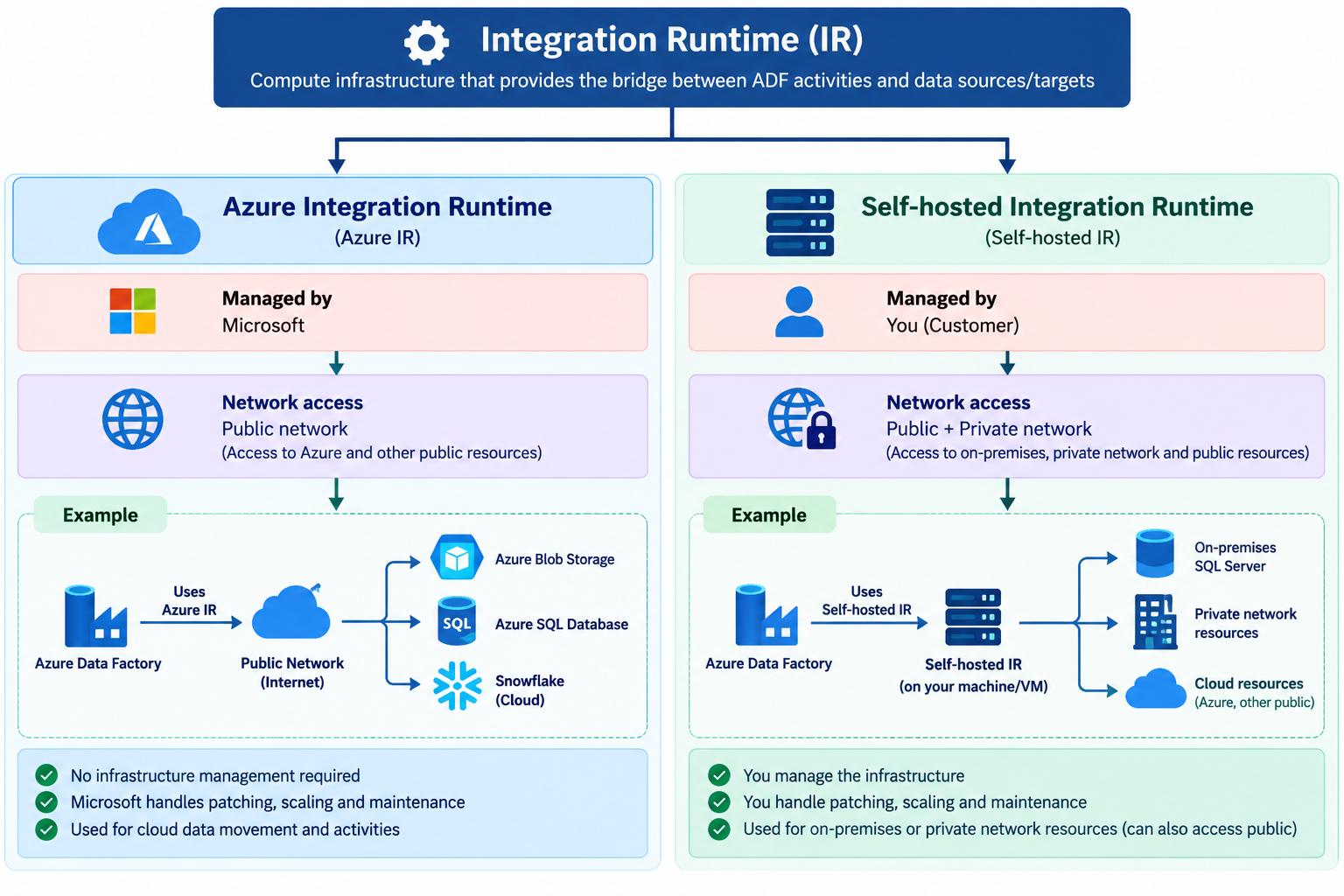
The IR provides the compute environment needed to perform activities such as:
- Copying data
- Running data flows
- Connecting to data stores
- Executing certain external activities
2. Types of Integration Runtime
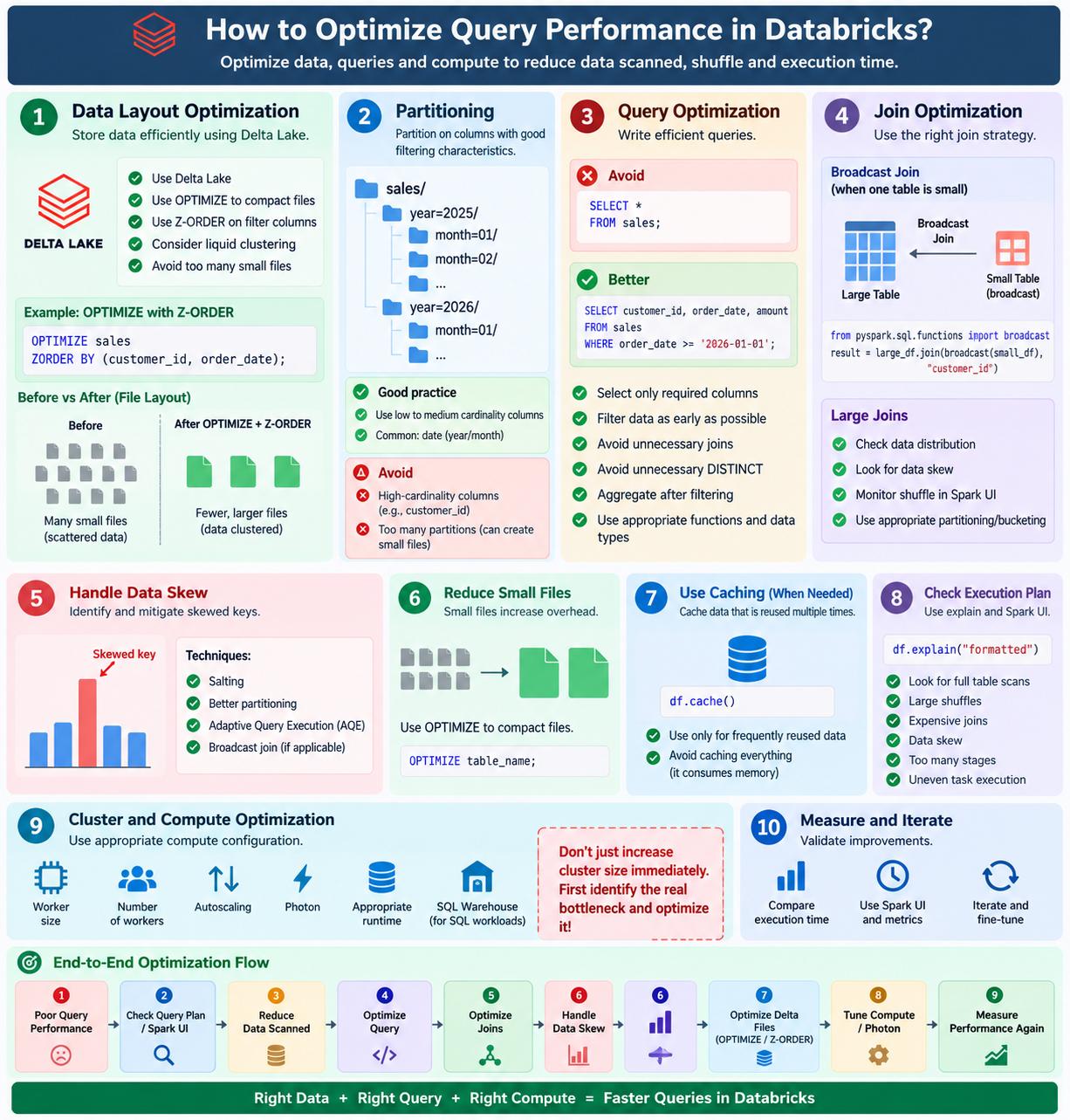
For interview purposes, remember these two important types:
3. Azure Integration Runtime
Azure IR is managed by Microsoft.
You don't have to manage the underlying infrastructure.
Microsoft takes care of things such as:
- Provisioning
- Patching
- Scaling
- Maintenance
Example
Suppose you have:
Azure Data Factory
       │
       ▼
Azure Integration Runtime
       │
       ▼
Azure Blob Storage
ADF can use Azure IR to perform the data movement.
Important point
Azure IR generally accesses resources that are reachable through the public network, unless the architecture is configured with supported managed/private connectivity features.
4. Self-hosted Integration Runtime
Self-hosted IR is managed by you.
You install the IR software on a machine/VM in your environment.
For example, suppose your company has an on-premises SQL Server:
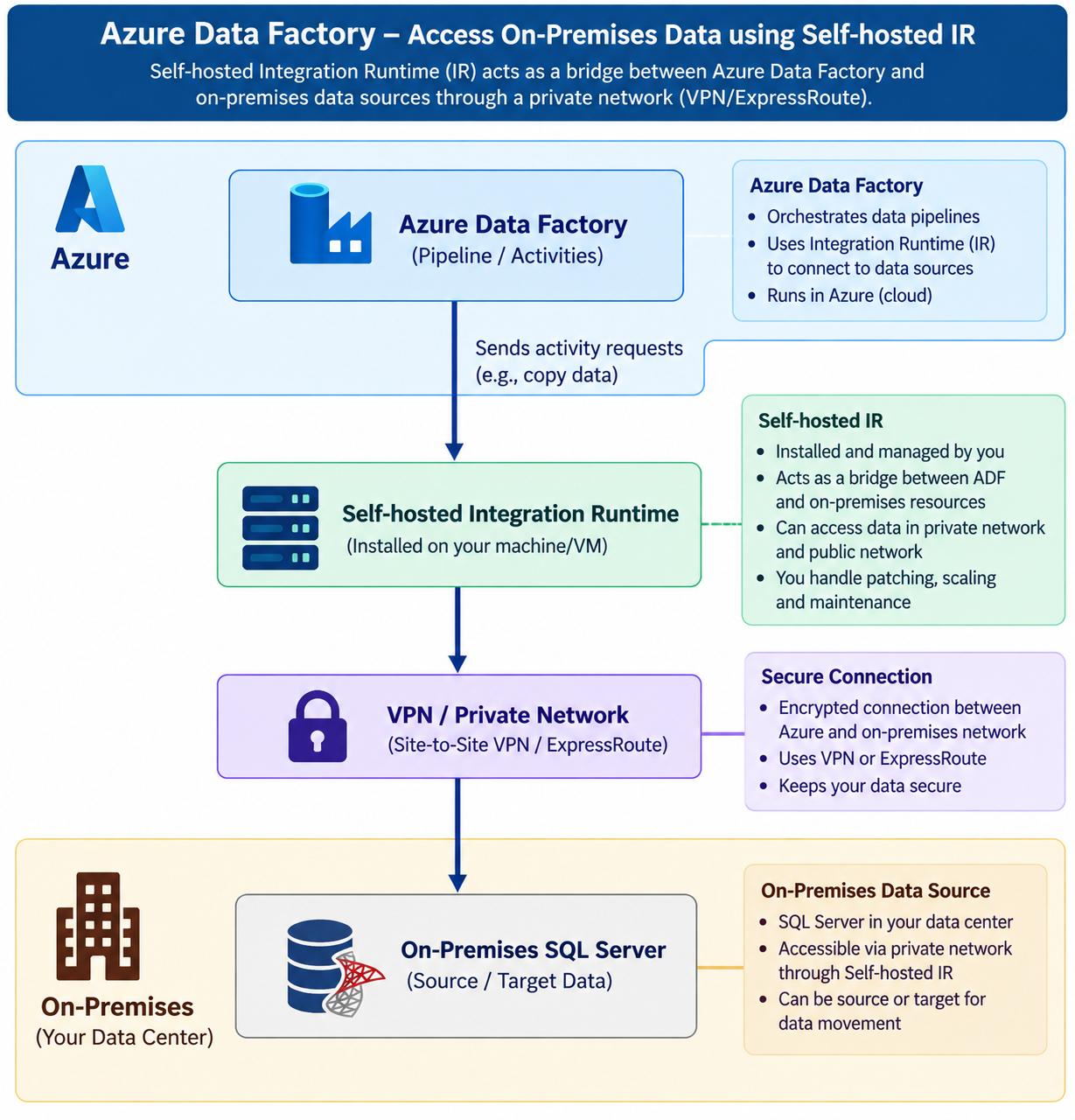
This is one of the most important use cases for Self-hosted IR.
You are responsible for:
- Installing the IR
- Patching it
- Scaling it
- Maintaining the machine
- Network configuration
5. Biggest difference
| Feature | Azure IR | Self-hosted IR |
|---|---|---|
| Managed by | Microsoft | You |
| Infrastructure | Microsoft managed | Customer managed |
| Patching | Microsoft | You |
| Scaling | Microsoft-managed | You |
| On-prem/private resources | ❌ Generally not directly | ✅ Yes |
| Public resources | ✅ Yes | ✅ Yes |
| Typical use | Cloud data movement | On-prem/private network access |
6. Easy real-world example
Imagine a company has:
                 ADF
                  │
          ┌───────┴───────┐
          │               │
          ▼               ▼
    Azure SQL         On-Prem SQL
          │               │
     Azure IR        Self-hosted IR
For Azure SQL, Azure IR is usually sufficient.
For on-premises SQL Server, you can install Self-hosted IR inside the company's network so ADF can communicate with it securely.
Summary:
If the interviewer asks:
"What is Integration Runtime and what are its types?"
You can answer:
"Integration Runtime is the compute infrastructure used by Azure Data Factory to provide a bridge between pipeline activities and data stores or services. It provides the environment required for activities such as data movement and data transformation.
The two important types are Azure Integration Runtime and Self-hosted Integration Runtime. Azure IR is managed by Microsoft, including its infrastructure, patching and maintenance, and is commonly used for cloud-based data movement.
Self-hosted IR is installed and managed by us on a machine or VM. We use it when ADF needs to access resources inside a private network or on-premises environment. With Self-hosted IR, we are responsible for infrastructure, patching, scaling and maintenance.
So, the simple difference is: Azure IR is Microsoft-managed, whereas Self-hosted IR is customer-managed and is particularly useful for accessing private or on-premises data."
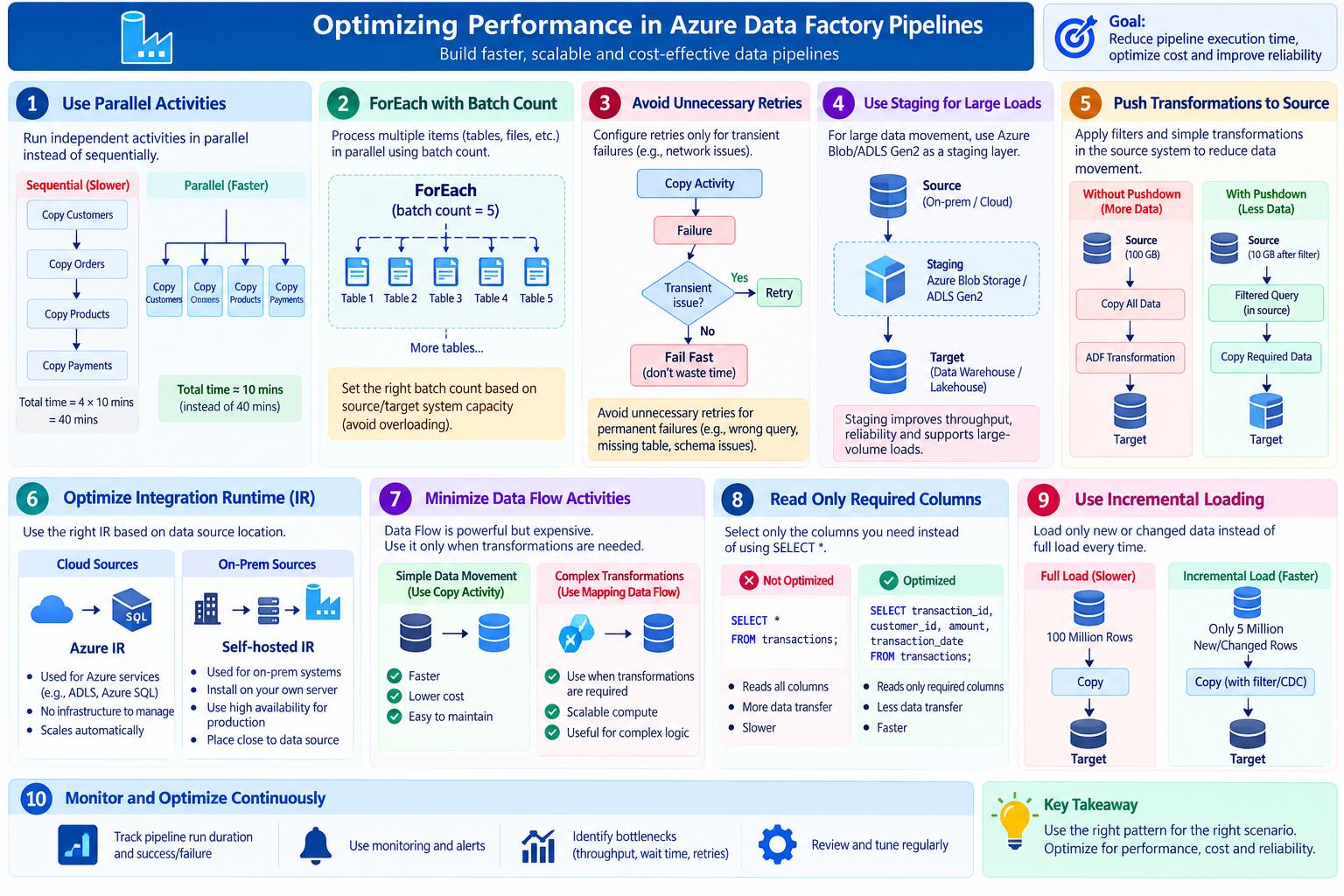
How would you optimize the performance of an ADF pipeline?
MediumA strong answer should cover parallelism, retries, data movement, transformation choice, Integration Runtime, and cost.
1. Use parallel activities where possible
Suppose you need to load 5 independent tables:
Customers
Orders
Products
Payments
Transactions
Sequential approach ❌
Customers
   ↓
Orders
   ↓
Products
   ↓
Payments
   ↓
Transactions
If each takes 10 minutes:
5 × 10 = 50 minutes
Parallel approach ✅
             ┌── Customers ──┐
             ├── Orders ─────┤
             ├── Products ───┤
ADF Pipeline ├── Payments ───┤
             └── Transactions┘
                    ↓
               All complete
Now they can potentially finish in roughly the time of the slowest activity, subject to ADF limits and source/target capacity.
Interview answer:
“For independent activities, I would run them in parallel rather than sequentially, while respecting source and target system capacity.”
2. ForEach with Batch Count
Suppose you have 100 tables to load.
Instead of:
Table 1 → finish
Table 2 → finish
Table 3 → finish
...
you can use a ForEach activity with parallel execution and an appropriate batch count.
Conceptually:
100 Tables
    ↓
ForEach
    ↓
┌────┬────┬────┬────┬────┐
│ T1 │ T2 │ T3 │ T4 │ T5 │
└────┴────┴────┴────┴────┘
       Parallel
But don't blindly maximize parallelism.
If the source database can handle only 10 concurrent connections, running 50 copies simultaneously may actually make performance worse.
Good interview statement:
“I would use ForEach parallelism and tune the batch count based on the source and target system capacity.”
3. Avoid unnecessary Copy Activity retries
ADF allows retries when an activity fails.
For example:
Copy Activity
     ↓
Failure
     ↓
Retry
     ↓
Failure
     ↓
Retry
Retries are useful for temporary/transient failures, such as network issues.
But if the problem is permanent:
Invalid SQL
Wrong schema
Missing table
Bad credentials
retries won't fix it.
They just waste time and resources.
So configure retry policies appropriately.
Interview answer:
“I would use retries for transient failures, but avoid excessive retries for permanent failures.”
4. Use staging for large data loads
For large data movement, staging can improve performance depending on the source/target and connector.
Conceptually:
Source
   ↓
Azure Blob / ADLS Gen2
   ↓
Target
Instead of trying to move/process everything through a less efficient direct path.
For example:
Large Source
     ↓
   Staging
     ↓
 ADLS Gen2
     ↓
 Data Warehouse
Staging is particularly useful in some bulk-loading scenarios.
Interview statement:
“For large-volume loads, I would evaluate staging through Azure Blob Storage or ADLS Gen2 to improve bulk data movement.”
5. Push transformations to the source when possible
This is an important concept.
Suppose your source database can perform a simple filter:
SELECT *
FROM transactions
WHERE transaction_date >= '2026-01-01';
It's often better to extract only the required data rather than copying everything into ADF and then filtering.
Bad approach ❌
Database
   ↓
100 GB
   ↓
ADF
   ↓
Filter
   ↓
10 GB
Better approach ✅
Database
   ↓
Filter at source
   ↓
10 GB
   ↓
ADF
This reduces:
- Data movement
- Network traffic
- Processing
- Time
This idea is often called source-side filtering/pushdown.
6. Don't use Mapping Data Flow for everything
Mapping Data Flow is powerful, but it uses compute resources.
For example, if your requirement is simply:
SQL Server → ADLS
you don't necessarily need:
SQL Server
   ↓
Data Flow
   ↓
ADLS
A Copy Activity may be sufficient.
Use Data Flow when you actually need transformations that benefit from it.
Think:
Simple movement
      ↓
Copy Activity ✅

Complex transformation
      ↓
Mapping Data Flow ✅
Interview answer:
“I would minimize unnecessary Mapping Data Flow activities because they can introduce additional compute cost. For simple data movement, I would prefer Copy Activity.”
7. Optimize Integration Runtime
Integration Runtime, or IR, is the compute/infrastructure used by ADF to perform activities.
The appropriate configuration depends on where your data resides.
Cloud sources
Azure Source
     ↓
Azure Integration Runtime
On-premises source
On-premises Database
       ↓
Self-hosted IR
       ↓
ADF
For example:
On-Prem SQL Server
       │
       ▼
Self-hosted Integration Runtime
       │
       ▼
Azure Data Factory
       │
       ▼
ADLS
You should also consider the IR's region, networking, concurrency and available capacity.
8. Minimize unnecessary Data Flow activities
Suppose the pipeline is:
Copy
 ↓
Data Flow
 ↓
Copy
 ↓
Data Flow
 ↓
Copy
If some Data Flows aren't actually necessary, they add processing time and cost.
A better design might be:
Source
  ↓
Copy
  ↓
Target
or:
Source
  ↓
Required Transformation
  ↓
Target
The goal is:
Use the simplest ADF activity that can correctly solve the problem.
9. Another important optimization — Incremental loading
This is an excellent point to add in an interview even though it isn't shown in the image.
Don't copy the entire table every day.
Full load ❌
Source
100 Million rows
      ↓
ADF
      ↓
Target
Incremental load ✅
If only 500,000 rows changed:
Source
   ↓
CDC / Last Modified Date
   ↓
500,000 changed rows
   ↓
ADF
   ↓
Target
This can dramatically reduce processing time and cost.
10. Avoid unnecessary data
Only select the columns you need.
Instead of:
SELECT *
FROM transactions;
use:
SELECT transaction_id,
       customer_id,
       amount,
       transaction_date
FROM transactions;
Less data means:
Less data
↓
Less network transfer
↓
Less processing
↓
Faster pipeline
I would optimize an ADF pipeline by first identifying the bottleneck. For independent activities, I would use parallel execution and tune ForEach batch count based on source and target capacity. I would configure retries only for transient failures and avoid unnecessary retries. For large data loads, I would evaluate staging through ADLS Gen2 or Blob Storage. I would push filters and simple transformations to the source where possible, use Copy Activity for simple data movement instead of unnecessary Mapping Data Flows, and choose the appropriate Integration Runtime. I would also use incremental loading instead of full loads, select only required columns, and monitor pipeline duration, throughput and failures to validate the optimization
How do you design an ADF pipeline to load multiple tables dynamically?
MediumWhat the interviewer is testing
- Practical experience with Azure Data Factory
- Knowledge of dynamic pipelines
- Understanding of Lookup, ForEach, Copy Activity, and parameterization
- Ability to build scalable and reusable pipelines
Expected approach
You should mention:
- Lookup Activity
- ForEach Activity
- Parameterization
- Copy Activity
I use a Lookup Activity to read table metadata from a control table. The control table contains information such as source table name, source schema, target table name, and load type.
The Lookup output is passed to a ForEach Activity, which iterates through each table dynamically.
Inside the ForEach, I use a parameterized Copy Activity. The source and target datasets are parameterized, so the same pipeline can load multiple tables without creating separate pipelines for each table.
This makes the pipeline reusable, scalable, and easier to maintain.
You have 1 TB of data in SQL Server and ADF is taking 4 hours to copy it to ADLS. How would you optimize it?
EasyI would check whether we're doing a full load. If possible, I would implement an incremental load using a watermark such as last_updated_date or an increasing ID.
If a large historical load is still required, I would check the source query performance and database indexes, select only required columns, and use parallel copy with appropriate partitioning. I would also verify that the Integration Runtime has enough resources and that the source and target can handle the parallel workload.
Then I would monitor the Copy Activity to compare throughput before and after the changes.
How do you optimize Azure Data Factory (ADF)?
MediumADF optimization means improving pipeline performance, reducing execution time, and controlling the Azure cost. I first identify where the bottleneck is—whether it is data movement, transformation, source performance, or pipeline orchestration.
For Copy Activities, I optimize the source query by using filtering and incremental loads instead of copying the entire dataset. I select only the required columns and use appropriate partitioning or parallel copy when dealing with large datasets.
For Mapping Data Flows, I avoid unnecessary transformations, filter data as early as possible, and tune the partitioning strategy. For large workloads, I also make sure the Integration Runtime has sufficient compute resources.
For pipeline orchestration, I use parallel execution where activities are independent instead of running everything sequentially. I also avoid unnecessary activities and use parameters and metadata-driven pipelines so that the same pipeline can process multiple tables.
I also use incremental loading, partitioning, caching where appropriate, monitoring, and retry/error-handling strategies. Finally, I monitor pipeline runs and activity execution times to identify bottlenecks and optimize both performance and cost.
Main ADF optimization areas
| Area | Optimization |
|---|---|
| Data loading | Incremental load instead of full load |
| Source query | Filter early, select required columns |
| Copy Activity | Parallel copy / partitioning |
| Data Flow | Reduce unnecessary transformations |
| Integration Runtime | Right-size compute |
| Pipeline | Run independent activities in parallel |
| Orchestration | Avoid unnecessary activities |
| Large tables | Partition data |
| Metadata | Metadata-driven pipelines |
| Monitoring | Check activity duration and bottlenecks |
| Cost | Avoid unnecessary Data Flow/IR execution |

How do you monitor pipeline runs?
EasyI monitor pipeline runs using the Monitor section in Azure Data Factory. It provides details such as pipeline run status, start and end time, duration, activity-level status, and errors. I use these details to identify failures, troubleshoot issues, and track the overall pipeline execution.
How do you schedule pipelines in Azure Data Factory?
EasySTAR-based interview answer:
S – Situation:
In my project, data pipelines needed to run automatically at specific times instead of being executed manually.
T – Task:
My responsibility was to configure the pipelines so that data processing happened automatically based on the business requirements.
A – Action:
I used Triggers in Azure Data Factory to schedule and automate pipeline execution. I mainly used:
- Schedule Trigger – to run pipelines at a specific time or frequency, such as daily or hourly.
- Tumbling Window Trigger – to process data within fixed time windows, useful for incremental and time-based processing.
- Event-based Trigger – to start a pipeline when a specific event occurs, such as a new file arriving in Azure Blob Storage or ADLS.
I also configured parameters and dependencies where required and monitored the trigger and pipeline execution through ADF Monitor.
R – Result:
This automated the data-processing workflow, eliminated manual execution, and ensured that data was processed consistently according to the required schedule or event.
Summary:
We schedule ADF pipelines using triggers. For time-based execution, I use Schedule or Tumbling Window triggers. For event-driven processing, I use Event-based triggers, such as triggering a pipeline when a new file arrives in ADLS. This allows pipelines to run automatically without manual intervention.
What is Copy Activity in Azure Data Factory?
EasyS – Situation:
In my project, we needed to transfer data from different source systems such as SQL Server, APIs, and files into Azure Data Lake and other target systems.
T – Task:
My responsibility was to automate the movement of data between the source and destination systems efficiently and reliably.
A – Action:
I used Copy Activity in Azure Data Factory to move data from a source to a destination. I configured the source and sink datasets, linked services, mappings, and required parameters. For example, I used Copy Activity to extract data from SQL Server and load it into Azure Data Lake Storage. I also configured error handling, retries, and monitoring for reliable execution.
R – Result:
This automated the data movement process, reduced manual effort, and enabled reliable ingestion of data into the target system for downstream processing and analytics.
summary
Copy Activity is an activity in Azure Data Factory used to move data from a source to a destination. It supports many different source and sink systems. In my project, I used Copy Activity to extract data from SQL Server and load it into Azure Data Lake, with appropriate mappings, parameters, error handling, and monitoring.
What is a Pipeline in Azure Data Factory?
EasyIn my project, we needed to automate the movement and processing of data from source systems into the data warehouse.
T – Task:
I needed to organize multiple data-processing steps and execute them in the correct sequence.
A – Action:
I used an ADF Pipeline, which is a logical grouping of activities that together perform a data-processing workflow. For example, a pipeline could first extract data using Copy Activity, then trigger a Databricks notebook for transformation, and finally load the processed data into a target database. I also configured parameters, dependencies, triggers, and error handling.
R – Result:
This allowed us to automate the complete workflow, reduce manual intervention, and reliably execute data-processing tasks on a scheduled or event-driven basis.
Summary
An ADF Pipeline is a logical grouping of activities that defines and orchestrates an end-to-end data workflow. For example, it can copy data from SQL Server to Azure Data Lake, trigger a Databricks transformation, and then load the processed data into a data warehouse. Pipelines can be scheduled, parameterized, monitored, and configured with dependencies and error handling.