FULL JOIN
Sql tutorial · PySpark.in
7.5 Full Join
A FULL JOIN (also called FULL OUTER JOIN) returns all rows from both tables.
- If a row in one table has a matching row in the other table, SQL combines them into one row.
- If a row has no match, SQL still includes that row, and the missing columns from the other table are filled with NULL.
In simple words:
FULL JOIN returns all matching rows plus all non-matching rows from both tables.
You can think of it as combining the results of LEFT JOIN and RIGHT JOIN.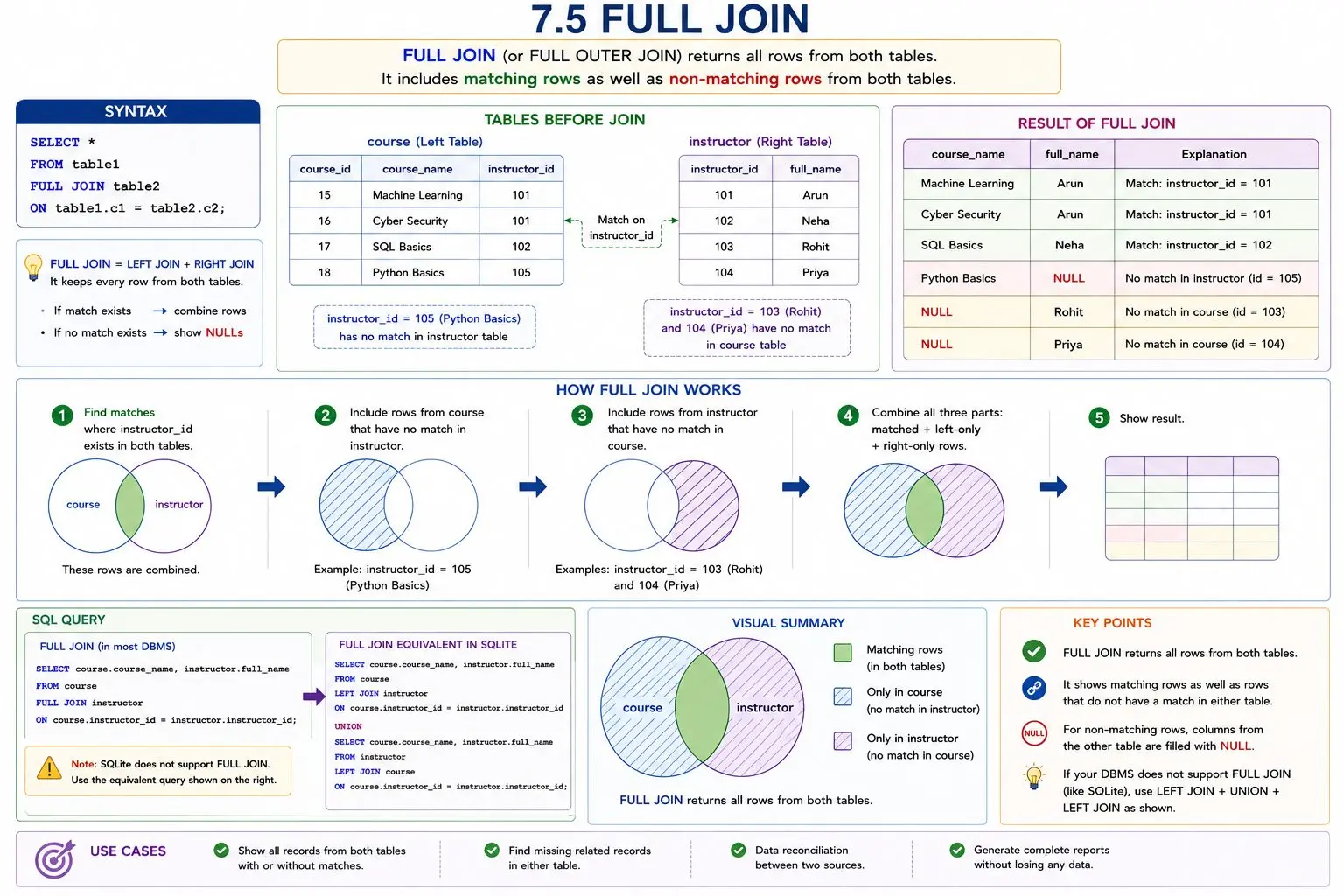
Syntax:
```
hide
sql
SELECT *
FROM table1
FULL JOIN table2
ON table1.c1 = table2.c2;
```
Example
Perform a FULL JOIN on the course and instructor tables.
Here:
- The course table stores course details.
- The instructor table stores instructor names.
We want to show:
- courses that have instructors,
- courses that do not have matching instructors,
- instructors who do not teach any course.
```
sql
DROP TABLE IF EXISTS course;
DROP TABLE IF EXISTS instructor;
-- Create instructor table
CREATE TABLE instructor (
instructor_id INTEGER PRIMARY KEY,
full_name TEXT
);
-- Create course table
CREATE TABLE course (
course_id INTEGER PRIMARY KEY,
course_name TEXT,
instructor_id INTEGER
);
-- Insert instructors
INSERT INTO instructor (instructor_id, full_name) VALUES
(101, 'Arun'),
(102, 'Neha'),
(103, 'Rohit'),
(104, 'Priya');
-- Insert courses
INSERT INTO course (course_id, course_name, instructor_id) VALUES
(15, 'Machine Learning', 101),
(16, 'Cyber Security', 101),
(17, 'SQL Basics', 102),
(18, 'Python Basics', 105);
-- FULL JOIN equivalent in SQLite
SELECT course.course_name, instructor.full_name
FROM course
LEFT JOIN instructor
ON course.instructor_id = instructor.instructor_id
UNION
SELECT course.course_name, instructor.full_name
FROM instructor
LEFT JOIN course
ON course.instructor_id = instructor.instructor_id;
```
Note: FULL JOINS is not supported in some DBMS (SQLite). SQLite Version
SQLite does not support FULL JOIN.
To get the same result in SQLite, we combine:
- a LEFT JOIN from course to instructor
- a LEFT JOIN from instructor to course
How It Works
Step 1: Include all matching rows
Rows with the same instructor_id in both tables are joined together.
Step 2: Include unmatched rows from course
If a course has no matching instructor, the instructor columns become NULL.
Example:
course_name | full_name |
|---|---|
Python Basics | NULL |
Step 3: Include unmatched rows from instructor
If an instructor has no course, the course columns become NULL.
Example:
course_name | full_name |
|---|---|
NULL | Rohit |
NULL | Priya |
Important Point
A FULL JOIN preserves all rows from both tables.
That means:
- matched rows are combined
- unmatched rows from either table are still included
More Sql tutorials
All tutorials · Try the free PySpark compiler · Practice challenges