RIGHT JOIN
Sql tutorial · PySpark.in
7.4 Right Join
A RIGHT JOIN (also called RIGHT OUTER JOIN) returns all rows from the right table and the matching rows from the left table.
If a row in the right table has no matching row in the left table, SQL still includes that row in the result, and the columns from the left table are filled with NULL.
In simple words:
RIGHT JOIN keeps every row from the right table, whether a match exists or not.
A RIGHT JOIN works exactly like a LEFT JOIN, but the table priority is reversed.
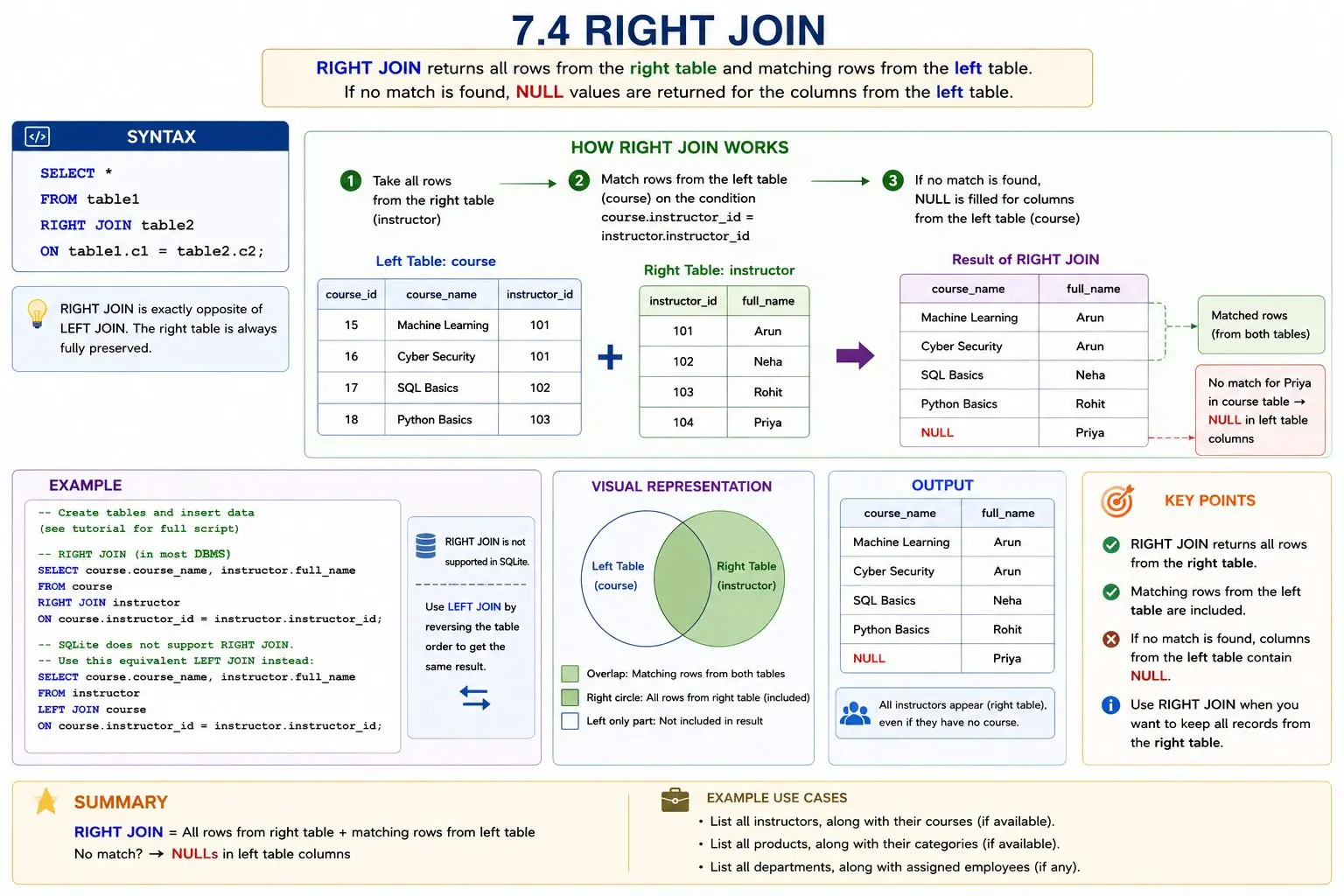
Syntax:
```
hide
sql
SELECT *
FROM table1
RIGHT JOIN table2
ON table1.c1 = table2.c2;
```
Example
Perform a RIGHT JOIN on the course and instructor tables.
Here:
- The course table stores course details.
- The instructor table stores instructor names.
We want to return all instructors, even if some instructors are not assigned to any course.
```
sql
DROP TABLE IF EXISTS course;
DROP TABLE IF EXISTS instructor;
-- Create instructor table
CREATE TABLE instructor (
instructor_id INTEGER PRIMARY KEY,
full_name TEXT
);
-- Create course table
CREATE TABLE course (
course_id INTEGER PRIMARY KEY,
course_name TEXT,
instructor_id INTEGER
);
-- Insert instructors
INSERT INTO instructor (instructor_id, full_name) VALUES
(101, 'Arun'),
(102, 'Neha'),
(103, 'Rohit'),
(104, 'Priya');
-- Insert courses
INSERT INTO course (course_id, course_name, instructor_id) VALUES
(15, 'Machine Learning', 101),
(16, 'Cyber Security', 101),
(17, 'SQL Basics', 102),
(18, 'Python Basics', 103);
-- Equivalent of RIGHT JOIN in SQLite
SELECT course.course_name, instructor.full_name
FROM instructor
LEFT JOIN course
ON course.instructor_id = instructor.instructor_id;
```
Note: RIGHT JOIN is not supported in some DBMS (SQLite). To get the same result in SQLite, reverse the table order and use LEFT JOIN:
How It Works
Step 1: Match rows
```
hide
ON course.instructor_id = instructor.instructor_id
```
SQL matches rows where the instructor_id exists in both tables.
Matching rows:
- Arun → 2 courses
- Neha → 1 course
- Rohit → 1 course
Step 2: Keep all rows from the right table
The right table is instructor.
That means every instructor appears in the result.
Even though Priya has no course assigned, she still appears.
Since there is no matching row in the course table, course_name becomes NULL.
Important Point
A RIGHT JOIN always keeps all rows from the right table.
If no matching row exists in the left table, the left-table columns contain NULL.
Summary
Use RIGHT JOIN when:
- you want all rows from the right table
- and matching rows from the left table if they exist
Note:
RIGHT JOIN returns every row from the right table and matching rows from the left table. If no match exists, the left-table columns contain NULL.
More Sql tutorials
All tutorials · Try the free PySpark compiler · Practice challenges