IN and BETWEEN Operators
Sql tutorial · PySpark.in
3.4 IN and BETWEEN OPERATORS
SQL provides special operators such as IN and BETWEEN to simplify queries.
These operators help us:
- Check multiple values easily
- Filter data within a range
- Write cleaner and shorter queries
- Improve query readability
Product Table Example
Suppose we have the following product table.
name | category | price | brand | rating |
|---|---|---|---|---|
Blue Shirt | Clothing | 1000 | Puma | 4.3 |
Jeans | Clothing | 1800 | Levi's | 4.5 |
Smart Cam | Electronics | 2600 | Realme | 4.4 |
Realme Smart Band | Electronics | 3000 | Realme | 4.6 |
Shoes | Clothing | 4500 | Nike | 4.2 |
T-Shirt | Clothing | 700 | Mufti | 4.1 |
1. IN Operator
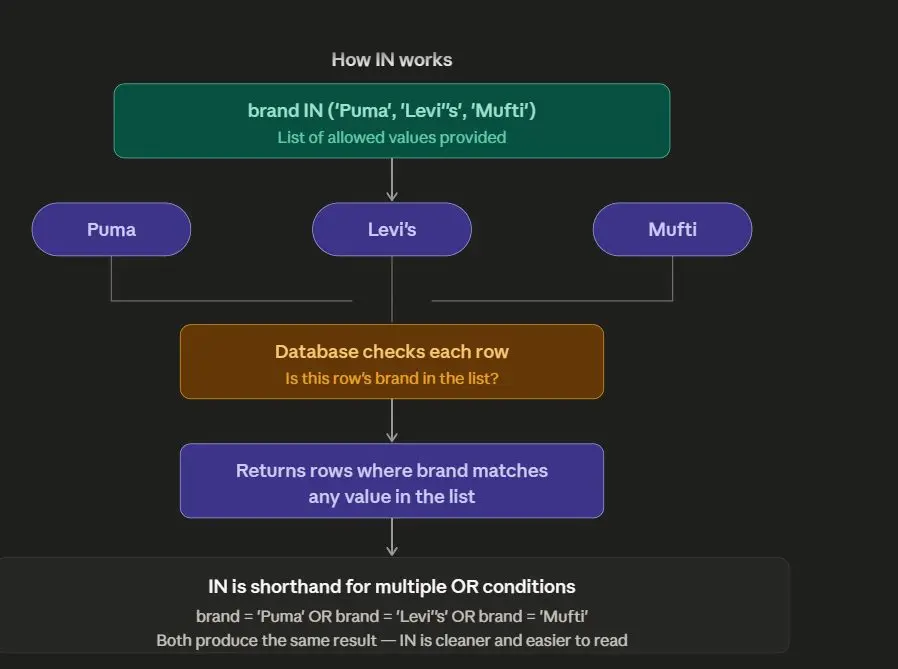
The IN operator is used to check whether a value exists in a given list of values.
Instead of writing multiple OR conditions, we can use IN.
Why Use IN?
Without IN:
```
hide
WHERE brand = 'Puma'
OR brand = 'Levi''s'
OR brand = 'Mufti'
```
Using IN makes the query shorter and easier to read.
Syntax
```
hide
SELECT *
FROM table_name
WHERE column_name IN (value1, value2, value3);
```
Example
Retrieve all products where the brand is:
- Puma
- Mufti
- Levi's
- Lee
- Denim
```
hide
SELECT *
FROM product
WHERE brand IN ('Puma', 'Levi''s', 'Mufti', 'Lee', 'Denim');
```
Output
name | category | price | brand | rating |
|---|---|---|---|---|
Blue Shirt | Clothing | 1000 | Puma | 4.3 |
Jeans | Clothing | 1800 | Levi's | 4.5 |
T-Shirt | Clothing | 700 | Mufti | 4.1 |
How IN Works
2. BETWEEN Operator
The BETWEEN operator is used to retrieve values within a specific range.
It is commonly used with:
- numbers
- dates
- prices
- ratings
Important Note
BETWEEN is inclusive.
This means:
- lower limit is included
- upper limit is also included
Syntax
```
hide
SELECT *
FROM table_name
WHERE column_name BETWEEN value1 AND value2;
```
Example
Retrieve products whose price is between 1000 and 5000.
```
hide
SELECT name, price, brand
FROM product
WHERE price BETWEEN 1000 AND 5000;
````
Output
name | price | brand |
|---|---|---|
Blue Shirt | 1000 | Puma |
Jeans | 1800 | Levi's |
Smart Cam | 2600 | Realme |
Realme Smart Band | 3000 | Realme |
Shoes | 4500 | Nike |
How BETWEEN Works
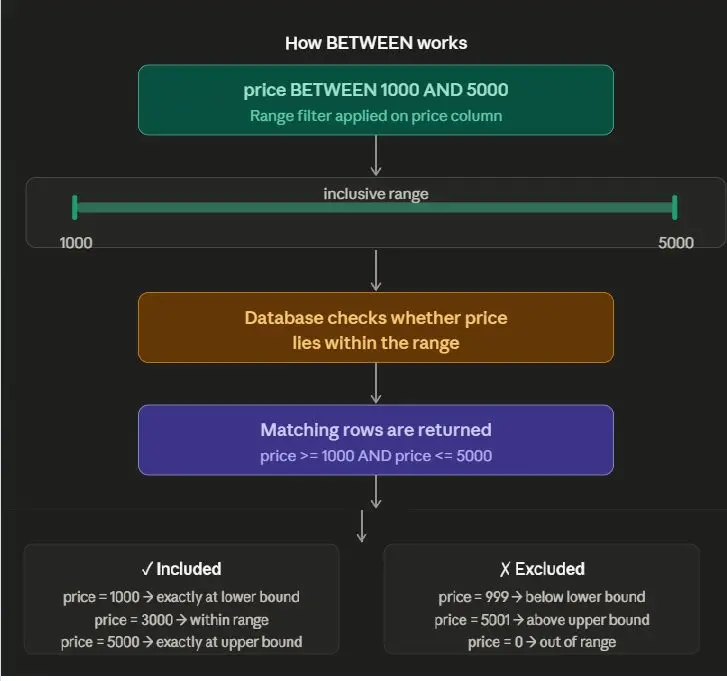
BETWEEN Includes Boundary Values
BETWEEN 1000 AND 5000
Included Values:
1000 ✓
5000 ✓
Complete Example
```
sql
CREATE TABLE product (
name VARCHAR(200),
category VARCHAR(100),
price INTEGER,
brand VARCHAR(100),
rating FLOAT
);
INSERT INTO product (name, category, price, brand, rating)
VALUES
('Blue Shirt', 'Clothing', 1000, 'Puma', 4.3),
('Jeans', 'Clothing', 1800, 'Levi''s', 4.5),
('Smart Cam', 'Electronics', 2600, 'Realme', 4.4),
('Realme Smart Band', 'Electronics', 3000, 'Realme', 4.6),
('Shoes', 'Clothing', 4500, 'Nike', 4.2),
('T-Shirt', 'Clothing', 700, 'Mufti', 4.1);
SELECT *
FROM product
WHERE brand IN ('Puma', 'Mufti');
````
Output
name | category | price | brand | rating |
|---|---|---|---|---|
Blue Shirt | Clothing | 1000 | Puma | 4.3 |
T-Shirt | Clothing | 700 | Mufti | 4.1 |
Step 4: Query Using BETWEEN
```
sql
SELECT name, price, brand
FROM product
WHERE price BETWEEN 1000 AND 5000;
```
Final Output
name | price | brand |
|---|---|---|
Blue Shirt | 1000 | Puma |
Jeans | 1800 | Levi's |
Smart Cam | 2600 | Realme |
Realme Smart Band | 3000 | Realme |
Shoes | 4500 | Nike |
Common Mistakes with IN
Mistake 1: Missing Quotes
Wrong
```
hide
WHERE brand IN (Puma, Nike)
```
Correct
```
hide
WHERE brand IN ('Puma', 'Nike')
```
Mistake 2: Using = Instead of IN
Wrong
```
hide
WHERE brand = ('Puma', 'Nike')
```
Correct
```
hide
WHERE brand IN ('Puma', 'Nike')
```
Common Mistakes with BETWEEN
Mistake 1: Reversing the Range
Wrong
```
hide
WHERE price BETWEEN 5000 AND 1000
```
This may return incorrect or empty results.
Correct
```
hide
WHERE price BETWEEN 1000 AND 5000
```
Mistake 2: Missing AND Keyword
Wrong
```
hide
WHERE price BETWEEN 1000 5000
```
Correct
```
hide
WHERE price BETWEEN 1000 AND 5000
```
Summary
Operator | Purpose |
|---|---|
IN | Matches values from a list |
BETWEEN | Filters values within a range |
More Sql tutorials
All tutorials · Try the free PySpark compiler · Practice challenges