Logical Operators
Sql tutorial · PySpark.in
3 LOGICAL OPERATORS
Logical operators are used to combine multiple conditions in SQL queries.
Using logical operators, we can:
- Filter data using multiple conditions
- Combine conditions together
- Exclude specific rows
- Create advanced queries
Logical operators are mostly used with the WHERE clause.
Why Logical Operators are Needed
Suppose we have a product table.
name | category | price | brand | rating |
|---|---|---|---|---|
T-Shirt | Clothing | 800 | Puma | 4.2 |
Jeans | Clothing | 1200 | Levi's | 4.5 |
Smart Phone | Electronics | 25000 | Redmi | 4.6 |
Earbuds | Electronics | 2000 | OnePlus | 4.4 |
Cake Box | Food | 500 | Bakery | 4.1 |
Sometimes we need data matching multiple conditions.
Examples:
- Products under ₹1000 AND in Clothing category
- Products from Redmi OR OnePlus
- Products NOT containing "Cake"
For these situations, SQL provides logical operators.
Logical Operators Table
Operator | Description |
|---|---|
AND | Returns rows when all conditions are true |
OR | Returns rows when at least one condition is true |
NOT | Negates a condition |
Syntax
```
hide
SELECT *
FROM table_name
WHERE condition1
operator condition2
operator condition3;
```
1. AND Operator
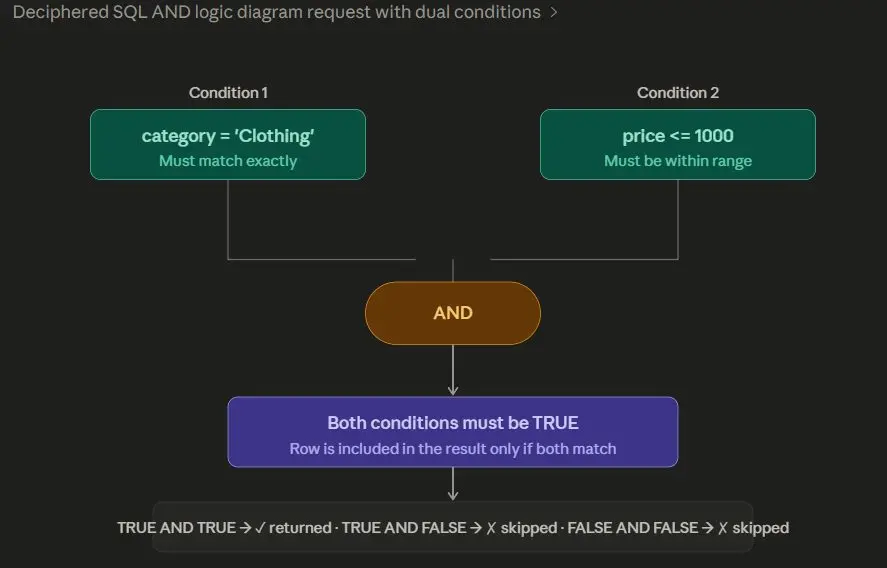
The AND operator returns rows only when all conditions are true.
Example
Retrieve products whose:
- category is "Clothing"
- AND price is less than or equal to 1000
```
hide
SELECT *
FROM product
WHERE category = 'Clothing'
AND price <= 1000;
```
Output
name | category | price | brand | rating |
|---|---|---|---|---|
T-Shirt | Clothing | 800 | Puma | 4.2 |
How AND Works
2. OR Operator
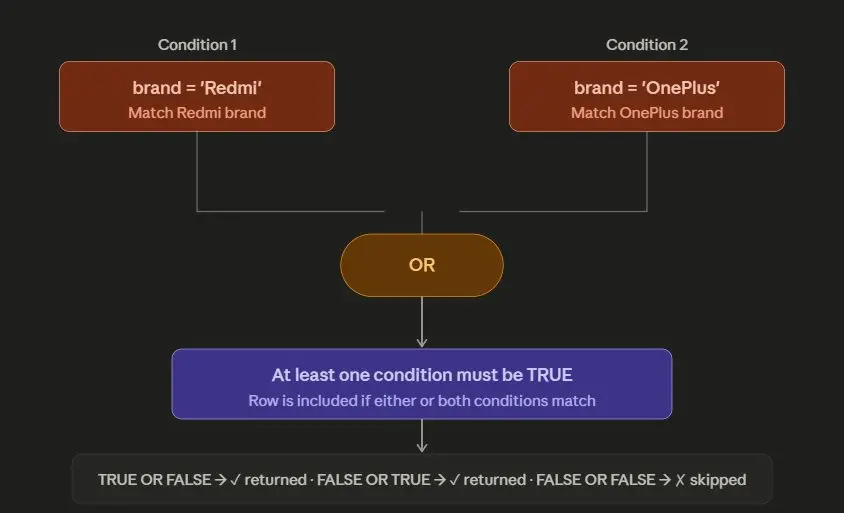
The OR operator returns rows when at least one condition is true.
Example
Retrieve products that belong to:
- Redmi brand
- OR OnePlus brand
```
hide
SELECT *
FROM product
WHERE brand = 'Redmi'
OR brand = 'OnePlus';
```
Output
name | category | price | brand | rating |
|---|---|---|---|---|
Smart Phone | Electronics | 25000 | Redmi | 4.6 |
Earbuds | Electronics | 2000 | OnePlus | 4.4 |
How OR Works
3. NOT Operator
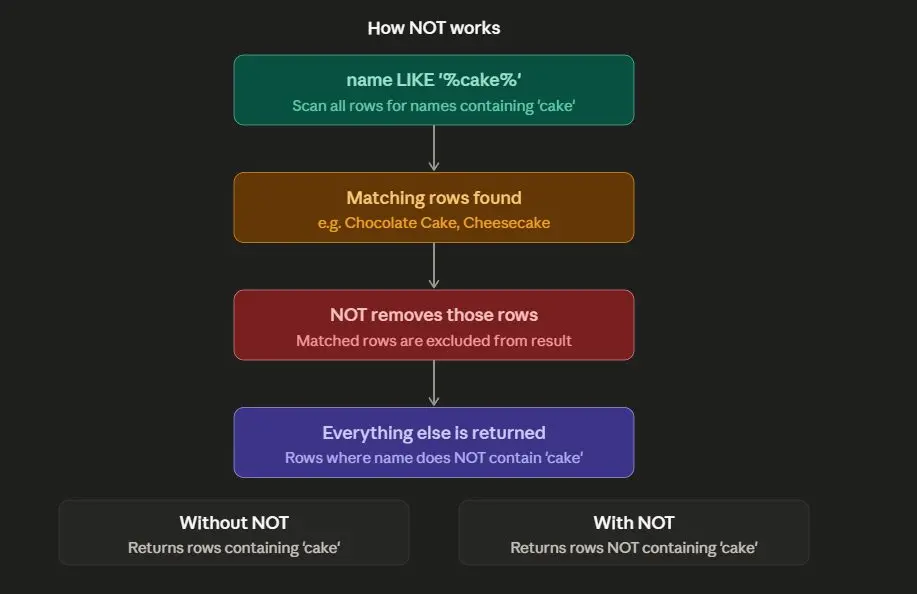
The NOT operator is used to exclude rows matching a condition.
Example
Ignore products whose name contains "cake".
```
hide
SELECT *
FROM product
WHERE NOT name LIKE '%cake%';
```
Output
name | category | price | brand | rating |
|---|---|---|---|---|
T-Shirt | Clothing | 800 | Puma | 4.2 |
Jeans | Clothing | 1200 | Levi's | 4.5 |
Smart Phone | Electronics | 25000 | Redmi | 4.6 |
Earbuds | Electronics | 2000 | OnePlus | 4.4 |
How NOT Works
Multiple Logical Operators
We can combine multiple logical operators in a single query.
This helps create more advanced filtering conditions.
Example
Retrieve products that:
- belong to Redmi brand AND rating greater than 4
- OR belong to OnePlus brand
```
hide
SELECT *
FROM product
WHERE brand = 'Redmi'
AND rating > 4
OR brand = 'OnePlus';
```
Output
name | category | price | brand | rating |
|---|---|---|---|---|
Smart Phone | Electronics | 25000 | Redmi | 4.6 |
Earbuds | Electronics | 2000 | OnePlus | 4.4 |
Understanding Operator Precedence
When multiple logical operators are used together, SQL follows precedence rules.
Order of Precedence
Priority | Operator |
|---|---|
1 | NOT |
2 | AND |
3 | OR |
Understanding the Previous Query
```
hide
SELECT *
FROM product
WHERE brand = 'Redmi'
AND rating > 4
OR brand = 'OnePlus';
```
SQL evaluates AND first.
So the query becomes:
```
hide
SELECT *
FROM product
WHERE (brand = 'Redmi' AND rating > 4)
OR brand = 'OnePlus';
```
Why Parentheses are Important
Using parentheses improves:
- readability
- correctness
- query clarity
Recommended Style
```
hide
SELECT *
FROM product
WHERE (brand = 'Redmi' AND rating > 4)
OR brand = 'OnePlus';
```
Complete Example
```
sql
CREATE TABLE product (
name VARCHAR(200),
category VARCHAR(100),
price INTEGER,
brand VARCHAR(100),
rating FLOAT
);
INSERT INTO product (name, category, price, brand, rating)
VALUES
('T-Shirt', 'Clothing', 800, 'Puma', 4.2),
('Jeans', 'Clothing', 1200, 'Levis', 4.5),
('Smart Phone', 'Electronics', 25000, 'Redmi', 4.6),
('Earbuds', 'Electronics', 2000, 'OnePlus', 4.4),
('Cake Box', 'Food', 500, 'Bakery', 4.1);
SELECT *
FROM product
WHERE category = 'Clothing'
AND price <= 1000;
```
Final Output
name | category | price | brand | rating |
|---|---|---|---|---|
T-Shirt | Clothing | 800 | Puma | 4.2 |
Common Mistakes
Mistake 1: Missing Quotes
Wrong
```
hide
SELECT *
FROM product
WHERE brand = Redmi;
```
Correct
```
hide
SELECT *
FROM product
WHERE brand = 'Redmi';
```
Mistake 2: Confusing AND and OR
Wrong Logic
```
hide
WHERE category = 'Clothing'
OR price <= 1000
```
This returns many unwanted rows.
Correct Logic
```
hide
WHERE category = 'Clothing'
AND price <= 1000
```
Summary
Operator | Purpose |
|---|---|
AND | All conditions must be true |
OR | At least one condition must be true |
NOT | Excludes matching rows |
More Sql tutorials
All tutorials · Try the free PySpark compiler · Practice challenges