String Operations
Sql tutorial · PySpark.in
3.2 STRING OPERATIONS
String operations are used to search and filter text data stored in database tables.
SQL provides the LIKE operator to perform pattern matching on strings.
Using LIKE, we can search for data such as:
- Names starting with specific letters
- Words ending with certain characters
- Text containing specific words
- Strings with fixed length patterns
Product Table Example
Suppose we have the following product table.
name | category | price | brand | rating |
|---|---|---|---|---|
Bourbon Biscuits | Food | 30 | Brit | 4.4 |
Smart Watch | Gadgets | 2500 | Noise | 4.6 |
Smart TV | Electronics | 45000 | Sony | 4.7 |
Chips | Food | 20 | Lays | 4.5 |
Mobile | Gadgets | 25000 | Apple | 4.8 |
LIKE Operator
The LIKE operator is used in the WHERE clause to search for specific patterns in string columns.
Syntax
```
hide
SELECT *
FROM table_name
WHERE column_name LIKE pattern;
```
Wildcard Characters
Wildcards are special symbols used to create matching patterns.
Common Wildcards
Wildcard | Description |
|---|---|
% | Represents zero or more characters |
_ | Represents exactly one character |
Understanding %
The % symbol matches any number of characters.
Examples of %
Pattern | Matches |
|---|---|
ch% | chips, chocolate, chess |
%tv | smart tv, android tv |
%phone% | smartphone, headphone |
Understanding _
The _ symbol matches exactly one character.
Examples of _
Pattern | Matches |
|---|---|
_at | cat, bat, hat |
A__ | App, Ace |
____ | Any 4-letter word |
Common LIKE Patterns
Pattern Type | Example | Description |
|---|---|---|
Exact Match | LIKE 'Mobile' | Finds exact value |
Starts With | LIKE 'Smart%' | Starts with "Smart" |
Ends With | LIKE '%TV' | Ends with "TV" |
Contains | LIKE '%phone%' | Contains "phone" |
Fixed Length | LIKE '_____' | Exactly 5 characters |
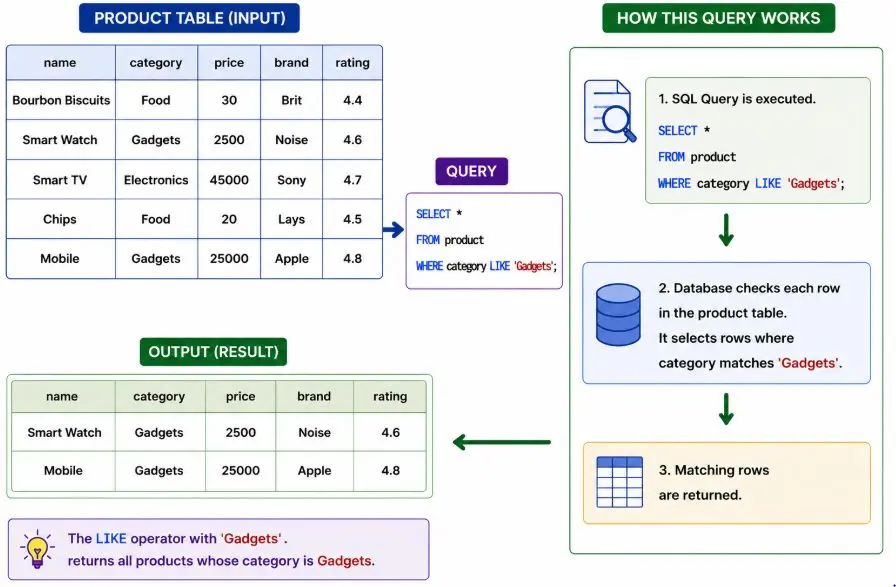
Example 1: Exact Match
Retrieve products whose category is exactly "Gadgets".
```
hide
SELECT *
FROM product
WHERE category LIKE 'Gadgets';
```
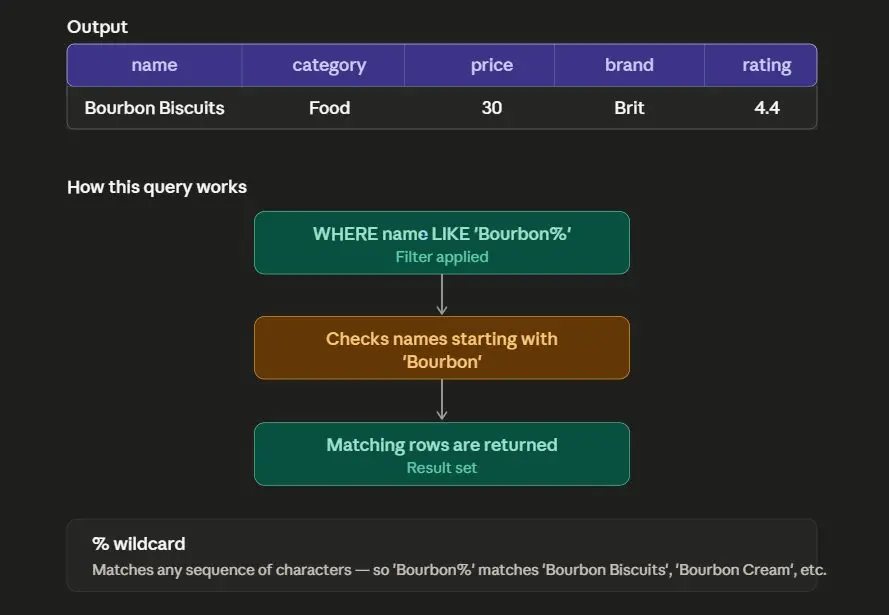
Example 2: Starts With
Retrieve products whose name starts with "Bourbon".
```
hide
SELECT *
FROM product
WHERE name LIKE 'Bourbon%';
```
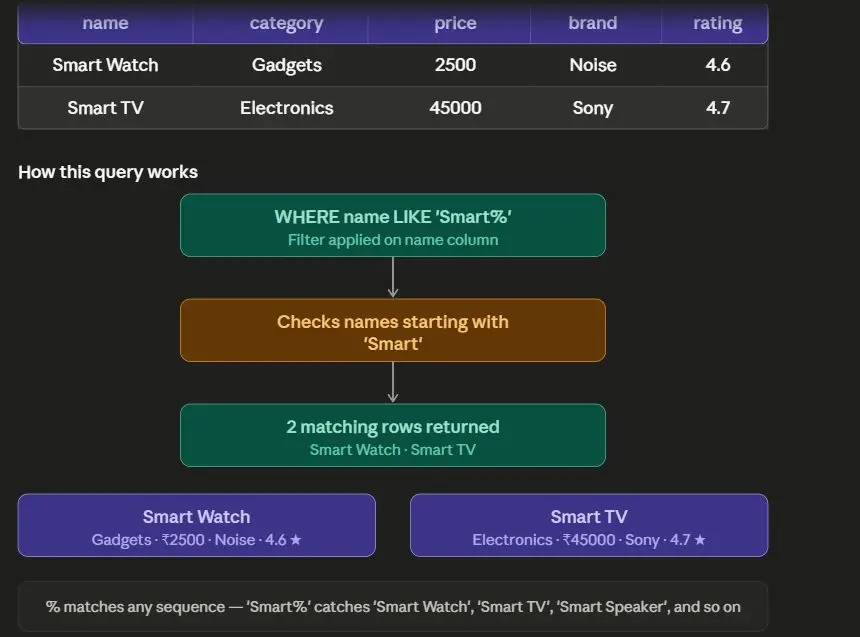
Example 3: Contains Word
Retrieve products whose name contains "Smart".
```
hide
SELECT *
FROM product
WHERE name LIKE '%Smart%';
```
Output
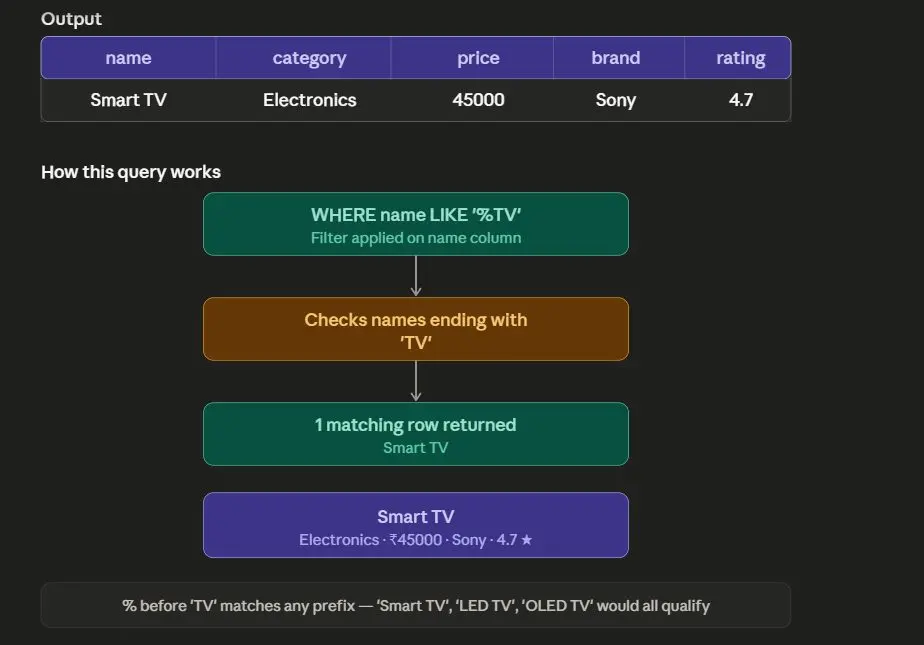
Example 4: Ends With
Retrieve products whose name ends with "TV".
```
hide
SELECT *
FROM product
WHERE name LIKE '%TV';
```
Example 5: Fixed Length Pattern
Retrieve products whose brand contains exactly 5 characters.
```
hide
SELECT *
FROM product
WHERE brand LIKE '_____';
```
Output
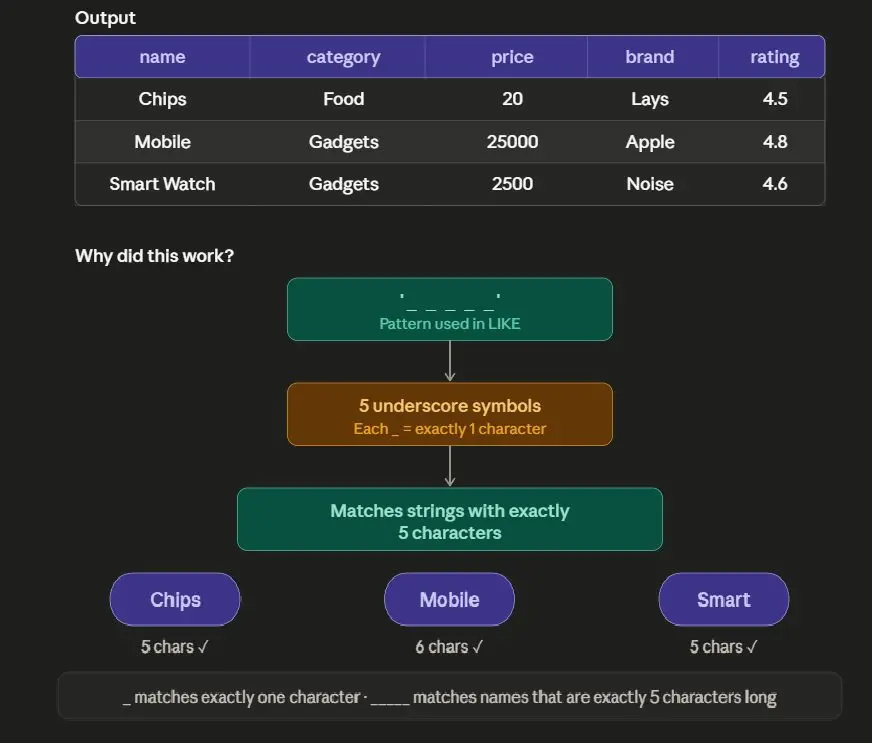
Why Did This Work?
'_____'
|
v
5 underscore symbols
|
v
Matches strings with exactly 5 characters
Important Note
% is used when the number of characters is unknown.
_ is used when the exact number of characters is known.
Complete Example
```
sql
CREATE TABLE product (
name VARCHAR(200),
category VARCHAR(100),
price INTEGER,
brand VARCHAR(100),
rating FLOAT
);
INSERT INTO product (name, category, price, brand, rating)
VALUES
('Bourbon Biscuits', 'Food', 30, 'Brit', 4.4),
('Smart Watch', 'Gadgets', 2500, 'Noise', 4.6),
('Smart TV', 'Electronics', 45000, 'Sony', 4.7),
('Chips', 'Food', 20, 'Lays', 4.5),
('Mobile', 'Gadgets', 25000, 'Apple', 4.8);
SELECT *
FROM product
WHERE name LIKE '%Smart%';
```
Final Output
name | category | price | brand | rating |
|---|---|---|---|---|
Smart Watch | Gadgets | 2500 | Noise | 4.6 |
Smart TV | Electronics | 45000 | Sony | 4.7 |
Common Mistakes
Mistake 1: Forgetting Quotes
Wrong
```
sql
SELECT *
FROM product
WHERE name LIKE Smart%;
```
Correct
```
sql
SELECT *
FROM product
WHERE name LIKE 'Smart%';
```
Mistake 2: Using = Instead of LIKE
Wrong
```
sql
SELECT *
FROM product
WHERE name = '%Smart%';
```
This checks exact equality instead of pattern matching.
Correct
```
sql
SELECT *
FROM product
WHERE name LIKE '%Smart%';
```
Summary
Operator | Purpose |
|---|---|
LIKE | Pattern matching |
% | Zero or more characters |
_ | Exactly one character |
More Sql tutorials
All tutorials · Try the free PySpark compiler · Practice challenges