Update Rows
Sql tutorial · PySpark.in
2.4 UPDATING ROWS
What is UPDATE?
The UPDATE statement is used to modify existing data in a table.
Using UPDATE, we can:
- Update all rows
- Update only selected rows
- Modify one or multiple columns
Real-World Example
Suppose we have a player table containing player details.
name | age | score |
|---|---|---|
Virat | 32 | 45 |
Rakesh | 39 | 35 |
Sai | 47 | 30 |
If a player’s score changes, we can use the UPDATE statement to modify the data.
Basic UPDATE Syntax
```
hide
UPDATE table_name
SET column_name = value;
```
Understanding the Syntax
Part | Meaning |
|---|---|
UPDATE | Modifies existing data |
table_name | Name of the table |
SET | Specifies the column to update |
value | New value |
Updating All Rows
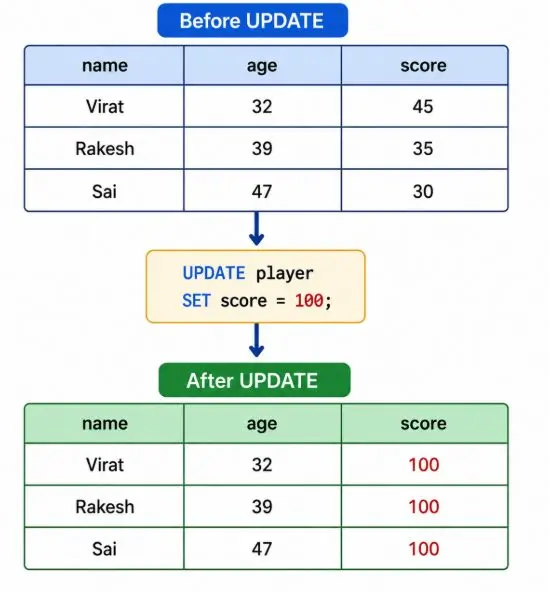
If we do not use a WHERE clause, all rows in the table are updated.
Example: Update Score for All Players
```
sql
-- Create Table
CREATE TABLE player (
name VARCHAR(200),
age INTEGER,
score INTEGER
);
-- Insert Data
INSERT INTO player (name, age, score)
VALUES
('Virat', 32, 45),
('Rakesh', 39, 35),
('Sai', 47, 30);
-- View Original Data
SELECT * FROM player;
-- Update All Rows
UPDATE player
SET score = 100;
-- View Updated Data
SELECT * FROM player;
```
Before UPDATE
Important Note
Without a WHERE clause, every row in the table will be updated.
Updating Specific Rows
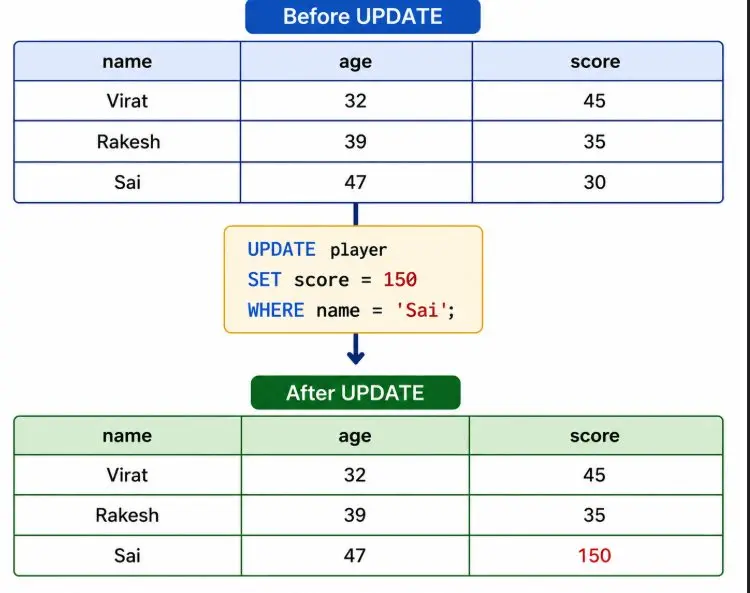
To update only selected rows, we use the WHERE clause.
Syntax
```
hide
UPDATE table_name
SET column_name = value
WHERE condition;
```
Example: Update Score of Sai
```
sql
UPDATE player
SET score = 150
WHERE name = 'Sai';
```
Before UPDATE
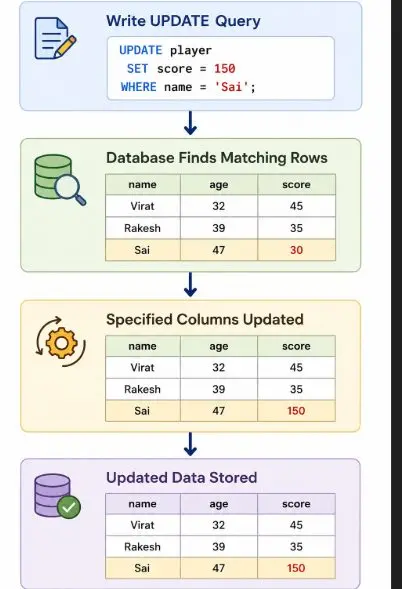
Flow Diagram
Updating Multiple Columns
We can update more than one column in a single query.
Syntax
```
hide
UPDATE table_name
SET column1 = value1,
column2 = value2
WHERE condition;
```
Example
```
sql
UPDATE player
SET age = 40,
score = 200
WHERE name = 'Rakesh';
```
Common Mistakes in UPDATE
Mistake 1: Forgetting WHERE Clause
```
sql
UPDATE player
SET score = 0;
```
This updates every row unintentionally.
Mistake 2: Wrong Column Name
```
sql
UPDATE player
SET marks = 50
WHERE name = 'Sai';
```
Error
Error: no such column: marks
Mistake 3: Wrong Data Type
```
sql
UPDATE player
SET age = 'Thirty'
WHERE name = 'Sai';
```
age expects an INTEGER value.
Complete Example
```
-- Create Table
CREATE TABLE player (
name VARCHAR(200),
age INTEGER,
score INTEGER
);
-- Insert Data
INSERT INTO player (name, age, score)
VALUES
('Virat', 32, 45),
('Rakesh', 39, 35),
('Sai', 47, 30);
-- Update Specific Row
UPDATE player
SET score = 150
WHERE name = 'Sai';
-- View Updated Data
SELECT * FROM player;
```
Final Output
name | age | score |
|---|---|---|
Virat | 32 | 45 |
Rakesh | 39 | 35 |
Sai | 47 | 150 |
Summary
Topic | Description |
|---|---|
UPDATE | Modifies existing data |
SET | Specifies new values |
WHERE | Filters rows to update |
Update All Rows | Happens without WHERE |
Update Specific Rows | Uses WHERE clause |
More Sql tutorials
All tutorials · Try the free PySpark compiler · Practice challenges