Aggregations
Sql tutorial · PySpark.in
4. AGGREGATIONS AND GROUP BY
In SQL, aggregation means combining multiple values into a single value.
For example:
- Finding total sales
- Calculating average marks
- Counting students
- Finding highest salary
SQL provides aggregation functions to perform these operations easily.
Why Aggregations are Useful
Suppose we have match data of players.
name | year | score |
|---|---|---|
Ram | 2011 | 62 |
Ram | 2011 | 75 |
Ram | 2012 | 84 |
Sai | 2011 | 68 |
Sai | 2012 | 90 |
Instead of manually calculating totals or averages, SQL aggregation functions can do it automatically.
4.1 Aggregation Functions
Aggregation functions operate on multiple rows and return a single result.
Common Aggregation Functions
Function | Description |
|---|---|
COUNT() | Counts rows or values |
SUM() | Adds values |
MIN() | Returns smallest value |
MAX() | Returns largest value |
AVG() | Calculates average |
General Syntax
```
hide
SELECT
aggregate_function(column_name)
FROM table_name;
```
Multiple Aggregations Together
We can calculate multiple aggregate functions in a single query.
```
hide
SELECT
MAX(score),
MIN(score),
AVG(score)
FROM player_match_details;
```
Example Table
Suppose we have the following table.
name | year | Score |
|---|---|---|
Ram | 2011 | 62 |
Ram | 2011 | 75 |
Ram | 2012 | 84 |
Sai | 2011 | 68 |
Sai | 2012 | 90 |
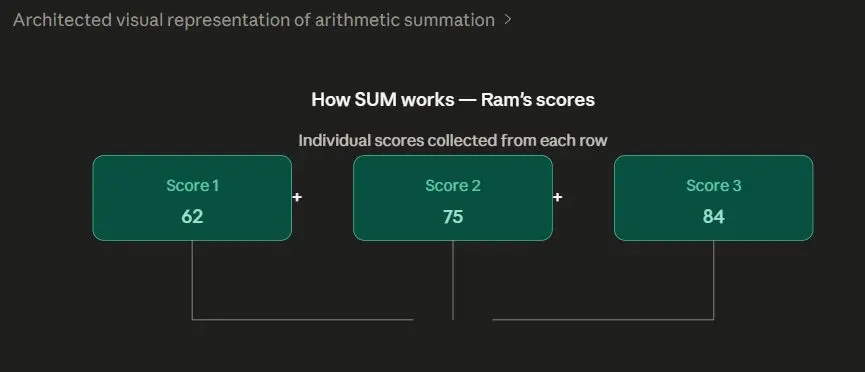
1. SUM Function
The SUM() function adds all numeric values.
Example
Retrieve the total runs scored by "Ram".
```
hide
SELECT SUM(score)
FROM player_match_details
WHERE name = 'Ram';
```
Output
SUM(score) |
|---|
221 |
How SUM Works
2. MAX and MIN Functions
- MAX() returns the highest value
- MIN() returns the smallest value
Example
Retrieve highest and lowest scores in the year 2011.
```
hide
SELECT MAX(score), MIN(score)
FROM player_match_details
WHERE year = 2011;
```
Output
MAX(score) | MIN(score) |
|---|---|
75 | 62 |
How MAX and MIN Work

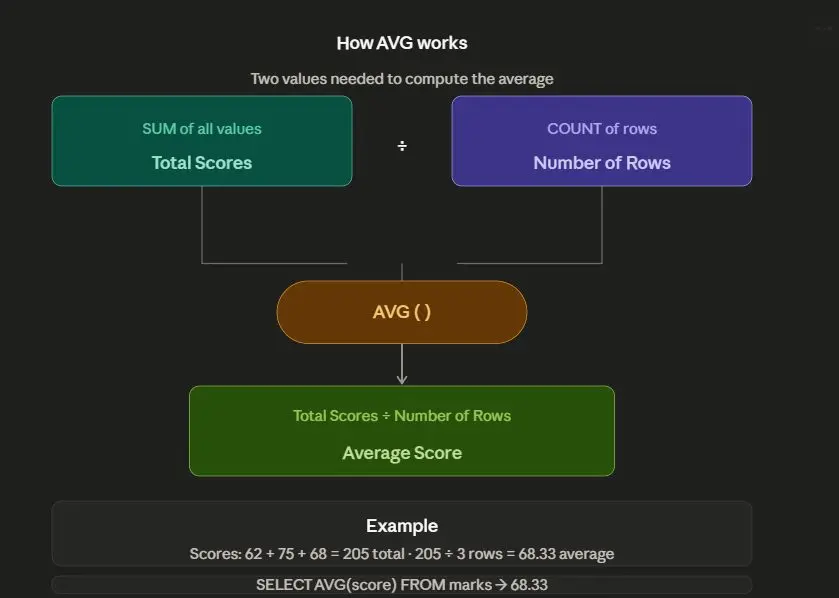
3. AVG Function
The AVG() function calculates the average value.
Example
Retrieve average score of all players.
```
hide
SELECT AVG(score)
FROM player_match_details;
```
Output
AVG(score) |
|---|
75.8 |
How AVG Works
4. COUNT Function
The COUNT() function counts rows or values.
Example
Count total rows in the table.
```
hide
SELECT COUNT(*)
FROM player_match_details;
```
Output
COUNT(*) |
|---|
5 |
COUNT Variants
SQL provides different COUNT variations.
Variant 1
```
hide
SELECT COUNT(*)
FROM player_match_details;
```
Counts all rows.
Variant 2
```
hide
SELECT COUNT(1)
FROM player_match_details;
```
Also counts all rows.
Variant 3
```
hide
SELECT COUNT(score)
FROM player_match_details;
```
Counts only non-NULL values in score column.
Important Difference
Query | Behavior |
|---|---|
COUNT(*) | Counts all rows |
COUNT(column_name) | Counts non-NULL values only |
Example with NULL Values
name | Score |
|---|---|
Ram | 75 |
Sai | NULL |
Virat | 90 |
Query
```
hide
SELECT COUNT(score)
FROM player_match_details;
```
Output
COUNT(score) |
|---|
2 |
Because NULL values are ignored.
NULL Handling in Aggregation Functions
Most aggregation functions ignore NULL values.
Aggregation Results on NULL Values
Function | Result |
|---|---|
MIN | NULL |
MAX | NULL |
SUM | NULL |
COUNT | 0 |
AVG | NULL |
Special Cases
SUM on Non-Numeric Columns
Applying SUM() on text columns may behave differently across DBMS.
Example:
```
hide
SELECT SUM(name)
FROM player_match_details;
```
Behavior
DBMS | Result |
|---|---|
SQLite | 0.0 |
PostgreSQL | NULL/Error |
Complete Example
```
sql
CREATE TABLE player_match_details (
name VARCHAR(100),
year INTEGER,
score INTEGER
);
INSERT INTO player_match_details (name, year, score)
VALUES
('Ram', 2011, 62),
('Ram', 2011, 75),
('Ram', 2012, 84),
('Sai', 2011, 68),
('Sai', 2012, 90);
SELECT
SUM(score),
AVG(score),
MAX(score),
MIN(score),
COUNT(*)
FROM player_match_details;
```
Output
SUM(score) | AVG(score) | MAX(score) | MIN(score) | COUNT(*) |
|---|---|---|---|---|
379 | 75.8 | 90 | 62 | 5 |
Alias in SQL
Using AS, we can provide temporary names to columns.
Aliases improve readability of output.
Syntax
```
hide
SELECT column_name AS alias_name
FROM table_name;
```
Example
Display player names using column name "player_name".
```
sql
SELECT name AS player_name
FROM player_match_details;
```
Output
player_name |
|---|
Ram |
Ram |
Ram |
Sai |
Sai |
Why Aliases are Useful
Without alias:
```
hide
SUM(score)
```
With alias:
```
hide
total_score
```
Aliases make reports easier to understand.
Example with Aggregation Alias
```
sql
SELECT SUM(score) AS total_score
FROM player_match_details;
```
Output
total_score |
|---|
379 |
Common Mistakes
Mistake 1: Using Aggregation Without Numeric Column
Wrong
```
sql
SELECT SUM(name)
FROM player_match_details;
```
Correct
```
sql
SELECT SUM(score)
FROM player_match_details;
```
Mistake 2: Forgetting Parentheses
Wrong
```
sql
SELECT COUNT
FROM player_match_details;
```
Correct
```
sql
SELECT COUNT(*)
FROM player_match_details;
```
Mistake 3: Confusing COUNT(*) and COUNT(column)
Example
```
sql
SELECT COUNT(score)
FROM player_match_details;
```
This ignores NULL values.
Summary
Function | Purpose |
|---|---|
COUNT() | Count rows |
SUM() | Add values |
MIN() | Smallest value |
MAX() | Largest value |
AVG() | Average value |
More Sql tutorials
All tutorials · Try the free PySpark compiler · Practice challenges