Data LakeHouse Architecture
Spark tutorial · PySpark.in
Introduction to Lakehouse Architecture
Lakehouse Architecture aims to bring together the best features of Data Warehouses and Data Lakes.
It is designed to provide strong support for Business Intelligence (BI), Data Science, and Machine Learning workloads.
Let's look at what a Data Lakehouse Architecture looks like.
1. Understanding Lakehouse Architecture
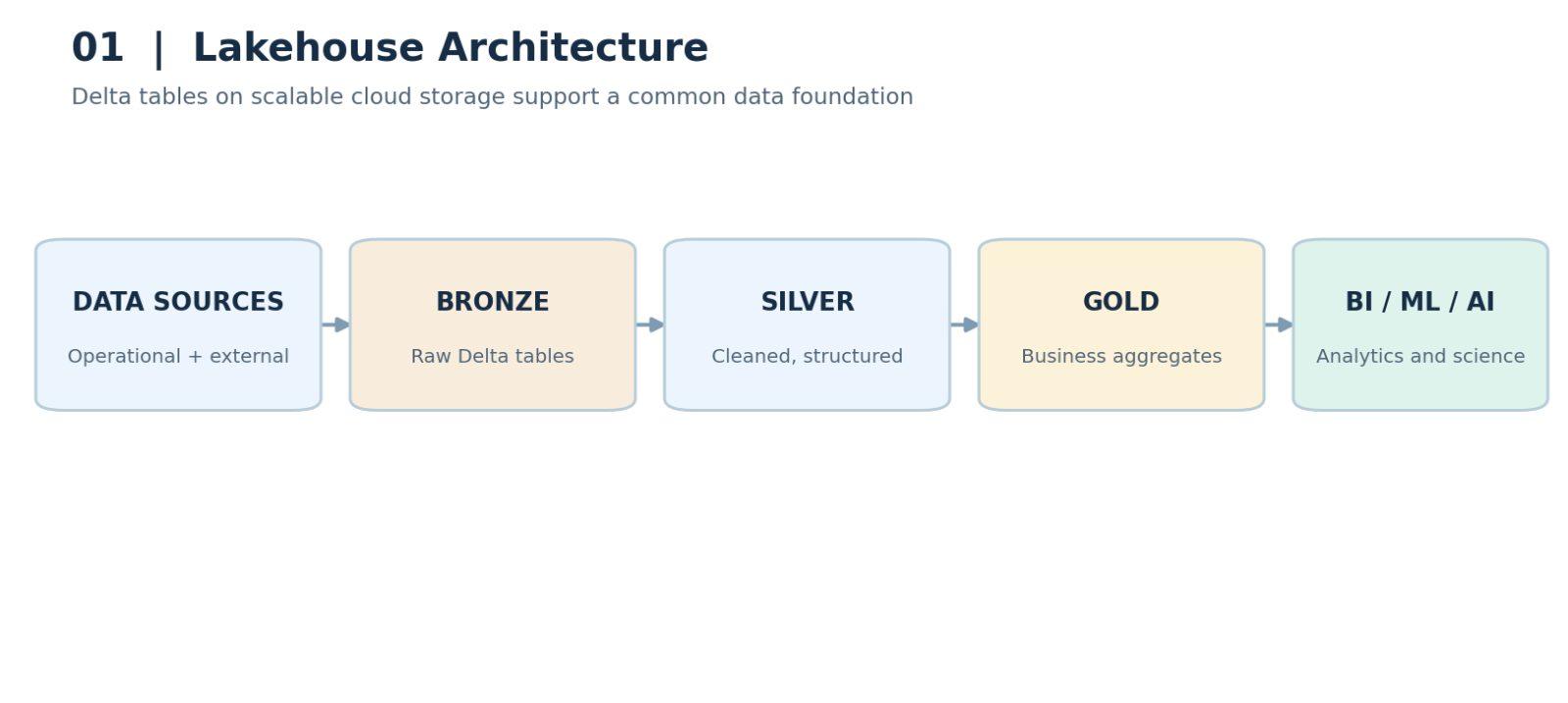
Similar to Data Lakes, we can ingest operational and external data into Delta Lake.
Delta Lake is a storage layer for Data Lakes that adds ACID transaction support. With ACID transactions, we can combine streaming and batch workloads more easily and reduce the need for a complex Lambda Architecture.
This data can then be transformed more efficiently, without manually rewriting entire partitions when reprocessing data or handling data deletion requests under the GDPR.
Usually, there is more than one stage of transformation, but we will look at the main stages here.
2. Bronze, Silver, and Gold Tables
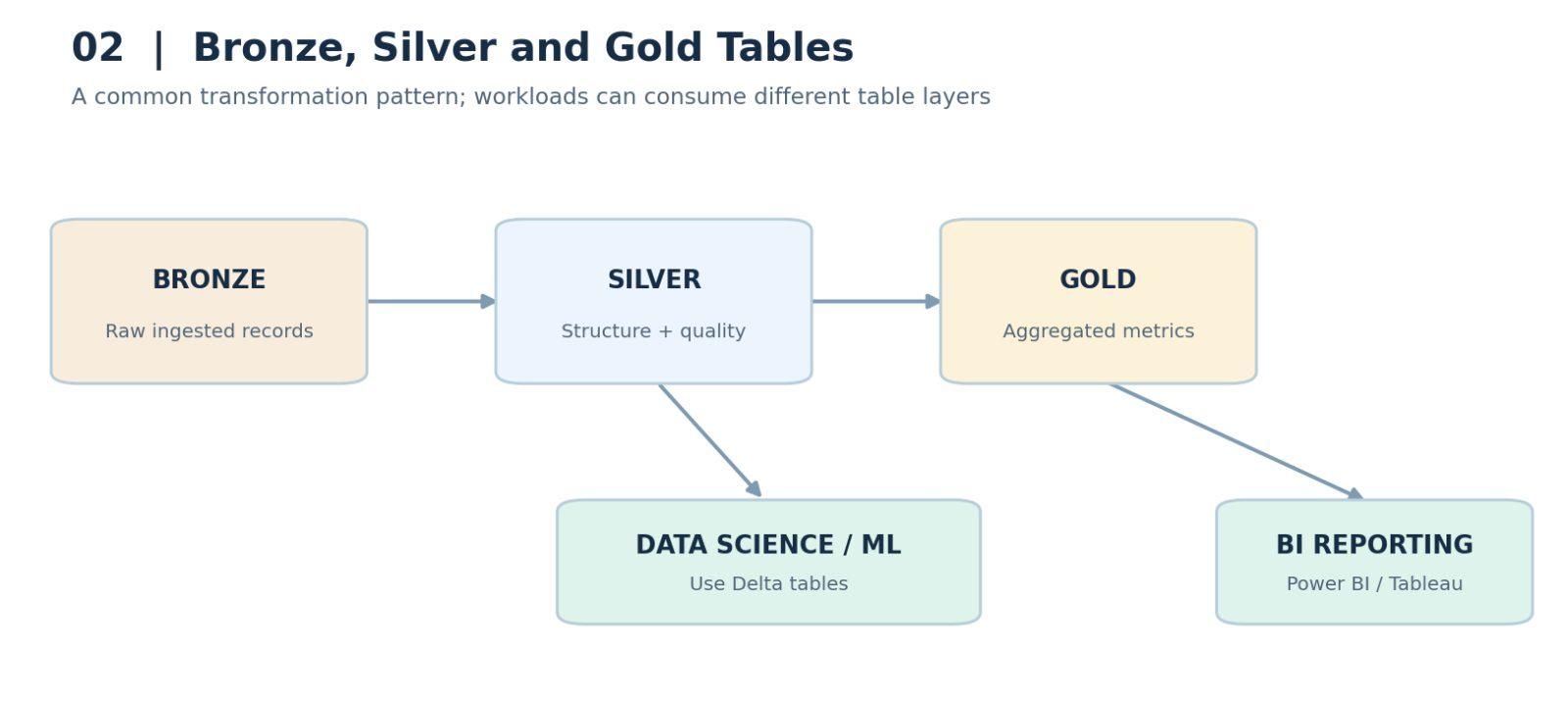
In the Databricks Medallion Architecture, raw data is stored in Bronze tables.
The first transformation stage adds structure, performs data cleansing and quality checks, and produces a set of Silver tables.
Data from the Silver tables is then aggregated and enriched with business meaning to create Gold tables.
So, the data flows from Bronze to Silver and then to Gold.
Data from any of these Delta table layers can be used for Data Science and Machine Learning workloads.
Delta Lake tables can also be accessed using BI tools such as Power BI and Tableau through compatible connectors and query services.
Roles and access controls can be defined through supporting catalog and governance systems.
This can remove the need to copy data into a separate Data Warehouse for reporting.
3. Reporting Performance Considerations
This is the basic Lakehouse Architecture. However, some projects still run BI reports from a separate relational database or Data Warehouse when their reporting requirements demand it.
Delta Lake has continued to evolve since its initial development in 2018. Its reporting performance depends on the query engine, table layout, optimization, and workload.
For some workloads, a dedicated Data Warehouse may still provide better performance, so organizations may continue to copy selected data into one.
As Lakehouse technologies improve, the need for a separate Data Warehouse may decrease for more workloads. That is a reasonable expectation, although the best choice depends on each use case.
4. Benefits of Lakehouse Architecture
Let's quickly summarize the benefits of moving to a Lakehouse Architecture.
Similar to a Data Lake, Delta Lake supports structured, semi-structured, and unstructured data within a wider Lakehouse system. It runs on scalable storage such as Amazon S3 and Azure Data Lake Storage, providing potential cost benefits.
Delta Lake uses the open Apache Parquet file format for table data.
Lakehouse architectures can support BI, Data Science, Machine Learning, and both batch and streaming workloads.
They provide a way for BI tools to access data directly through compatible query engines and connectors.
Most importantly, Delta Lake provides ACID transactions, table history, and versioning. These features help prevent the unreliable data management problems associated with traditional Data Lakes.
Delta Lake can also improve query performance compared with a basic file-based Data Lake, particularly when combined with optimization features.
Finally, a Lakehouse can simplify the overall architecture. We may no longer need separate Lambda Architecture pipelines for streaming and batch workloads, and we may reduce or eliminate the need to move data into a separate Data Warehouse.
5. How Delta Lake Works Internally
Now that we understand the benefits of Lakehouse Architecture, let’s look more closely at how Delta Lake provides these capabilities.
Similar to a traditional Data Lake, Delta Lake stores table data in Apache Parquet files, an open file format.
The key difference is that Delta Lake creates and maintains a transaction log alongside those data files.
The transaction log is responsible for tracking committed changes and supporting table history, versioning, ACID transactions, and time travel.
This is one of the key differences between an ordinary collection of Parquet files and a Delta table.
Above the storage layer, Spark-compatible processing and query engines read the Delta transaction log and process the data. Distributed processing helps these engines handle large datasets efficiently.
Delta tables can be registered in a metastore or catalog, such as a Hive Metastore or a modern governance catalog. Together with the relevant platform services, this supports table discovery, permissions, governance, constraints, and optimization.
We can run Apache Spark workloads on Delta tables, including SQL transformations, Machine Learning, and streaming processing, just as we do with data stored in a traditional Data Lake.
BI workloads can also access Delta tables directly through compatible engines and connectors.
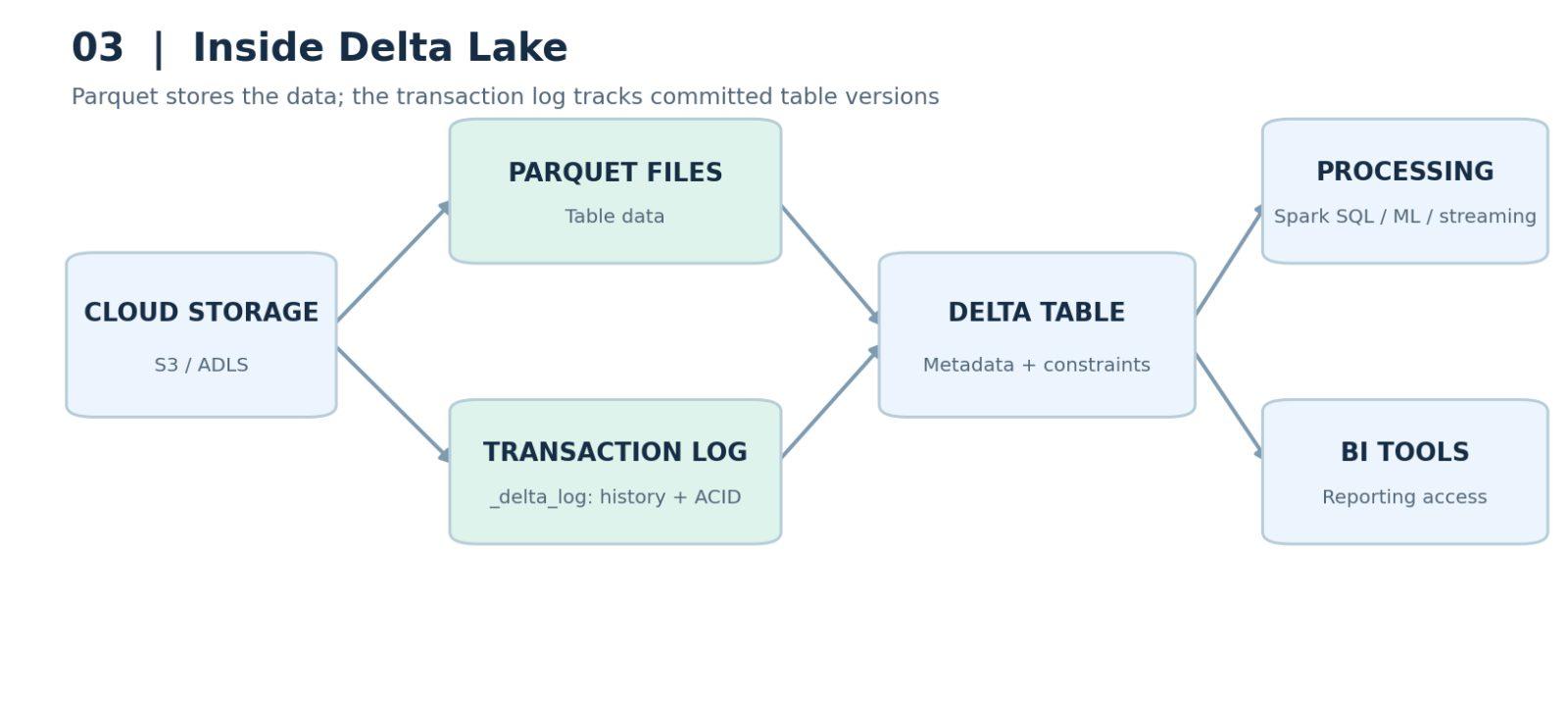
The transaction log is stored in the _delta_log directory.
6. Moving from Parquet to Delta Lake
Although the architecture contains several components, using Delta Lake can be straightforward for a developer.
In a Spark application configured to support Delta Lake, you can often change the data format from Parquet to Delta in spark.read or the DataFrame writer API.
Spark and Delta Lake then manage the table format and transaction log for you.
Keep in mind that converting an existing Parquet dataset into a Delta table requires a proper conversion or rewrite; changing the format string alone does not convert existing files.
7. Conclusion and What’s Next
I hope you now have a clear understanding of what Delta Lake is and how it fits into Lakehouse Architecture.
That brings us to the end of this lesson.
In the next lesson, we will put some of these concepts into practice.
See you then.
More Spark tutorials
- Apache Spark Runtime Architecture
- Introduction to RDD
- Actions vs Transformations
- Lazy Evaluation in PySpark
- DataFrame Operations in PySpark
- Spark SQL Basics
All tutorials · Try the free PySpark compiler · Practice challenges