Pitfalls of Delta Lake
Spark tutorial · PySpark.in
Introduction to Delta Lake
In this section, we're going to look at Delta Lake.
Delta Lake is a project originally developed by Databricks and open-sourced in 2019. It is now a project under the Linux Foundation.
It is an open-source storage layer that brings reliability to Data Lakes.
Delta Lake provides ACID transactions, scalable metadata handling, and unified support for streaming and batch workloads.
Delta Lake runs on top of existing Data Lakes and is compatible with Apache Spark APIs.
That's quite a lot of information.
So, to understand what Delta Lake is, let's first look at the problems it is designed to solve.
We'll start by going back in time to understand Data Warehouse architecture, its limitations, and how Data Lakes emerged to address those limitations.
Then, we'll explore the challenges associated with Data Lakes.
This will help us understand how Delta Lake addresses some of these challenges and how it supports the emerging Data Lakehouse Architecture.
So, let's get started.
1. Understanding Data Warehouses
Let's begin by understanding what a Data Warehouse is.
Data Warehouses became popular in the 1980s when businesses wanted to make decisions using data collected from across their organizations, rather than analyzing information separately within individual departments.
A Data Warehouse primarily contained operational data collected from different systems within an organization.
Some large Data Warehouses also included external data to support better business decisions.
The data stored in traditional Data Warehouses was mainly structured, such as SQL tables and CSV files, or semi-structured, such as JSON and XML files.
Traditional Data Warehouses had limited support for processing unstructured data.
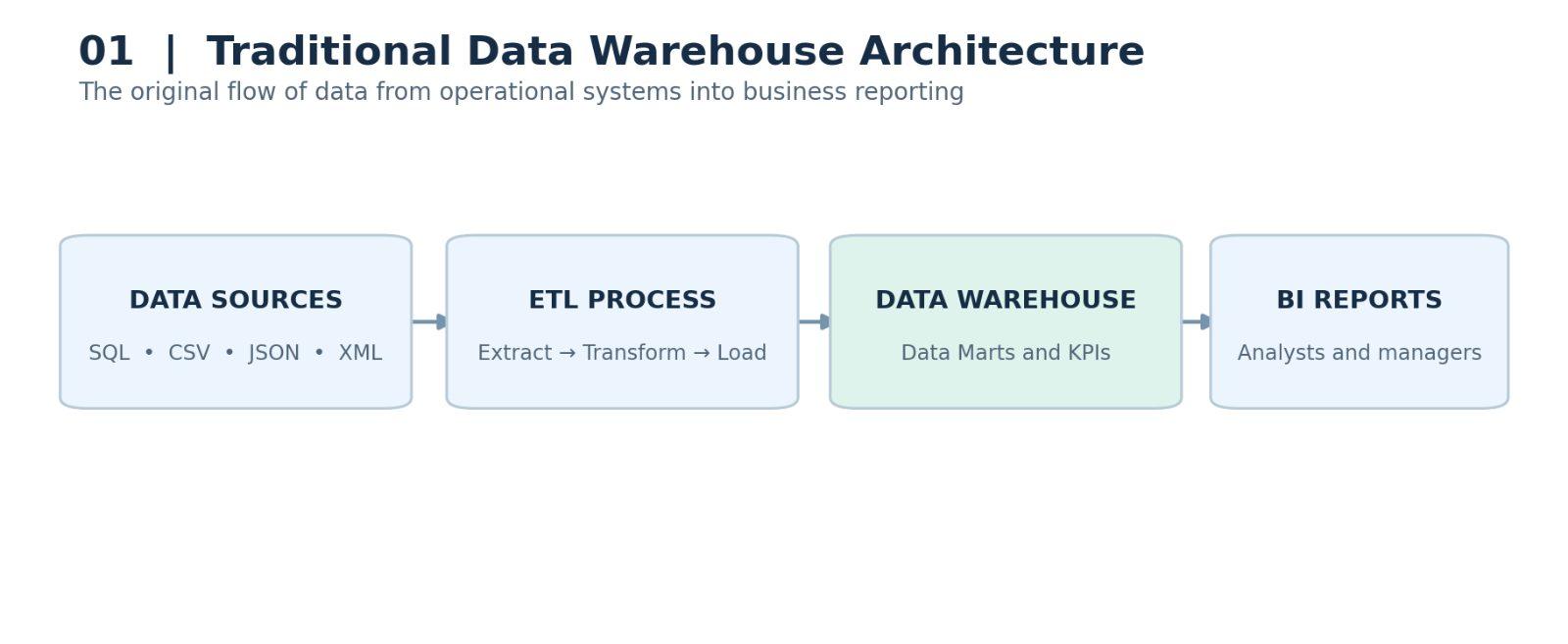
Before data was loaded into a Data Warehouse, it typically went through an ETL (Extract, Transform, Load) process.
During this process, the data was extracted from source systems, cleaned, validated, transformed, and then loaded into the Data Warehouse or Data Marts.
The data stored in Data Marts was often aggregated and enriched with business meaning to provide useful information, such as Key Performance Indicators (KPIs).
Business analysts and managers then used this data to generate Business Intelligence (BI) reports and make informed decisions.
Traditional Data Warehouse Architecture
Data Sources
Operational databases, SQL tables, CSV, JSON, XML
ETL Process
Extract → Transform → Load
Data Warehouse / Data Marts
BI Reports and Dashboards
Business analysts and managers
Data Warehouses became extremely valuable for business decision-making, and by the early 2000s, most large organizations had adopted some form of Data Warehousing.
However, they also had several significant limitations.
2. Limitations of Traditional Data Warehouses
In the early 2000s, the rapid growth of the internet led to a significant increase in both the volume and variety of data.
Organizations started collecting more unstructured data, including videos, images, text files, and other digital content.
This information was valuable for business analysis, but traditional Data Warehouses were not designed to handle such large amounts of unstructured data efficiently.
Another limitation was the time required to load new data.
In traditional Data Warehouses, data generally had to be cleaned, validated, and transformed before it could be loaded.
As a result, adding new data sources often required significant development effort and time.
Data Warehouses were commonly built using traditional relational databases or Massively Parallel Processing (MPP) systems. Many of these systems relied on proprietary storage formats and technologies, which could lead to vendor lock-in.
Traditional on-premises Data Warehouses were also difficult and expensive to scale.
In some cases, organizations had to undertake large data migration projects to increase their storage or processing capacity.
Storage was often expensive, and scaling storage independently of computing resources was not always possible.
Finally, traditional Data Warehouses had limited support for Data Science, Machine Learning (ML), and Artificial Intelligence (AI) workloads.
These limitations created the need for a more flexible and cost-effective approach to storing and processing data.
This led to the emergence of Data Lakes.
3. Introduction to Data Lakes
Data Lake architecture emerged around 2010–2011 to address many of the limitations of traditional Data Warehouses.
Unlike traditional Data Warehouses, Data Lakes can store structured, semi-structured, and unstructured data.
This includes SQL tables, CSV files, JSON files, XML files, images, videos, audio recordings, and text documents.
One of the main advantages of a Data Lake is that data can be ingested in its original format without requiring cleansing or transformation beforehand.
This allows organizations to collect and store data more quickly, reducing development time and improving ingestion performance.
Technologies such as Hadoop Distributed File System (HDFS) and cloud object storage services, including Amazon S3 and Azure Data Lake Storage, provide relatively low-cost storage for large volumes of data.
As a result, organizations can store large amounts of raw data without the same cost constraints associated with traditional Data Warehouses.
Data Lakes also support open file formats such as Apache Parquet, ORC, and Avro.
These formats allow different tools, applications, and libraries to process and analyze the stored data.
Data Science and Machine Learning workloads can work with both raw and transformed data stored in a Data Lake.
Traditional Data Lake Architecture
Structured
SQL, CSV
Semi-structured
JSON, XML
Unstructured
Images, Videos
Data Lake
Amazon S3 / Azure Data Lake / HDFS
Raw and transformed data
Data Processing
Apache Spark and other processing tools
Data Science
ML / AI
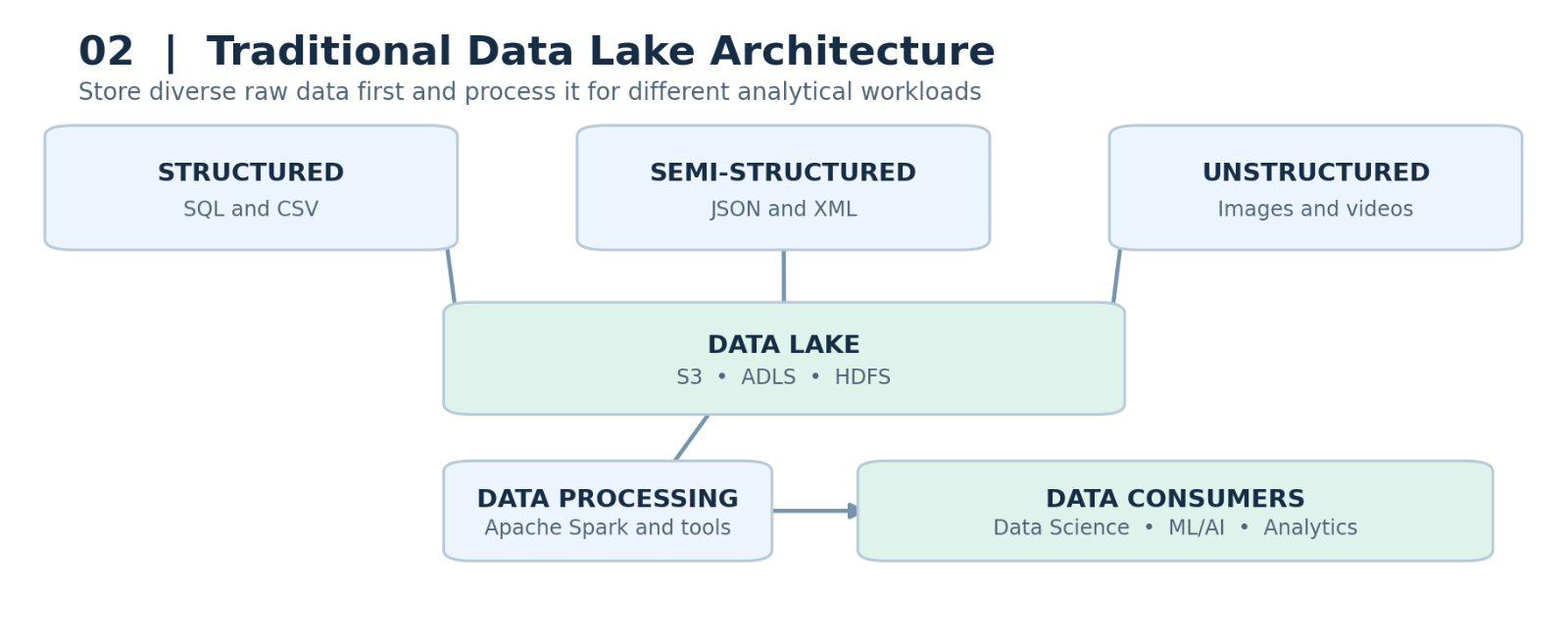
Analytics
However, Data Lakes introduced their own set of challenges.
One major problem was that traditional Data Lakes often struggled to provide the performance, reliability, and governance required for interactive BI reporting.
As a result, organizations frequently copied selected datasets from their Data Lakes into Data Warehouses to support business reporting.
This created a more complex architecture with additional data pipelines, storage systems, and maintenance requirements.
Now that we understand Data Lake architecture, let's examine its main limitations.
4. Limitations of Traditional Data Lakes
4.1 Lack of ACID Transactions
Traditional file-based Data Lakes do not inherently support ACID transactions.
This creates several challenges when data is written, updated, or deleted.
For example, if a data processing job fails while writing files to a Data Lake, partially written output may remain in the storage system.
Developers may need separate cleanup processes to remove incomplete files before rerunning the job.
4.2 Inconsistent Data Reads
Traditional Data Lakes do not automatically guarantee consistent reads when files are being modified.
A user or application might read data while another process is still writing or replacing files.
This could result in incomplete or inconsistent datasets, reducing the reliability of analytical results.
4.3 Difficulties with Updating Data
Updating existing records in a traditional file-based Data Lake can be complicated.
For example, if an existing record needs to be corrected, developers may have to read the affected files or partitions, modify the data, and rewrite them.
This increases development effort and processing costs.
4.4 Lack of Built-in Rollback Support
Traditional file-based Data Lakes do not inherently provide transactional rollback capabilities.
If a data processing job overwrites existing files with incorrect information, restoring the previous data may require backups, snapshots, or rewriting entire partitions or tables.
4.5 Challenges with Data Deletion
Data deletion is another significant challenge.
Under the European Union's General Data Protection Regulation (GDPR), individuals have certain rights concerning their personal data, including the right to erasure under specified conditions.
Organizations may therefore need to delete an individual's personal information from their storage systems.
However, traditional file-based Data Lakes do not provide built-in row-level deletion operations.
In some cases, developers must read the affected files, remove the relevant records, and rewrite the remaining data.
4.6 Lack of Built-in Data History and Versioning
Traditional Data Lakes do not inherently maintain transaction-based table history or versioning.
Without a separate versioning or snapshot mechanism, it can be difficult to recover earlier versions of data, perform rollbacks, or track changes over time.
These limitations also create challenges for auditing and data governance.
4.7 Risk of Creating Data Swamps
A combination of poor data quality, inconsistent records, limited governance, and insufficient metadata management can turn a Data Lake into a Data Swamp.
A Data Swamp is a storage environment where data becomes difficult to find, manage, understand, or trust.
4.8 Poor Interactive Query Performance and BI Support
Traditional Data Lakes may provide poor performance for interactive queries, particularly when data is stored in inefficient file layouts or large numbers of small files.
They may also require additional technologies to provide the security, governance, and performance capabilities expected from enterprise BI systems.
This makes the overall architecture more complex to implement and maintain.
4.9 Complexity of Combining Batch and Streaming Workloads
Traditional Data Lake architectures often require separate processing pipelines for batch and streaming workloads.
This can lead to complex architectures, such as the Lambda Architecture, where batch and real-time data processing are handled by different systems.
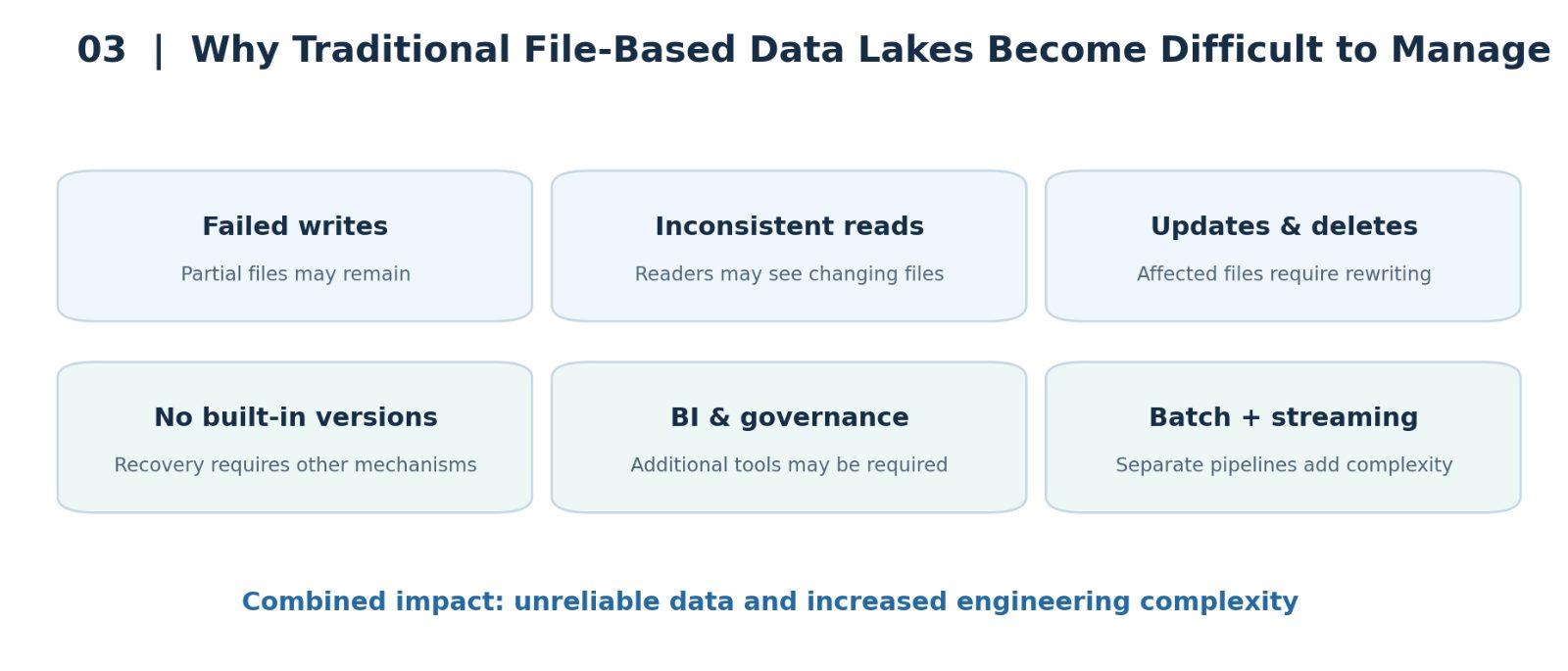
Maintaining these separate pipelines increases development and operational complexity.
Note: Streaming architecture is not shown in the diagrams above because it is outside the scope of this lesson.
5. Data Warehouse vs. Data Lake: Summary
Let's summarize the differences between traditional Data Warehouses and Data Lakes.
Feature | Traditional Data Warehouse | Traditional Data Lake |
Primary purpose | Business Intelligence and reporting | Data Science, Machine Learning, and large-scale data processing |
Data support | Primarily structured data | Structured, semi-structured, and unstructured data |
BI workloads | Strong support | Often requires additional tools and optimization |
Data Science and ML | Limited in older systems | Strong support |
Streaming | Limited in traditional systems | Supported, but integration with batch processing can be complex |
ACID transactions | Built-in support | Not inherently supported by basic file storage |
Data updates and deletions | Supported | Often require rewriting files |
Data history and rollback | Depends on the platform | Requires additional mechanisms |
Governance | Typically well established | Requires additional governance tools |
Traditional Data Warehouses were highly effective for Business Intelligence workloads, but they had limitations when handling streaming, Data Science, and Machine Learning workloads.
Data Lakes, on the other hand, provided flexible and cost-effective storage for large volumes of structured and unstructured data.
They were particularly useful for Data Science and Machine Learning, but traditional Data Lakes often struggled to meet the requirements of interactive BI workloads.
Although Data Lakes could support streaming data, combining streaming and batch workloads was often complicated.
In addition, the lack of built-in ACID transactions in basic file-based Data Lakes could lead to inconsistent data, difficult recovery processes, and unreliable Data Swamps.
6. What's Next?
In the next lesson, we'll explore how Data Lakehouse Architecture, with the help of Delta Lake, addresses many of these limitations.
We'll look at how Delta Lake introduces ACID transactions, data versioning, reliable updates and deletions, and unified batch and streaming support to make Data Lakes more dependable and easier to manage.
More Spark tutorials
- Apache Spark Runtime Architecture
- Introduction to RDD
- Actions vs Transformations
- Lazy Evaluation in PySpark
- DataFrame Operations in PySpark
- Spark SQL Basics
All tutorials · Try the free PySpark compiler · Practice challenges