Words and Tokens
Nlp tutorial · PySpark.in
Words and Tokens
- Morphemes: Parts of Words
Words have parts. At the level of characters, this is obvious. The word cats is composed of four characters, ‘c’, ‘a’, ‘t’, ‘s’. But this is also true at a more subtle level: words have components that themselves have coherent meanings. The study of how languages vary in their morphology, i.e., how words break up into their parts, is called morphological typology.
- Unicode: It is a standard method for representing text written using any character in any script of the languages of the world
- code point How does it work? Unicode assigns a unique id, called a code point, for each one of these 150,000 characters.
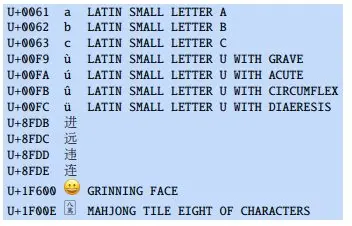
glyph Note that a code point does not specifiy the glyph, the visual representation of a character. Glyphs are stored in fonts. The code point U+0061 is an abstract representation of a.
- UTF-8 Encoding: ASCII-based systems that historically used a 0 byte as an end-of-string marker. Instead, the most common encoding standard is UTF-8 (Unicode Transformation Format 8), which represents characters efficiently (using fewer bytes on average) by writing some characters using fewer bytes and some using more bytes. UTF-8 is thus a variable-length encoding.
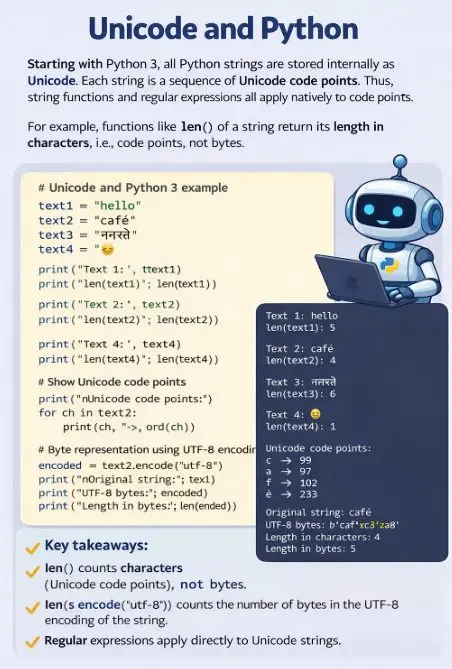
Unicode and Python: Starting with Python 3, all Python strings are stored internally as Unicode, each string a sequence of Unicode code points. Thus string functions and regular expressions all apply natively to code points. For example, functions like len() of a string return its length in characters, i.e., code points, not its length in bytes.
```
# Unicode and Python 3 example
text1 = "hello"
text2 = "café"
text3 = "नमस्ते"
text4 = "🙂"
print("Text 1:", text1)
print("len(text1):", len(text1))
print("\nText 2:", text2)
print("len(text2):", len(text2))
print("\nText 3:", text3)
print("len(text3):", len(text3))
print("\nText 4:", text4)
print("len(text4):", len(text4))
# Show Unicode code points
print("\nUnicode code points:")
for ch in text2:
print(ch, "->", ord(ch))
# Byte representation using UTF-8 encoding
encoded = text2.encode("utf-8")
print("\nOriginal string:", text2)
print("UTF-8 bytes:", encoded)
print("Length in characters:", len(text2))
print("Length in bytes:", len(encoded))
```
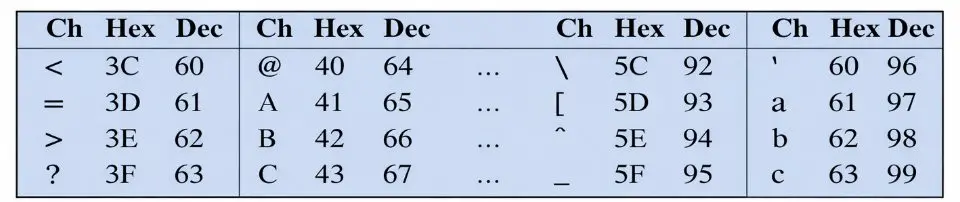
variable-length encoding For some characters (the first 127 code points, i.e. the set of ASCII characters), UTF-8 encodes them as a single byte, so the UTF-8 encoding of hello is : 68 65 6C 6C 6F
- ASCII (American Standard Code for Information Interchange) represented each character with a single byte. A byte can represent 256 different characters, but ASCII only used 127 of them; the high-order bit of ASCII bytes is always set to 0.
- Devanagari And lots of languages aren’t based on Latin characters at all! The Devanagari script is used for 120 languages (including Hindi, Marathi, Nepali, Sindhi, and Sanskrit). Here’s a Devanagari example from the Hindi text of the Universal Declaration of Human Rights:

Subword Tokenization: Byte-Pair Encoding
Tokenization, the first stage of natural language processing, is the process of segtokens menting the running input text into tokens. we do in practice for NLP: use a data-driven approach to define tokens that will generally result in units about the size of morphemes or words, but occasionally use units as small as characters.
Why tokenize the input? One reason is that converting an input to a deterministic fixed set of units means that different algorithms and systems can agree on simple questions
For example, How long is this text? (How many units are in it?). Standardizing is thus essential for replicability in NLP experiments, and many algorithms that we introduce in this tutorial (like the perplexity metric for language models) assume that all texts have a fixed tokenization. Tokenization algorithms that include smaller tokens for morphemes and letters also eliminate the problem of unknown words.
subwords
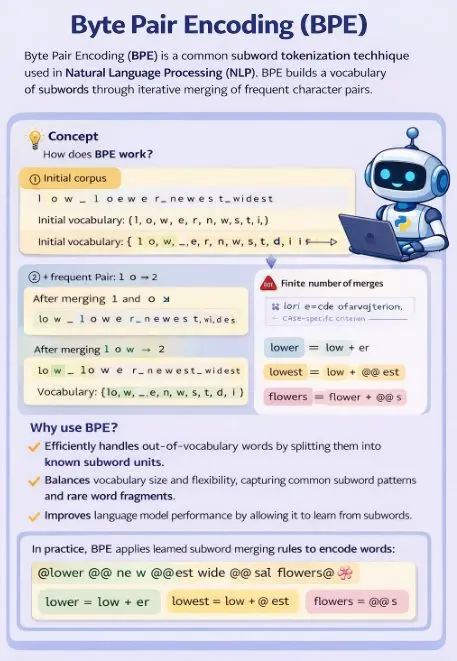
To deal with this unknown word problem, modern tokenizers automatically induce sets of tokens that include tokens smaller than words, called subwords. Two tokenization algorithms are widely used in modern language models: bytepair encoding (BPE) and unigram language modeling.
Like most tokenization schemes, the BPE algorithm has two parts: a trainer, and an encoder
BPE encoder: The encoder just runs on the test data the merges we have learned from the training data
Regular Expressions: (or regex), a language for specifying text strings. Regexes are used in regular expression every computer language, in text processing tools like Unix grep, and in editors like vim or Emacs. Practically, we can use a regex to search for a string in a text and to specify how to change the string, both of which are key to tokenization. We use regular expressions to search for a pattern in a string which can be a single line or a longer text. For example, the Python function re.search(pattern,string)
- Regex Character Classes (Brackets [])
Pattern | Meaning (Match) | Example Match | Example String |
|---|---|---|---|
r"[mh]ary" | matches m or h before "ary" | mary, hary | "Mary Ann stopped by Mona's" |
r"[abc]" | matches a OR b OR c | a, b, c | "a, b, or c" |
r"[1234567890]" | matches any digit (0–9) | 7 | "plenty of 7 to 5" |
- Regex Range Using - (Dash)
Pattern | Meaning | Example Match | Example String |
|---|---|---|---|
r"[A-Z]" | any uppercase letter | D | "Directed by Blossoms" |
r"[a-z]" | any lowercase letter | b | "my beans were impatient" |
r"[0-9]" | any single digit | 1 | "Chapter 1" |
r"[b-g]" | letters from b to g | d | "abcdefg" |
- Regex Negation Using ^
Pattern | Meaning | Example Match | Example String |
|---|---|---|---|
r"[^A-Z]" | NOT uppercase letter | x, 3 | "Often piped in" |
r"[^'s]" | not ' or s | a, t | "I have no exquisite reason" |
r"[^.]" | any character except . | a, b | "our resident Djinn" |
r"[^e]" | any char except e | a, b | "look up now" |
r"a*b" | zero or more a before b | b, ab, aaab | "look up a b now" |
Counting, Optionality, and Wildcards
Wildcards & Quantifiers
Symbol / Pattern | Meaning | Explanation (Simple) | Example | Matches |
|---|---|---|---|---|
. | Any single character | Matches any one character except newline | c.t | cat, cot, cut |
* | 0 or more occurrences | Can appear zero or many times | ab*c | ac, abc, abbc |
+ | 1 or more occurrences | Must appear at least once | ab+c | abc, abbc (not ac) |
? | 0 or 1 occurrence | Optional (present or not) | colou?r | color, colour |
{n} | Exactly n times | Must appear exactly n times | a{3} | aaa |
{n,} | n or more times | Minimum n repetitions | a{2,} | aa, aaa, aaaa |
{n,m} | Between n and m times | Range of repetitions | a{2,4} | aa, aaa, aaaa |
.* | Any string (0 or more chars) | Most commonly used wildcard | a.*b | ab, axb, a123b |
.+ | Any string (1 or more chars) | At least one char required | a.+b | axb (not ab) |
^ | Start of string | Matches beginning | ^hello | hello world |
$ | End of string | Matches ending | world$ | hello world |
\ | Escape character | Makes special char normal | \. | matches "." |
\d | Digit | Same as [0-9] | \d+ | 123 |
\D | Not digit | Opposite of \d | \D+ | abc |
\w | Word character | letters, digits, underscore | \w+ | abc123 |
\W | Non-word character | opposite of \w | \W+ | @# |
\s | Whitespace | space, tab, newline | \s | " " |
\S | Non-whitespace | anything except space | \S+ | hello |
Special Combined Examples
Pattern | Meaning | Matches |
|---|---|---|
^a.*z$ | starts with a, ends with z | abcz, a123z |
\d{3} | exactly 3 digits | 123 |
\w+@\w+\.\w+ | email pattern | test@gmail.com |
a.* | starts with a | apple, a123 |
Disjunction, Grouping, and Precedence
Category | Symbol / Pattern | Meaning | Explanation (Simple) | Example | Matches |
|---|---|---|---|---|---|
Parenthesis | ( ) | Grouping | Groups part of regex together | (ab)+ | ab, abab |
(a|b) | Group with OR | Matches either a or b | (cat|dog) | cat, dog | |
Counters (Quantifiers) | * | 0 or more | Can appear many times or not at all | ab*c | ac, abc |
+ | 1 or more | Must appear at least once | ab+c | abc, abbc | |
? | 0 or 1 | Optional | colou?r | color, colour | |
{n} | Exactly n times | Fixed repetition | a{3} | aaa | |
{n,m} | Between n and m times | Range repetition | a{2,4} | aa, aaa | |
Sequences & Anchors | ^ | Start of string | Matches beginning | ^hi | hi there |
$ | End of string | Matches ending | end$ | the end | |
. | Any character | Matches any single char | c.t | cat, cut | |
.* | Any sequence | Any number of chars | a.*b | axxxb | |
Disjunction | | | OR operator | Matches either pattern | cat|dog | cat, dog |
counters have a higher precedence than sequences, r"the*" matches theeeee but not thethe. Because sequences have a higher precedence than disjunction, r"the|any" matches the or any but not thany or theny. Patterns can be ambiguous in another way. Consider the expression r"[a-z]*" when matching against the text once upon a time. Since r"[a-z]*" matches zero or more letters, this expression could match nothing, regular expressions always match the largest string they can; we say that patterns are greedy, expanding to cover as much of a string as they can. There are, however, ways to enforce non-greedy matching, using another meaning of the ? qualifier. The operator *? is a Kleene star that matches as little text
Regex Aliases (Common Character Classes)
Regex | Expansion | Meaning (Match) | Example Matches |
|---|---|---|---|
\d | [0-9] | Any digit | 1, 5, 9 |
\D | [^0-9] | Any non-digit | a, #, _ |
\w | [a-zA-Z0-9_] | Alphanumeric + underscore | abc, A1_, test123 |
\W | [^ \w ] | Non-alphanumeric | @, #, ! |
\s | [ \t\n\f] | Whitespace (space, tab, newline) | " ", \t, \n |
\S | [^ \s ] | Non-whitespace | a, 1, @ |
Special Characters (Need Escaping with \)
Regex | Meaning | Why Escape? | Example | Matches |
|---|---|---|---|---|
\* | Asterisk * | * is special (quantifier) | a\*b | a*b |
\. | Dot . | . means any character | \. | . |
\? | Question mark ? | ? is optional operator | a\? | a? |
\n | Newline | Special escape sequence | line1\nline2 | newline |
\t | Tab | Special escape sequence | hello\tworld | tab space |
```
import re
text = "Day_1 score: 95!"
# Find digits
print(re.findall(r"\d", text))
# Find words
print(re.findall(r"\w+", text))
# Find non-digits
print(re.findall(r"\D", text))
```
Substitutions and Capture Groups
1. Substitution (re.sub)
Concept | Syntax | Meaning | Example | Output |
|---|---|---|---|---|
Basic replace | re.sub(pattern, repl, string) | Replace pattern with new text | re.sub("cat", "dog", "cat is here") | "dog is here" |
Replace all occurrences | Same as above | Replaces ALL matches | re.sub("a", "x", "banana") | "bxnxnx" |
Case conversion | Use string methods | Modify matched text | re.sub("hello", "HELLO", text) | HELLO |
2. Capture Groups ( )
Concept | Syntax | Meaning | Example | Output |
|---|---|---|---|---|
Capture group | ( ) | Groups part of regex | (ab)+ | ab, abab |
Multiple groups | ( ) ( ) | Each group numbered | (a)(b) | group1=a, group2=b |
Refer group in replace | \1, \2 | Use captured values | re.sub(r"(a)(b)", r"\2\1", "ab") | "ba" |
3. Date Format Example (Important)
Pattern | Meaning | Replacement | Result |
|---|---|---|---|
(\d{2})/(\d{2})/(\d{4}) | capture day/month/year | \2-\1-\3 | 15/10/2011 → 10-15-2011 |
4. Escape & Special Usage
Pattern | Meaning | Example |
|---|---|---|
\( \) | match literal brackets | \( |
\d | digit | 1,2,3 |
\w | word character | abc123 |
5. Non-Capturing Groups
Concept | Syntax | Meaning | Example |
|---|---|---|---|
Non-capturing group | (?: ) | Group but don't store | (?:ab)+ |
Lookahead Assertions
Regex | Type | Meaning | Example String | Match |
|---|---|---|---|---|
foo(?=bar) | Positive lookahead | match foo only if followed by bar | foobar | foo |
foo(?!bar) | Negative lookahead | match foo only if not followed by bar | foobaz | foo |
\d+(?=kg) | Positive lookahead | match digits only if followed by kg | 25kg | 25 |
\d+(?!kg) | Negative lookahead | match digits only if not followed by kg | 25m | 25 |
\b\w+\b(?=\.) | Positive lookahead | match a word only if followed by . | end. | end |
\b(?![Tt])\w+\b | Negative lookahead | match a word that does not start with T or t | cat toy Tree | cat |
```
import re
text = "foobar foobaz 25kg 30m Tree apple"
print(re.findall(r"foo(?=bar)", text)) # ['foo']
print(re.findall(r"foo(?!bar)", text)) # ['foo']
print(re.findall(r"\d+(?=kg)", text)) # ['25']
print(re.findall(r"\d+(?!kg)", text)) # ['3']
print(re.findall(r"\b(?![Tt])\w+\b", text)) # ['foobar', 'foobaz', '25kg', '30m', 'apple']
```
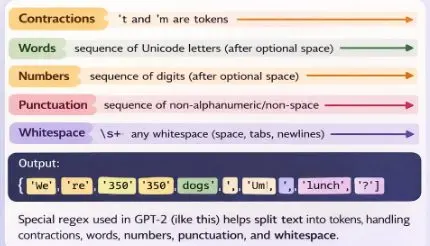
Regular Expressions for BPE pre-tokenization
```
import regex as re
# GPT-2 style pre-tokenizer regex
pat = re.compile(
r"""'s|'t|'re|'ve|'m|'ll|'d
| ?\p{L}+
| ?\p{N}+
| ?[^\s\p{L}\p{N}]+
| \s+(?!\S)
| \s+""",
re.VERBOSE
)
text = "We're 350 dogs! Um, lunch?"
tokens = pat.findall(text)
print("Input:", text)
print("Tokens:", tokens)
```
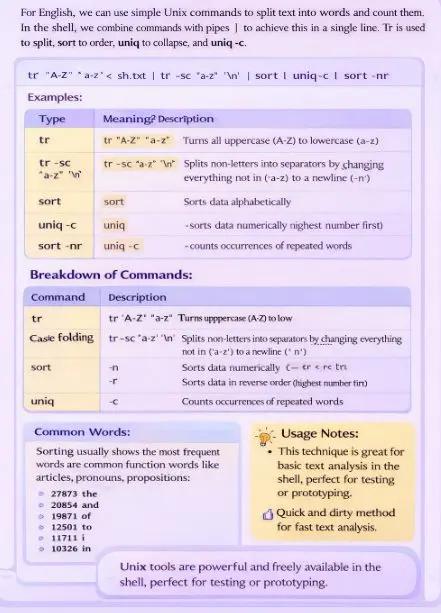
Simple Unix Tools for Word Tokenization
Rule-based tokenization
While data-based tokenization like BPE is the most common way of doing tokenization, there are also situations where we want to control our tokens to be words and not subwords. This can be useful when we want finer control over tokens, or when we already know the linguistic rules that matter.
In rule-based tokenization, we first define a set of rules that describe how text should be split. These rules are often written with regular expressions. The tokenizer then uses those rules to decide where one token ends and the next begins.
This approach is especially useful for text that contains:
- punctuation
- contractions
- abbreviations
- URLs
- numbers
- hyphenated words
- email addresses
- social media text
A rule-based tokenizer is useful because natural language often contains forms that are difficult to handle with a simple whitespace split. For example:
- don’t should often stay one token
- U.S.A. may need to stay together
- 3.14 should not be split into 3, ., and 14
- San Francisco-based might need special treatment depending on the application
So the tokenizer uses specific rules to preserve or split such patterns correctly.

```
import re
def rule_based_tokenize(text):
# Rules:
# 1. URLs
# 2. Email addresses
# 3. Numbers like 3.14 or 1,000
# 4. Words with apostrophes like don't, I'm
# 5. Hyphenated words like rule-based
# 6. Normal words
# 7. Punctuation marks
pattern = r"""
https?://\S+ | # URLs
[\w\.-]+@[\w\.-]+\.\w+ | # Emails
\d+(?:,\d{3})*(?:\.\d+)? | # Numbers: 10, 1,000, 3.14
[A-Za-z]+(?:'[A-Za-z]+)? | # Words with apostrophe: don't, I'm
[A-Za-z]+(?:-[A-Za-z]+)+ | # Hyphenated words: rule-based
[A-Za-z]+ | # Normal words
[^\w\s] # Punctuation
"""
tokens = re.findall(pattern, text, re.VERBOSE)
return tokens
# Example text
text = """
The San Francisco-based restaurant, they said, doesn't charge $10.50.
Visit https://example.com or email test123@gmail.com.
I'm learning rule-based tokenization in Python!
"""
tokens = rule_based_tokenize(text)
print("Original text:\n")
print(text)
print("\nTokens:\n")
for token in tokens:
print(token)
```
Sentence Segmentation
Sentence segmentation is a step that is can be optionally applied in text processing. It is especially important when applying NLP algorithms to tasks of detecting structure, like parse structure. Sentence segmentation depends on the language and the genre. The most useful cues for segmenting a text into sentences in English written text tend to be punctuation, like periods, question marks, and exclamation points. Question marks and exclamation points are relatively unambiguous markers of sentence boundaries, and simple rules can segment sentences when they appear.
```
import re
def sentence_segmentation(text):
# Split text into sentences based on ., !, ?
# followed by one or more spaces
sentences = re.split(r'(?<=[.!?])\s+', text.strip())
return sentences
# Example text
text = "Hello world. How are you? I am fine! This is sentence segmentation."
sentences = sentence_segmentation(text)
print("Original Text:\n")
print(text)
print("\nSentences:\n")
for i, sentence in enumerate(sentences, 1):
print(f"{i}. {sentence}")
```
More Nlp tutorials
- Natural Language Understanding (NLU) , Natural Language Generation (NLG) and phases of NL
- Tokenization in NLP and NLP Project Life Cycle
- Coverting The Text to Vector(one hot encoding and bag of words method)
- Convert text to vector: N-grams and TF-IDF method
- Word Embedding
- What is Natural Language Processing ?
All tutorials · Try the free PySpark compiler · Practice challenges