Accessing Text Corpora and Lexical Resources
Nlp tutorial · PySpark.in
Accessing Text Corpora and Lexical Resources
Accessing Text Corpora
A text corpus is a large and organized collection of texts stored in electronic form. In Natural Language Processing, corpora are used to study language patterns, vocabulary, grammar, meaning, and usage. A corpus may contain texts from one genre or from many genres, such as novels, speeches, web pages, or chat messages.
In NLTK, corpora are provided in a ready-to-use form, which makes it easier to explore real language data. Instead of working only with small sample texts, we can access larger and more meaningful collections of text and analyze them in different ways.
Why text corpora are important
Text corpora help us:
- study real language usage
- compare writing styles
- analyze frequency of words
- examine language over time
- build NLP applications
Thus, corpora form the foundation for many NLP tasks.
1. Gutenberg Corpus
The Gutenberg Corpus in NLTK contains a small collection of literary texts taken from Project Gutenberg, a digital library of free electronic books.This corpus is useful for studying formal written English, especially literature.
Example: Viewing file names
```
import nltk
from nltk.corpus import gutenberg
print(gutenberg.fileids())
```
Example: Accessing a text
```
emma_words = gutenberg.words('austen-emma.txt')
print(len(emma_words))
```
This code loads the words of Emma by Jane Austen and counts the total number of words.
Example: Concordance
```
from nltk.text import Text
emma = Text(gutenberg.words('austen-emma.txt'))
emma.concordance("surprize")
```
A concordance shows the occurrences of a word along with its surrounding context. It helps us understand how the word is used in a text.
2. Web and Chat Text
The Gutenberg Corpus mainly represents formal literature. However, language in real life is not always formal. People also communicate through websites,online discussions, chats, advertisements, and reviews.To study such informal language, NLTK provides the webtext corpus and the nps_chat corpus.
Web Text Corpus
The webtext corpus contains text from sources like:
- Firefox discussion forum
- movie scripts
- overheard conversations
- personal advertisements
- wine reviews
Example: Viewing web text files
```
from nltk.corpus import webtext
print(webtext.fileids())
```
Example: Reading raw text
```
for fileid in webtext.fileids():
print(fileid, ":", webtext.raw(fileid)[:100])
```
This prints the first 100 characters of each file.
Chat Corpus
The nps_chat corpus contains instant messaging chat data. It represents a more natural and casual form of language, including abbreviations, short expressions,and informal sentence structures.
Example: Accessing chat posts
```from nltk.corpus import nps_chat
chatroom = nps_chat.posts('10-19-20s_706posts.xml')
print(chatroom[123])
```
This displays one chat post as a list of words.
Such corpora are useful for studying:
- informal communication
- internet language
- abbreviations and slang
- conversational patterns
3. Inaugural Address Corpus
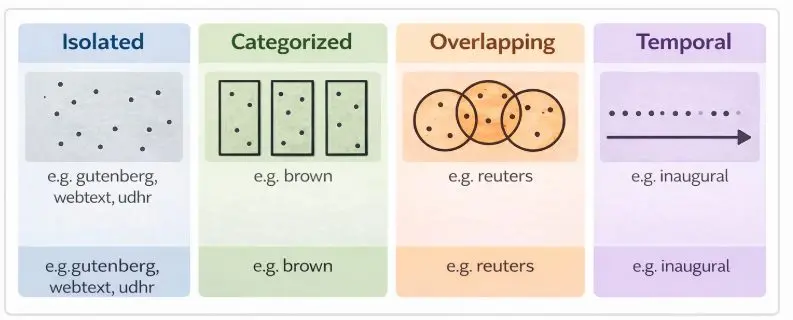
The Inaugural Address Corpus contains the speeches delivered by U.S. Presidents at their inaugurations. Unlike a single long text, this corpus is a collection of individual speeches, and each file includes the year and the name of the president.This corpus is especially useful for studying language change over time.
Example: Viewing file names
```
from nltk.corpus import inaugural
print(inaugural.fileids())
```
Example: Extracting years
```
years = [fileid[:4] for fileid in inaugural.fileids()]
print(years)
```
Here, fileid[:4] extracts the first four characters, which represent the year.
Example: Studying words over time
```
from nltk import ConditionalFreqDist
cfd = ConditionalFreqDist(
(target, fileid[:4])
for fileid in inaugural.fileids()
for w in inaugural.words(fileid)
for target in ['america', 'citizen']
if w.lower().startswith(target)
)
cfd.plot()
```
This code checks how often words like america and citizen appear in different years.This type of analysis helps us understand how political language changes with time.
4. Annotated Text Corpora
Some corpora contain only plain text, while others include annotations. An annotation is extra linguistic information added to the text.
These annotations may include:
- part-of-speech tags
- named entities
- syntactic structure
- semantic roles
- chunk information
Such corpora are called annotated corpora.They are very important for advanced NLP tasks because they provide both the text and its linguistic analysis.
Examples of annotated corpora in NLTK
Some well-known corpora available in NLTK are:
- Brown Corpus
- CESS Corpus
- Treebanks
- CMU Pronouncing Dictionary
- CoNLL Chunking Corpus
- Names Corpus
- Movie Reviews Corpus
- Reuters Corpus
- Stopwords Corpus
- WordNet
- Penn Treebank
- Genesis Corpus
- State of the Union Corpus
5. Brown Corpus
The Brown Corpus is one of the most famous corpora in NLP. It contains texts from different genres such as news, religion, hobbies, fiction, and government documents.
Example
```
from nltk.corpus import brown
print(brown.categories())
print(brown.words(categories='news')[:20])
```
This shows the available categories and prints the first 20 words from the news category.The Brown Corpus is useful for comparing language across genres.
6. Names Corpus
The Names Corpus contains lists of male and female names. It is often used in simple classification problems.
Example
```
from nltk.corpus import names
print(names.fileids())
print(names.words('male.txt')[:10])
print(names.words('female.txt')[:10])
```
This helps in learning how data can be divided into labeled categories.
7. Stopwords Corpus
Stopwords are very common words such as the, is, in, and, of. These words are often removed in NLP tasks because they carry less meaning.
Example
```
from nltk.corpus import stopwords
print(stopwords.words('english')[:20])
```
This gives a list of English stopwords.
8. CMU Pronouncing Dictionary
This corpus provides pronunciation information for English words. It is useful in speech processing and phonetics.
Example
```
from nltk.corpus import cmudict
entries = cmudict.entries()
print(entries[:10])
```
This shows words along with their pronunciation patterns.
9. WordNet
WordNet is a lexical database of English words. It groups words into sets of synonyms and also provides semantic relations like antonyms, hyponyms, and hypernyms.
Example
```
from nltk.corpus import wordnet as wn
synsets = wn.synsets('car')
print(synsets)
print(synsets[0].definition())
```
WordNet is very useful for semantic analysis.
10. Raw, Words, and Sents
In NLTK, corpora can often be accessed in three common ways:
- raw() → returns the original text as a string
- words() → returns a list of words
- sents() → returns a list of sentences
Example
```
from nltk.corpus import gutenberg
print(gutenberg.raw('austen-emma.txt')[:200])
print(gutenberg.words('austen-emma.txt')[:20])
print(gutenberg.sents('austen-emma.txt')[:2])
```
These functions allow us to examine the corpus at different levels.
Text Corpus Structure
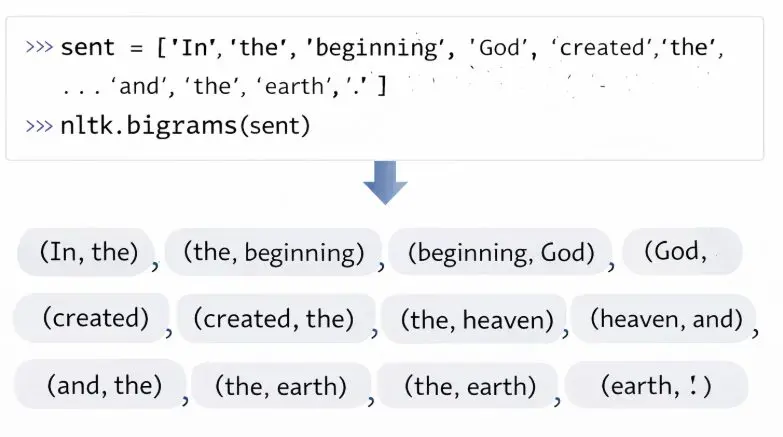
Generating Random Text with Bigrams
Lexical Resources
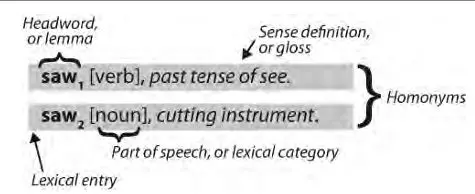
A lexicon, or lexical resource, is a collection of words and/or phrases along with associated information, such as part-of-speech and sense definitions. A lexical entry consists of a headword (also known as a lemma) along with additional information, such as the part-of-speech and the sense definition.
More Nlp tutorials
- Natural Language Understanding (NLU) , Natural Language Generation (NLG) and phases of NL
- Tokenization in NLP and NLP Project Life Cycle
- Coverting The Text to Vector(one hot encoding and bag of words method)
- Convert text to vector: N-grams and TF-IDF method
- Word Embedding
- What is Natural Language Processing ?
All tutorials · Try the free PySpark compiler · Practice challenges