Support Vector Machine (SVM)
Nlp tutorial · PySpark.in
Support Vector Machine (SVM) for Text Classification in NLP
Support Vector Machine (SVM) is one of the most powerful supervised machine learning algorithms used for classification and regression problems. In the field of Natural Language Processing (NLP), SVM is extensively applied for text classification tasks such as sentiment analysis, spam detection, topic categorization, and document classification.
SVM is particularly effective for handling high-dimensional textual data because it focuses on finding the optimal decision boundary that separates different classes with maximum margin.
Introduction to Support Vector Machine (SVM)
Support Vector Machine is a discriminative classifier that attempts to find the best hyperplane that separates data points belonging to different classes.
In text classification, each document is converted into a numerical vector, and SVM classifies the document into predefined categories. The primary objective of SVM is to identify a hyperplane that divides the dataset into different classes with the maximum possible margin.
For example:
Text | Class |
“This movie is amazing” | Positive |
“The product is terrible” | Negative |
The SVM model learns the boundary that separates positive and negative examples.
Hyperplane in SVM
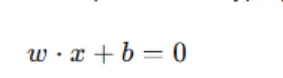
A hyperplane is a decision boundary that separates different classes.
For a two-dimensional dataset, the hyperplane is a straight line.
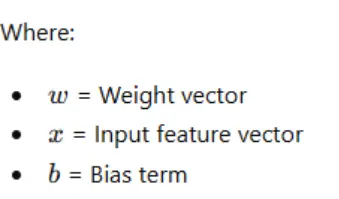
The equation of a hyperplane is: The hyperplane divides the data into different categories.
Support Vectors
Support vectors are the data points nearest to the decision boundary.
These points are extremely important because they determine the position and orientation of the hyperplane.
Without support vectors, the SVM model cannot determine the optimal boundary.
Margin in SVM
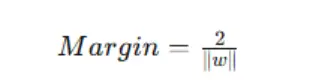
Margin refers to the distance between the hyperplane and the nearest data points from each class.
SVM always tries to maximize the margin because a larger margin generally improves classification performance. A larger margin indicates better generalization capability.
The margin formula is:
Working of SVM in NLP
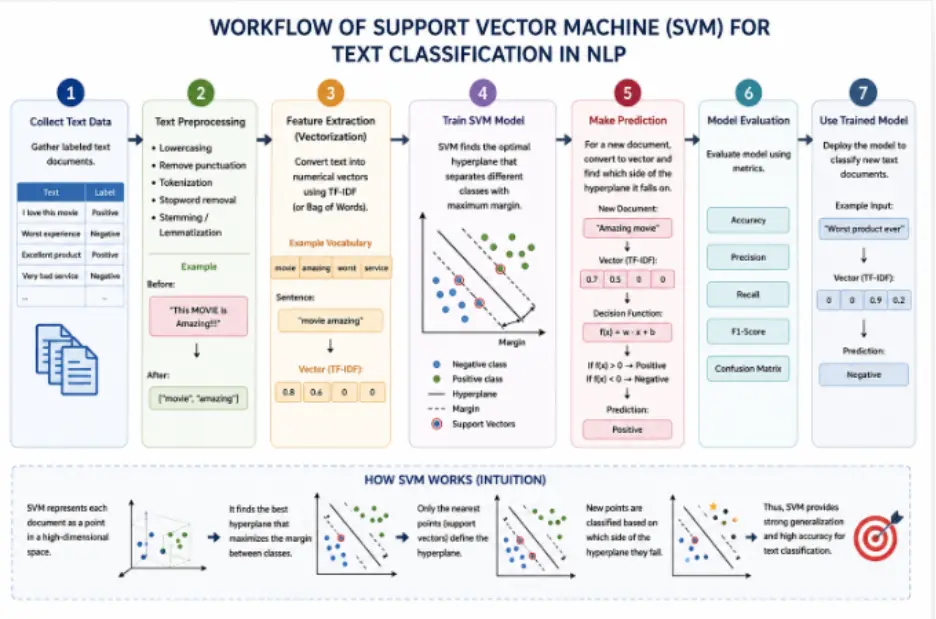
The workflow of SVM for text classification consists of the following stages.
Step 1: Collection of Text Data
A labeled dataset is collected.
Example Dataset
Text | Label |
“I love this phone” | Positive |
“Worst service ever” | Negative |
“Excellent performance” | Positive |
“Very disappointing” | Negative |
Step 2: Text Preprocessing
The textual data is cleaned and normalized.
Common preprocessing operations include:
Lowercasing
Removal of punctuation
Tokenization
Stop-word removal
Stemming
Lemmatization
Example
Before preprocessing:
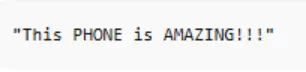
After preprocessing:
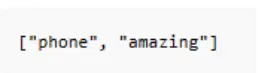
Step 3: Feature Extraction
Machine learning algorithms require numerical input.
Therefore, text is converted into vectors using:
Bag of Words (BoW)
TF-IDF
Example
Vocabulary:

Sentence:
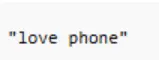
Vector representation:
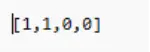
TF-IDF is generally preferred for SVM because it improves performance by assigning appropriate importance to words.
Step 4: Training the SVM Model
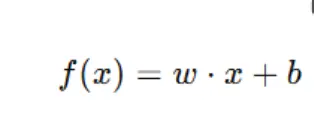
The SVM algorithm learns the optimal decision boundary that separates classes.
The prediction function is:
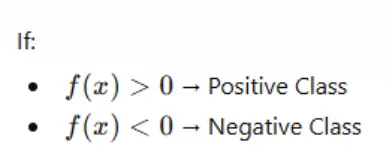
Types of SVM
1. Linear SVM
Used when data is linearly separable.
It is widely used for text classification because text data often becomes linearly separable in high-dimensional vector spaces.
2. Non-Linear SVM
Used when data cannot be separated using a straight line.
Kernel functions are used to transform data into higher dimensions.
Kernel Functions in SVM
Kernel functions help SVM handle non-linear data.
Common Kernel Functions
Kernel | Description |
Linear Kernel | Used for linearly separable data |
Polynomial Kernel | Creates polynomial boundaries |
RBF Kernel | Handles complex boundaries |
Sigmoid Kernel | Similar to neural networks |
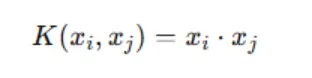
Linear Kernel Formula
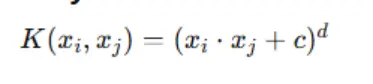
Polynomial Kernel Formula
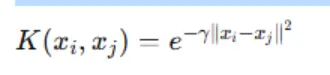
RBF Kernel Formula
Practical Implementation
Problem Statement
Build a sentiment analysis classifier using SVM.
```
import pandas as pd
from sklearn.feature_extraction.text import TfidfVectorizer
from sklearn.model_selection import train_test_split
from sklearn.svm import SVC
from sklearn.metrics import accuracy_score, classification_report
#Creating dataset
data = {
"text": [
"I love this product",
"This is an excellent movie",
"Worst experience ever",
"Very disappointing service",
"Amazing performance",
"I hate this item"
],
"label": [
"positive",
"positive",
"negative",
"negative",
"positive",
"negative"
]
}
#Creating DataFrame
df = pd.DataFrame(data)
#Features and target
X = df["text"]
y = df["label"]
#TF-IDF Vectorization
vectorizer = TfidfVectorizer()
X_vectorized = vectorizer.fit_transform(X)
#Splitting dataset
X_train, X_test, y_train, y_test = train_test_split(
X_vectorized,
y,
test_size=0.3,
random_state=42
)
#Creating SVM model
model = SVC(kernel='linear')
#Training model
model.fit(X_train, y_train)
#Prediction
y_pred = model.predict(X_test)
#Accuracy
print("Accuracy:", accuracy_score(y_test, y_pred))
#Classification Report
print(classification_report(y_test, y_pred))
#Custom Prediction
message = ["excellent product"]
message_vector = vectorizer.transform(message)
prediction = model.predict(message_vector)
print("Prediction:", prediction[0])
```
Conclusion
Support Vector Machine is one of the most powerful classical machine learning algorithms for Natural Language Processing tasks. Its ability to handle high-dimensional sparse textual data makes it highly suitable for sentiment analysis, spam filtering, document classification, and many other NLP applications. Although SVM requires careful parameter tuning and higher computational resources, it consistently provides strong classification performance and remains one of the most important algorithms in classical NLP.
More Nlp tutorials
- Natural Language Understanding (NLU) , Natural Language Generation (NLG) and phases of NL
- Tokenization in NLP and NLP Project Life Cycle
- Coverting The Text to Vector(one hot encoding and bag of words method)
- Convert text to vector: N-grams and TF-IDF method
- Word Embedding
- What is Natural Language Processing ?
All tutorials · Try the free PySpark compiler · Practice challenges